Fashion Editorial Studio Shoot
Sample Prompt
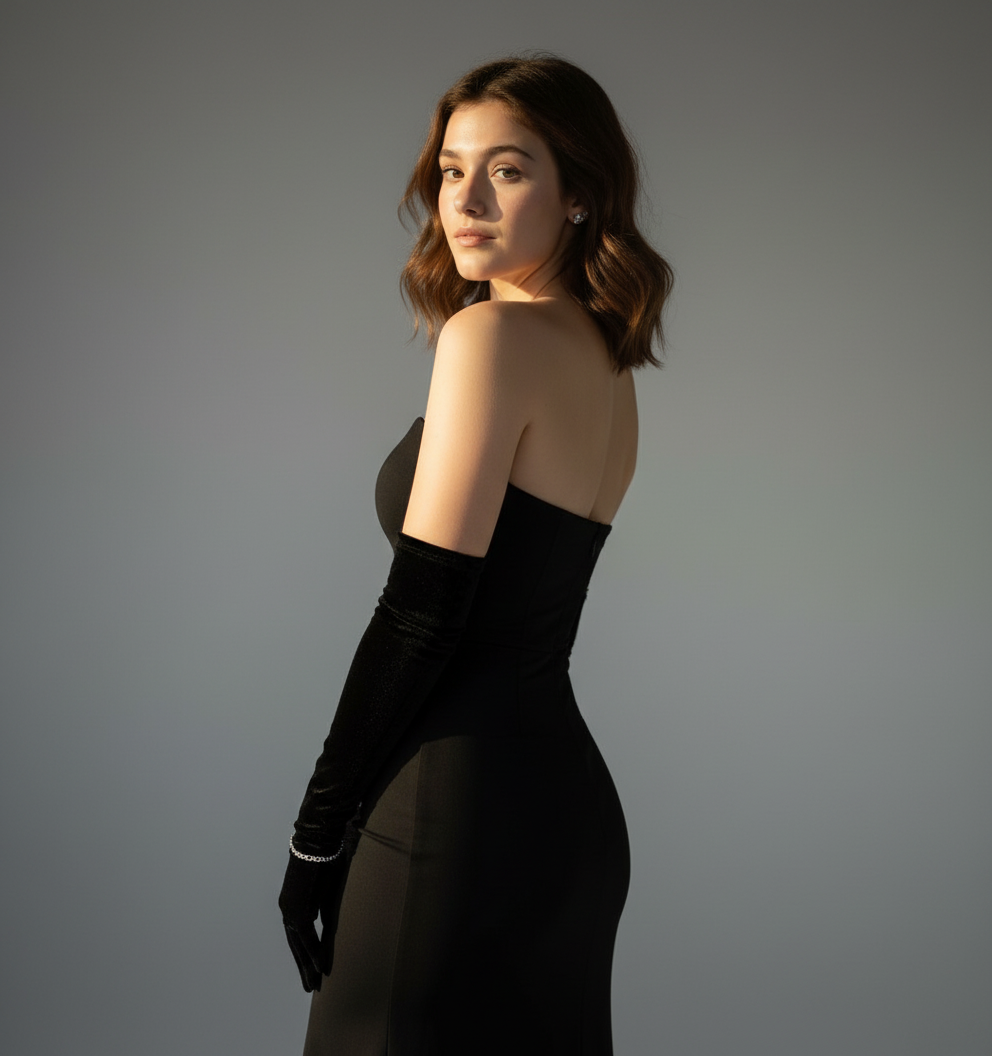
CREATE HIGHEST RESOLUTION PICTURE OF ME POSING ELEGANTLY WITH HER BACK SLIGHTLY TURNED AND HEAD LOOKING OVER THE SHOULDER TOWARDS THE CAMERA. SHE IS WEARING A SLEEK, FORM-FITTING STRAPLESS BLACK EVENING GOWN, PAIRED WITH LONG, ELEGANT BLACK VELVET OPERA GLOVES. HER HAIR IS STYLED IN LOOSE, GLOSSY WAVES, CASCADING NATURALLY OVER HER SHOULDER. SHE WEARS SMALL, SUBTLE EARRINGS AND A DELICATE BRACELET ON ONE WRIST. HER EXPRESSION IS CONFIDENT, GRACEFUL, AND ALLURING. THE BACKGROUND IS PLAIN STUARO GRAY WITH SOFT GRADIENT LIGHTING, GIVING HIGH-FASHION PHOTOGRAPHY LOOK. THE LIGHTHIKEIS DRAMATIC BUT SOFT, HIGHLIGHTING CONTOURS OF HER BODY AND FACE, WITH REALISTIC SHADOWS AND TEXTURES. THE IMAGE SHOULD LOOK LIKE A HIGH-QUALITY, ULTRA-REALISTIC FASHION MAGAZINE PHOTOS HEAT AS SHOWN IN THE PIETURKEEP IT.AS REAL AS SHOWN IN THE PICTURE
Use This Template
Click to start creating with this template
About Fashion Editorial Studio Shoot
CREATE HIGHEST RESOLUTION PICTURE OF ME POSING ELEGANTLY WITH HER BACK SLIGHTLY TURNED AND HEAD LOOKING OVER THE SHOULDER TOWARDS THE CAMERA. SHE IS WEARING A SLEEK, FORM-FITTING STRAPLESS BLACK EVENING GOWN, PAIRED WITH LONG, ELEGANT BLACK VELVET OPERA GLOVES. HER HAIR IS STYLED IN LOOSE, GLOSSY WAVES, CASCADING NATURALLY OVER HER SHOULDER. SHE WEARS SMALL, SUBTLE EARRINGS AND A DELICATE BRACELET ON ONE WRIST. HER EXPRESSION IS CONFIDENT, GRACEFUL, AND ALLURING. THE BACKGROUND IS PLAIN STUARO GRAY WITH SOFT GRADIENT LIGHTING, GIVING HIGH-FASHION PHOTOGRAPHY LOOK. THE LIGHTHIKEIS DRAMATIC BUT SOFT, HIGHLIGHTING CONTOURS OF HER BODY AND FACE, WITH REALISTIC SHADOWS AND TEXTURES. THE IMAGE SHOULD LOOK LIKE A HIGH-QUALITY, ULTRA-REALISTIC FASHION MAGAZINE PHOTOS HEAT AS SHOWN IN THE PIETURKEEP IT.AS REAL AS SHOWN IN THE PICTURE Features: 100% free. PicXStudio's AI-powered template for instant image generation.
This AI image template is designed to help you create professional Fashion Editorial Studio Shoot images quickly. Simply use the provided prompt as a starting point, customize it to your needs, and generate stunning AI images in seconds.