How do I use the selfcare template?
Choose the primary action to open PicX Studio with the available template settings. Review the model and format, personalize the creative direction, and generate when ready.
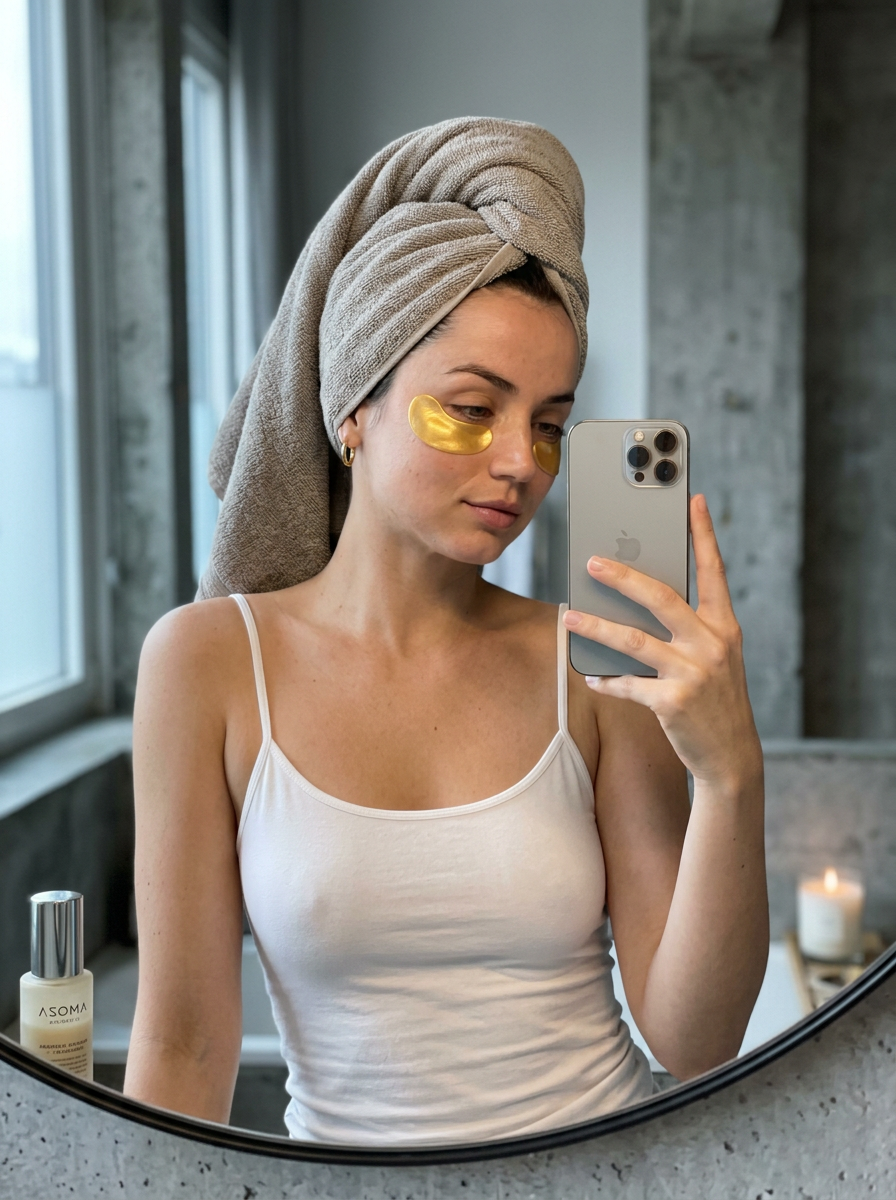


Use the selfcare AI image template on PicX Studio. Free template, no signup required.
{ "system_instruction": "Generate a hyper-realistic image following the hierarchical structure below. Priority: subject identity consistency and material texture fidelity.", "metadata": { "version": "2.0", "target_ratio": "3:4", "aesthetic_framework": "Scandinavian Minimalist / Quiet Luxury", "image_style": "Candid Lifestyle Photography" }, "subject_layer": { "identity": { "name": "Ana de Armas", "consistency_rules": [ "Preserve exact facial bone structure and eye shape", "Maintain natural skin texture with visible pores and slight imperfections", "Zero beauty-filter effect" ] }, "grooming_details": { "hair": { "style": "Towel Turban", "material": "Soft grey-beige terry cloth", "coverage": "100% hair coverage" }, "skincare": { "treatment": "Single gold hydrogel eye patch", "placement": "Under left eye only", "finish": "Semi-circular, reflective metallic sheen" }, "makeup": { "style": "Fresh, post-shower bare skin", "details": "Natural hydration glow, slight under-eye shadows, natural lip gloss" } }, "wardrobe": { "base_layer": "Thin white cotton spaghetti-strap tank top", "accessories": "Small 14k gold hoop earrings" }, "posture_and_mood": { "pose": "Mirror selfie, right hand holding phone, slightly tilted head", "expression": "Peaceful, calm, trace of morning fatigue", "eye_contact": "Directed at phone screen reflection (downward gaze)" } }, "environment_layer": { "primary_setting": "Modern Loft/Scandinavian Bathroom", "background_elements": { "wall_texture": "Industrial grey concrete with subtle grit", "window_location": "Left frame, providing directional soft light" }, "foreground_tabletop": { "surface": "Neutral matte surface", "mirror_object": { "shape": "Perfectly round", "frame": "Polished chrome metal", "features": "Slim metal stand, realistic silvering reflection" }, "decor_props": [ { "id": "diffuser", "label": "ASOMA", "material": "Clear glass, wooden sticks", "position": "Left foreground" }, { "id": "candle", "material": "Amber/brown glass jar", "state": "Partially burned, visible wax residue", "position": "Right foreground" } ] } }, "lighting_and_optics": { "lighting_profile": { "source": "Natural diffused daylight", "direction": "Side-lit from left", "color_temperature": "5500K (Slightly cool morning light)", "shadow_quality": "Soft, feathered edges" }, "camera_simulation": { "device": "iPhone 16 Pro Max (Silver/Gray)", "lens_focal_length": "50mm (Natural human perspective)", "aperture": "f/1.8 (Shallow depth of field)", "focus_point": "Subject's reflection in the mirror" }, "render_constraints": { "texture_mapping": [ "Terry cloth fiber detail", "Cold metal chrome reflections", "Micro-pores and skin hydration", "Glass transparency and refraction" ], "negative_constraints": [ "No airbrushing", "No plastic skin", "No high-contrast cinematic grading", "No AI artifacts in reflections" ] } }
Treat selfcare as a focused AI image concept rather than a finished brief. Read the preview for composition, choose the intended destination, and then personalize one creative variable at a time.
Use the primary action to load the template settings in PicX Studio.
Adjust the subject and creative details for your destination.
Create the image, compare the result with the preview, and refine one variable at a time.
A continuous mix — similar concepts first, woven with same-model prompts and fresh picks from the catalog.
Choose the primary action to open PicX Studio with the available template settings. Review the model and format, personalize the creative direction, and generate when ready.
Yes. You can change the subject, setting, lighting, mood, format, and available model controls before creating your image.
This template is free to open and customize. Generation usage is shown in PicX Studio before you create.
Choose a compatible model in PicX Studio based on the style, speed, and output controls your project needs.
A continuous mix — similar concepts first, woven with same-model prompts and fresh picks from the catalog.
Follow a topic to a crawlable collection of related PicX Studio templates.
32,032 public templates available. Verified via the PicX Studio public templates API; refreshed hourly.


