How do I use the Red-Haired Masked Samurai Portrait template?
Choose the primary action to open PicX Studio with the available template settings. Review the model and format, personalize the creative direction, and generate when ready.
This prompt generates a richly detailed anime-style warrior portrait suited for dramatic character art, fantasy key visuals, or stylized Japanese-inspired illustrations. Change the subject, setting, or lighting one variable at a time.
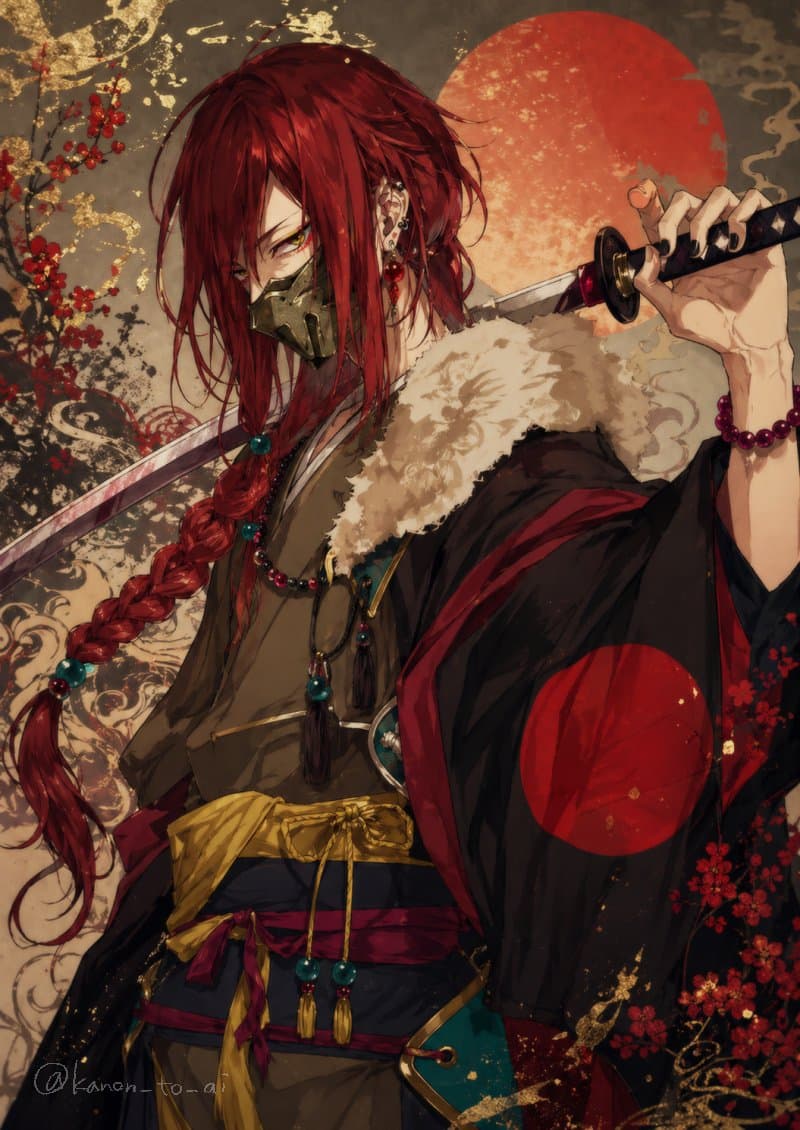
A dramatic anime-style portrait of a lone swordsman with an androgynous, elegant presence, shown from mid-thigh up in a three-quarter view, staring intensely at the viewer with narrowed golden eyes. The character has {argument name="hair color" default="deep crimson red"} hair, long and layered with loose messy strands, plus one very long thick braid draped over the front of the body and decorated with turquoise beads and tassels. They wear a dark metallic half-mask covering the lower face, multiple ear piercings with red and silver ornaments, and a confident, dangerous expression. One hand rests behind the neck holding a katana across the shoulders; the sword has a black hilt with red accents and a reflective blade. The outfit is a richly detailed fantasy-meets-feudal-Japanese ensemble: muted brown inner kimono, wide navy and magenta waist wraps, a large golden obi tied loosely, dangling bead ornaments, and a black outer robe lined in red with a fluffy pale fur collar. Add a large red sun emblem on the robe sleeve and teal accessories at the waist. The palette is dominated by red, black, gold, cream, and deep blue. The background is a decorative Japanese-inspired painting with a large glowing red-orange sun disk behind the head, red plum blossoms, smoky cloud-like swirls, parchment-textured beige and charcoal tones, and scattered gold leaf splashes. Highly detailed digital illustration, painterly anime rendering, ornate textures, refined linework, moody lighting, luxurious fabric folds, samurai aesthetic, elegant and fierce atmosphere.
Choose the primary action to open PicX Studio with the available template settings. Review the model and format, personalize the creative direction, and generate when ready.
Yes. You can change the subject, setting, lighting, mood, format, and available model controls before creating your image.
This template is free to open and customize. Generation usage is shown in PicX Studio before you create.
Start with GPT Image 2, which is the model associated with this template. You can compare another compatible model for a different finish.
© 2026 PicX Studio. All rights reserved.

Follow a topic to a crawlable collection of related PicX Studio templates.
43,474 public templates available. Verified via the PicX Studio public templates API; refreshed hourly.













![Minimalist Flat Vector Travel Poster — Premium minimalist flat-vector travel poster for {argument name="city name" default="[CITY_NAME]"}, 3:4 vertical format.](https://cms-assets.youmind.com/media/1787917359711_3ug846_HQX205cbMAA6F6S-300x400.jpg)