🎁
🎄
🎅
🎁
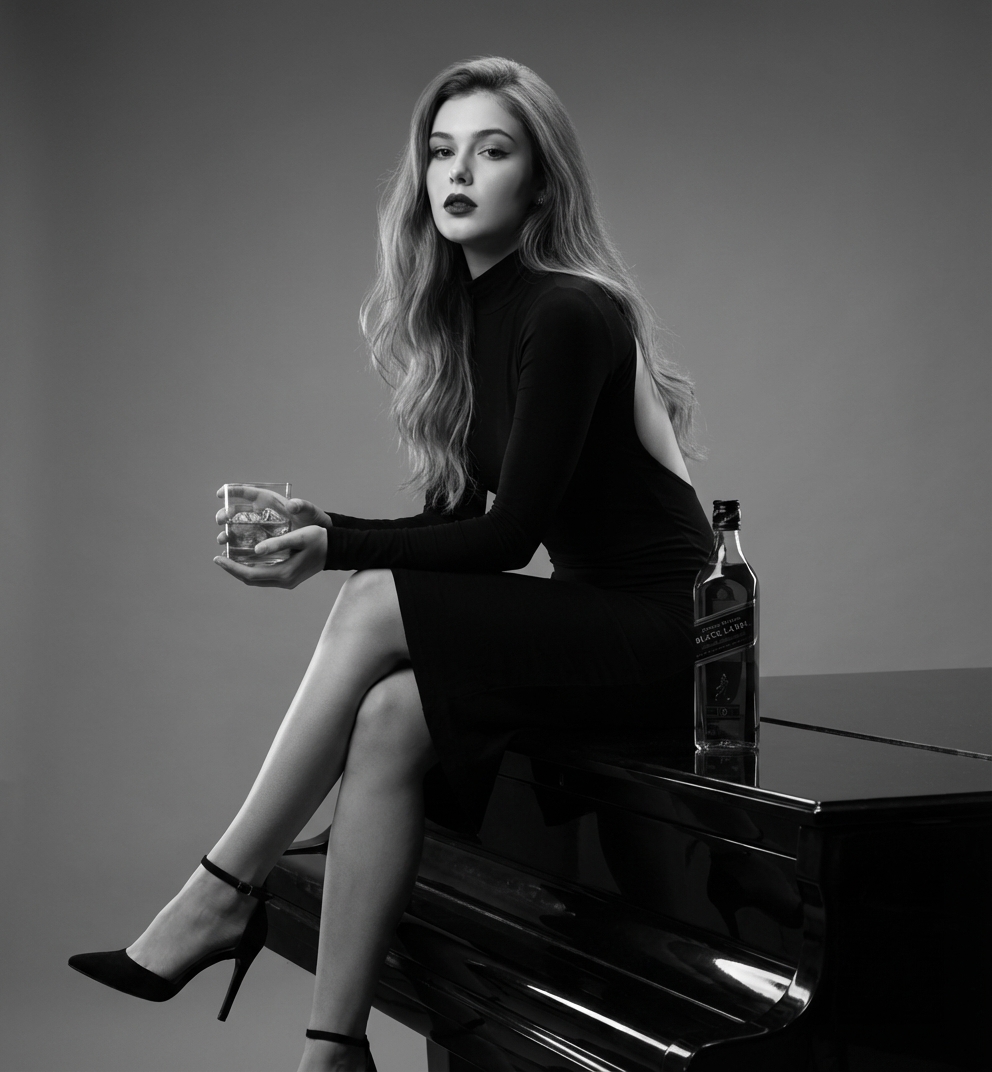
Use the uploaded image as reference. Do not change her face and features. Subject & Composition Subject: A captivating young woman with long, flowing, light-brown hair styled with soft waves. She has a strong, direct gaze and is wearing bold makeup (dark lipstick and defined eyes). Attire: A sophisticated, high-neck, long-sleeve black dress with a dramatic open back (backless design). Pose: She is seated with her left leg bent and her right leg extended and crossed over slightly, showcasing black, high-heeled ankle-strap pumps. She is perched on a dark, reflective surface, likely the top of a grand piano or a polished table. Props: She is holding a short, clear rocks glass containing a dark liquid (whiskey/scotch) and ice in her left hand. A bottle of Johnnie Walker Black Label scotch whiskey is placed prominently beside her on the reflective surface. Style & Aesthetics Color Palette: Monochromatic (Black and White/Grayscale). Mood: Elegant, seductive, luxurious, sophisticated, and strong. Lighting: Dramatic studio lighting with high contrast. The subject is well-lit, highlighting the texture of her hair and the lines of her body and dress. A strong key light appears to be coming from the front-left, creating defined shadows under her chin and props, emphasizing a high-fashion or luxury advertising aesthetic. Background: Solid, neutral gray background, completely smooth and devoid of texture or features, ensuring the focus remains entirely on the subject and the products.
Click to start creating with this template
Use the uploaded image as reference. Do not change her face and features. Subject & Composition Subject: A captivating young woman with long, flowing, light-brown hair styled with soft waves. She has a strong, direct gaze and is wearing bold makeup (dark lipstick and defined eyes). Attire: A sophisticated, high-neck, long-sleeve black dress with a dramatic open back (backless design). Pose: She is seated with her left leg bent and her right leg extended and crossed over slightly, showcasing black, high-heeled ankle-strap pumps. She is perched on a dark, reflective surface, likely the top of a grand piano or a polished table. Props: She is holding a short, clear rocks glass containing a dark liquid (whiskey/scotch) and ice in her left hand. A bottle of Johnnie Walker Black Label scotch whiskey is placed prominently beside her on the reflective surface. Style & Aesthetics Color Palette: Monochromatic (Black and White/Grayscale). Mood: Elegant, seductive, luxurious, sophisticated, and strong. Lighting: Dramatic studio lighting with high contrast. The subject is well-lit, highlighting the texture of her hair and the lines of her body and dress. A strong key light appears to be coming from the front-left, creating defined shadows under her chin and props, emphasizing a high-fashion or luxury advertising aesthetic. Background: Solid, neutral gray background, completely smooth and devoid of texture or features, ensuring the focus remains entirely on the subject and the products. Features: 100% free. PicXStudio's AI-powered template for instant image generation.
This AI image template is designed to help you create professional Noir Luxe Whiskey Portrait Template images quickly. Simply use the provided prompt as a starting point, customize it to your needs, and generate stunning AI images in seconds.