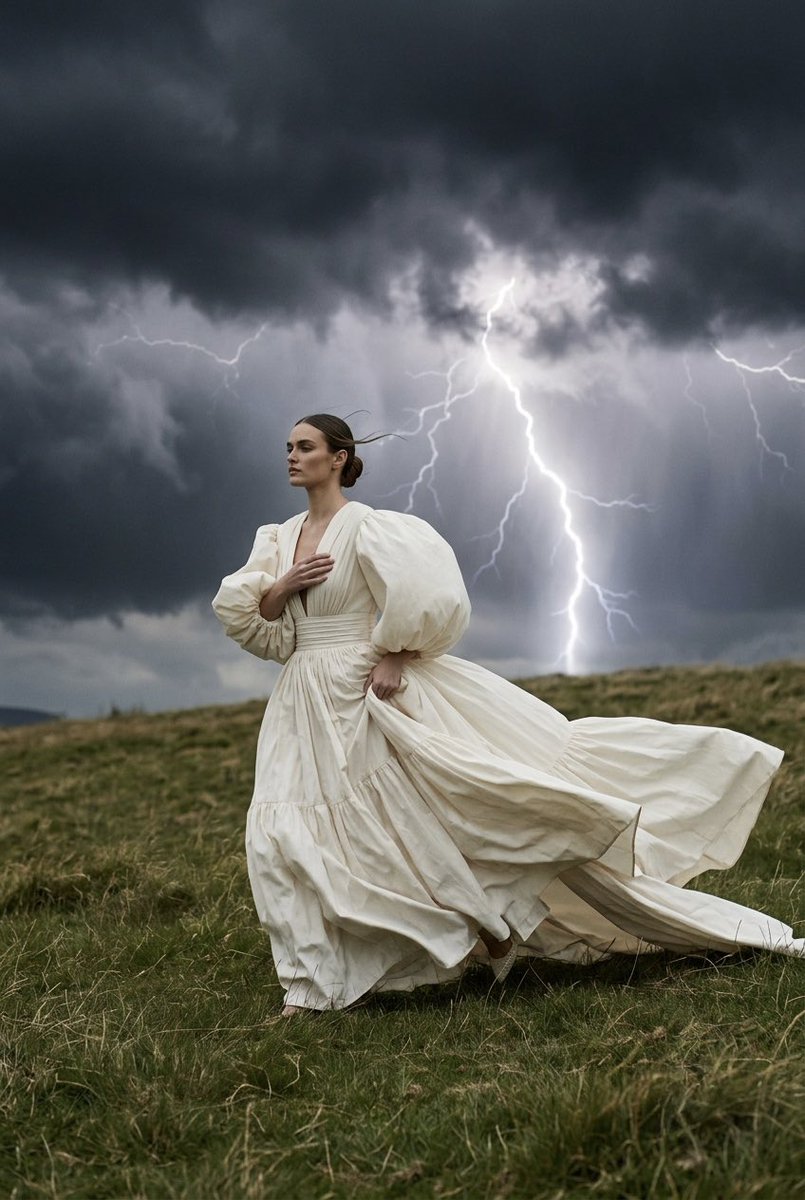
How do I use the Haute Couture Storm Editorial template?
Choose the primary action to open PicX Studio with the available template settings. Review the model and format, personalize the creative direction, and generate when ready.
A highly technical fashion photography prompt requiring reference images to generate a couture gown in a dramatic storm landscape. (free to use) — Free AI image template on PicX Studio.
Ultra realistic high-fashion editorial photography using the uploaded reference image as an ABSOLUTE 1:1 reference for the couture gown, storm atmosphere and fashion aesthetic. Use the uploaded identity photo ONLY for: - exact face identity - exact facial anatomy - exact eyes - exact eyebrows - exact nose - exact lips - exact natural skin tone REFERENCE CONTROLS EVERYTHING ELSE. Canon EOS R5. 85mm lens. RAW photograph. CAMERA Very wide cinematic shot. The camera is positioned very far away. The woman appears small in the landscape, occupying only about 15–20% of the frame. She is running across the top of a grassy hill. The dramatic landscape dominates the composition. FULL BODY. The entire floor-length gown is completely visible. Nothing is cropped. POSE The woman is running naturally across the hill. She is viewed mostly from the side with a slight three-quarter angle. She is NOT looking at the camera. She looks forward toward the direction she is running. One hand tightly holds the front of the gown across her chest to keep it from blowing open. The other hand gathers part of the skirt while running. Her posture shows urgency as she struggles against the violent wind. The running motion is natural, elegant and realistic. HAIR Hair is styled into a sleek elegant low bun. Only a few loose strands escape and whip violently in the wind. STRICT DRESS LOCK Recreate EXACTLY the uploaded couture gown. Keep identical: - floor-length ivory haute couture gown - oversized balloon sleeves - deep plunging V neckline - fitted gathered waist - enormous multi-layered skirt - identical silhouette - identical proportions - identical fabric - identical stitching - identical folds - identical volume The gown MUST remain floor-length. The skirt must touch the ground exactly like the reference. Do NOT redesign the dress. Do NOT shorten the skirt. Do NOT change the sleeves. Do NOT change the neckline. Keep the jewelry identical. WIND Violent storm wind. The enormous skirt flies dramatically in multiple directions. Huge sculptural folds sweep left, right and backward. The long train streams several meters behind her while she runs. Every fabric layer moves independently with realistic couture fabric physics. The oversized sleeves inflate dramatically. The movement feels powerful but physically believable. BACKGROUND Wide grassy hill. Massive black storm clouds cover the sky. A huge bright lightning bolt strikes in the distance behind the woman, illuminating part of the clouds. Additional faint lightning flashes are visible deeper inside the storm. No buildings. No people. Only the dramatic landscape. LIGHTING Dark storm atmosphere. Soft diffused overcast light. Brief cold flashes from the lightning illuminate parts of the clouds and subtly rim-light the flowing gown. Luxury Vogue editorial lighting. REALISM Visible skin texture. Correct anatomy. Natural running motion.
Use Haute Couture Storm Editorial to plan an AI image around nano-banana-2 generation. Match the preview's composition first, then personalize the subject, setting, and mood for your own project.
Use the primary action to load the template settings in PicX Studio.
Adjust the subject and creative details for your destination.
Create the image, compare the result with the preview, and refine one variable at a time.
A continuous mix — similar concepts first, woven with same-model prompts and fresh picks from the catalog.
Choose the primary action to open PicX Studio with the available template settings. Review the model and format, personalize the creative direction, and generate when ready.
Yes. You can change the subject, setting, lighting, mood, format, and available model controls before creating your image.
This template is free to open and customize. Generation usage is shown in PicX Studio before you create.
Start with nano-banana-2, which is the model associated with this template. You can compare another compatible model for a different finish.
A continuous mix — similar concepts first, woven with same-model prompts and fresh picks from the catalog.
Follow a topic to a crawlable collection of related PicX Studio templates.
32,032 public templates available. Verified via the PicX Studio public templates API; refreshed hourly.


