
Pixar Style F1 Pit Lane Scene
A stylized 3D animated cinematic scene of a legendary mechanic performing a high-speed tire change in a Formula 1 pit lane.
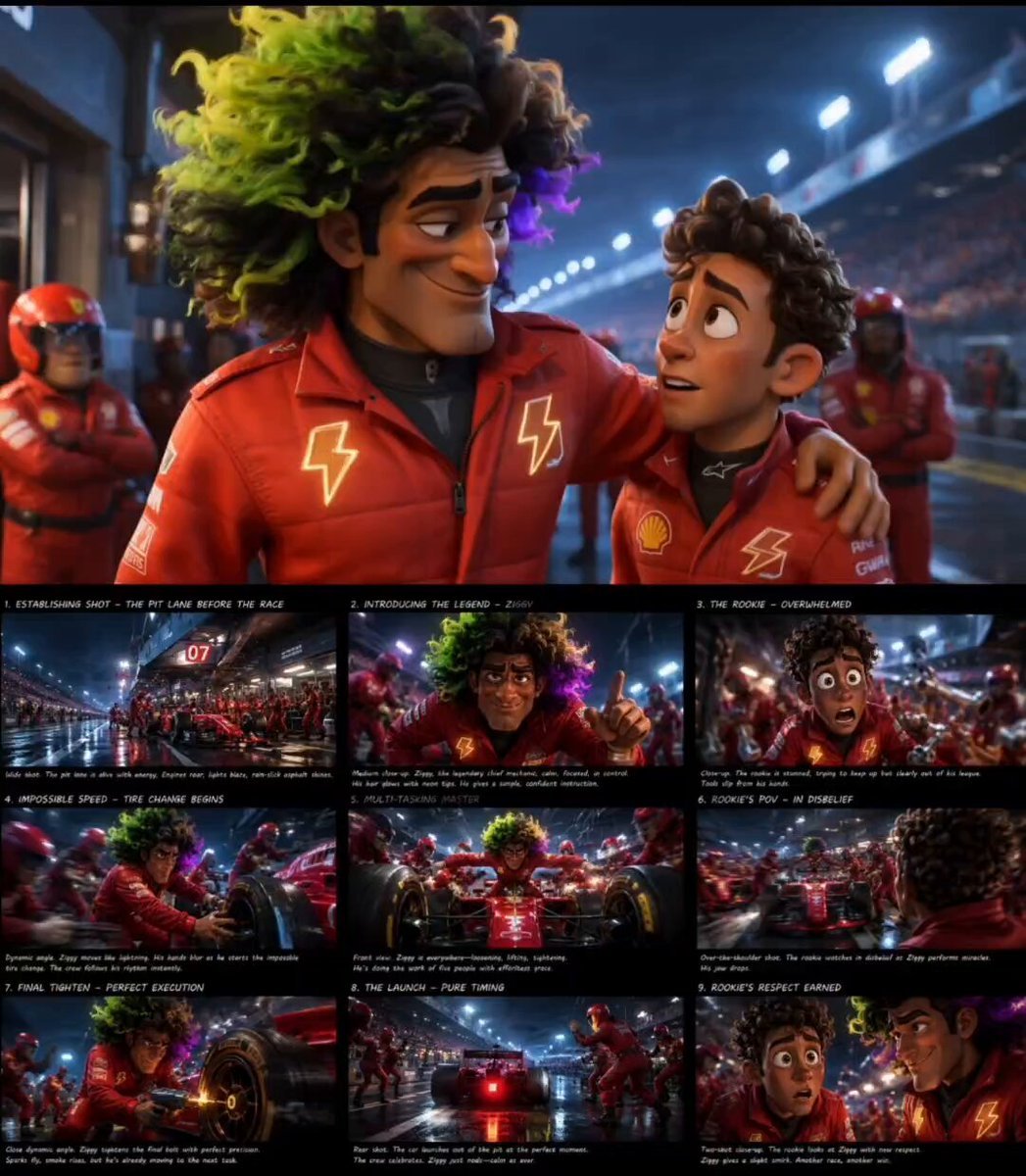
- Prompt included
- Model and format preset
- Premium template
The prompt behind this video
Copy the exact prompt behind Pixar Style F1 Pit Lane Scene, or open it in the studio and make it yours.
Stylized Pixar-inspired animated cinematic scene inside a Formula 1 pit lane moments before the race, legendary chief mechanic performing impossible tire changes with breathtaking speed while giving calm instructions, exhausted rookie mechanic dropping tools in disbelief, floodlights reflecting across polished race cars and wet asphalt, dynamic camera movement, exaggerated cartoon proportions, expressive facial animation, cinematic energy, realistic sparks and smoke, polished 3D rendering, immersive motorsport atmosphere, blockbuster animated movie quality, 16:9.
How to use Pixar Style F1 Pit Lane Scene in 3 steps
- 1
Open
The prompt is already in the box next to the preview, with the template's model and format selected.
- 2…a portrait of your subject in softgolden-hour light, 85mm…
Personalize
Edit the subject and creative details for your destination.
- 3Generate
Generate
Press Generate — your video is created in PicX Studio, so you can compare it with the original and refine one variable at a time.
More like this
Templates with the same subject, style or setup. Open one to see its prompt.
Spaceship Concert Moshpit
Formula 1 Night Rain Pit Stop

Mega Crocodile vs Carnivorous Flower Pit
Formula 1 Pit Stop Night Cinematic
Fairies and Squirrels Ball Pit
Highway Biker — Aggressive Lane Split (PixVerse C1)
Pixar Style Sleeping Girl Animation
Pixar Style 3D Animation Prompt

Pixar Style Beauty Routine Animation

Pigeon Nemesis Pixar Animation Storyboard
Disney Pixar Skincare Animation

Pixar Style Coffee Shop Kindness
Make it yours
Pixar Style F1 Pit Lane Scene works as-is. These are the safest ways to change it without losing the look.
Change one field
Copy a single group, rewrite it, and generate again so you can see what that field is doing.
Keep the frame, change the subject
Hold the composition and light of Pixar Style F1 Pit Lane Scene, then swap wardrobe, props or the person for a new take.
| If the result… | Why | Fix |
|---|---|---|
| The result drifts from the preview | Too many fields changed at once. | Reuse Pixar Style F1 Pit Lane Scene as-is first, then change one group — subject, light, or setting. |
| The model over-stylizes the scene | The prose prompt leaves finish and camera underspecified. | Add one camera or lighting sentence and stay on Seedance 2.0. |
More Seedance 2.0 templates
Other prompts made for Seedance 2.0.

Comical Martial Arts Punch Scene

Maglev Train Action Sequence

Martial Arts Fight Sequence

Wuxia Protection and Trust Script

Vintage Korean Arcade MiniDV Vlog

Mercedes 190 SL Luxury Ad

Rainy Night Supernatural Reverse Comedy Video Script

Amazon Civilization Discovery

Futuristic South Asian City Transformation

Cozy Luxury Cafe Commercial
More video prompts
Fresh picks from across the catalog.
Mysterious Victorian Woman and Floating Clocks

Second Spring Festival Gala Talk Show: Zhen Huan and Hu Fei

Supernatural Sigh Shockwave Anime Scene
Woman Smiling and Waving Animation
Cinematic Car Conversation Lip Sync
Seedance 2.0 Prompt: Tired Woman in a Cluttered Room

Mice and Rabbits in Blowing Winds
Futuristic Gladiator Arena Battle
Video Prompt for Digital Wasteland and Grok Figures
Time Glitch City Walk
Browse template categories
Pixar Style F1 Pit Lane Scene questions
How do I use the Pixar Style F1 Pit Lane Scene template?
Add your photo if the template asks for one, edit the prompt if you like — the template's model and format are already selected — and press Generate. Your version opens in PicX Studio.
Can I customize the Pixar Style F1 Pit Lane Scene template?
Yes. You can change the subject, setting, lighting, mood, format, and available model controls before creating your video.
Is the Pixar Style F1 Pit Lane Scene template free?
Opening and editing this template is free. Generating uses credits, shown on the Generate button when you are signed in.
Which AI model should I use?
Start with Seedance 2.0, which is the model associated with this template. You can compare another compatible model for a different finish.
Looking for something else? Browse all templates.

Your photo, any look
Thousands of ready templates for every top image and video model, from one credit balance.