How do I use the Playing Card Fashion Queen Editorial template?
Choose the primary action to open PicX Studio with the available template settings. Review the model and format, personalize the creative direction, and generate when ready.
A surrealist high-fashion editorial prompt featuring a subject in an avant-garde dress made of playing card art, with a matching card deck crown. Change the subject, setting, or lighting one variable at a time.
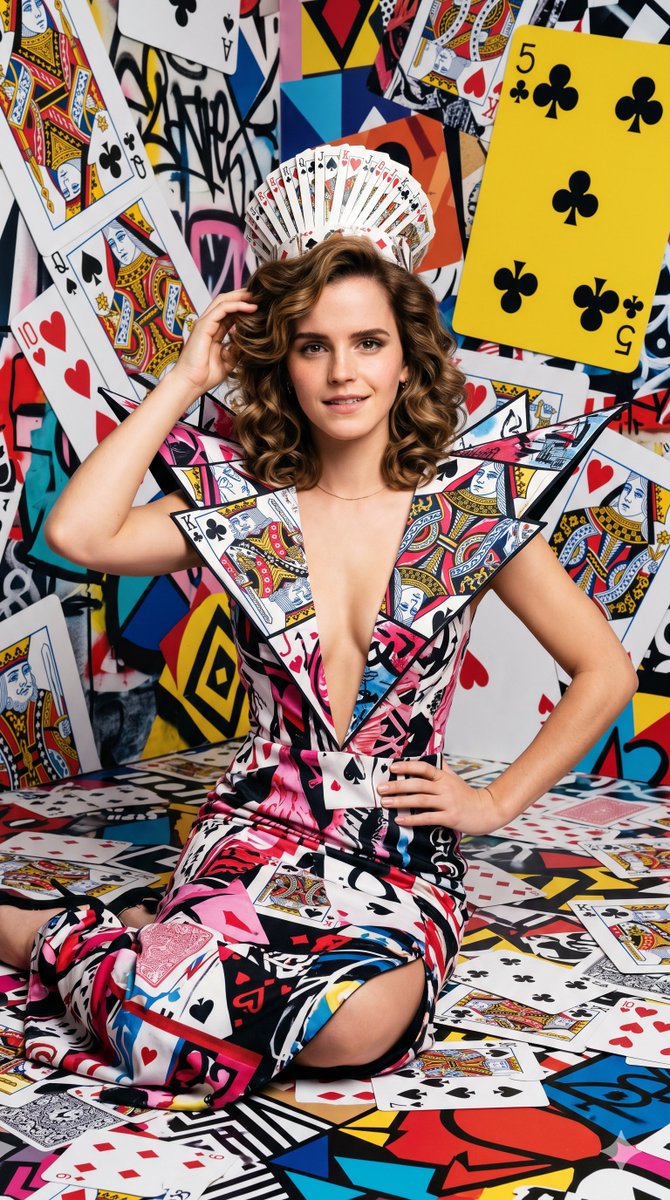
{ "image_prompt": { "subject": { "appearance": "A young woman with a smooth, sharp facial features, and captivating brown eyes with warm tone makeup. She has a voluminous, perfectly styled dark blonde wavy haircut that frames her face beautifully.", "reference_celebrity": "Emma Watson", "expression": "Naturally smiling, calm, confident, and direct gaze looking straight into the camera with neutral yet powerful intensity.", "physical_details": "Slender build, prominent collarbones, visible upper torso with a deep V-neck opening showing clean skin texture." }, "attire": { "garment": "An avant-garde, high-fashion dress featuring a plunging deep V-neckline. The fabric is a complex, pink, black, white collage pattern made entirely of abstract playing card art and vibrant graphic elements.", "styling": "The collar is structurally dramatic and rigid, flaring outward into sharp, geometric wing-like shapes covered in detailed artistic illustrations.", "headpiece": "A crown made from a deck of playing cards" }, "pose": { "stance": "Sitting comfortably on the floor, facing the camera directly with a high-fashion runway attitude.", "arms": "one hand running her hand through her hair, the other on her waist" }, "setting": { "environment": "A surreal, highly chaotic, and abstract background entirely themed around playing cards and graphic pop art.", "background_details": [ "Giant, oversized playing cards scattered and tilted at dynamic angles", "A large yellow card with black club symbols prominent on the upper right", "Abstract splatters of bold red, orange, blue, and black geometric shapes", "Graffiti-style street art and collage elements blending into a dense, non-realistic backdrop" ] }, "photography_style": { "aesthetic": "High-end fashion editorial photography, surrealist pop-art fusion, sharp digital illustration realism", "lighting": "Studio lighting, perfectly even and bright, casting minimal shadows to emphasize the vivid colors and complex patterns on the attire and background", "composition": "Centered medium shot from the waist up, perfectly symmetrical composition, eye-level angle, deep focus ensuring both the subject and the intricate background details remain sharp and vibrant" } } } --ar 9:16
Choose the primary action to open PicX Studio with the available template settings. Review the model and format, personalize the creative direction, and generate when ready.
Yes. You can change the subject, setting, lighting, mood, format, and available model controls before creating your image.
This template is free to open and customize. Generation usage is shown in PicX Studio before you create.
Start with Nano Banana 2, which is the model associated with this template. You can compare another compatible model for a different finish.
Follow a topic to a crawlable collection of related PicX Studio templates.
43,474 public templates available. Verified via the PicX Studio public templates API; refreshed hourly.






![Naive doodle-style subject illustration — A doodle-style {argument name="subject" default="[subject]"}, naive lines, humorous shape exaggeration](https://pbs.twimg.com/media/G6Wl2YxbsAARB2b.jpg)











![130-nano-banana-2 — use the character turnaround format from [img1] to create [character name / image] in the same style](/_next/image?url=https%3A%2F%2Fcdn.picxstudio.com%2Fuploads%2Fpost130_img0_0e694b48-cf6e-4b8f-95c2-9349e63ed697.jpg&w=828&q=100)