How do I use the Surreal Cinematic Portrait of Donald Trump template?
Choose the primary action to open PicX Studio with the available template settings. Review the model and format, personalize the creative direction, and generate when ready.
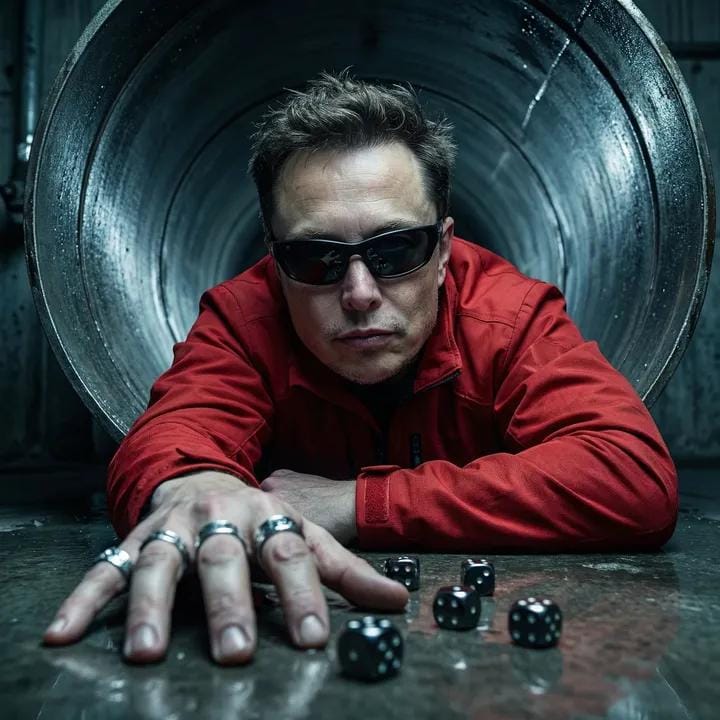
A highly specific and dramatic prompt for generating an ultra-realistic, cinematic portrait of Donald Trump, using a low-angle macro shot inside a dark industrial tunnel, emphasizing a hand reaching toward the camera, a bright red jacket, black wraparound sunglasses, and a brutal, high-fashion surrealist aesthetic. Change the subject, setting, or lighting one variable at a time.

Ultra-realistic, photorealistic cinematic portrait of Donald Trump. Low-angle macro-style shot. Subject inside a dark industrial circular tunnel or pipe opening, wet reflective surface. One hand reaching toward the camera, fingers extended, dominating the foreground. Dice scattered in front with identical scale and placement feel. Bright {argument name="jacket color" default="red"} jacket with identical fabric sheen, folds, texture, and tailored fit. Short textured messy hair, same length and volume. Black wraparound sunglasses with identical shape and tint. Multiple metal rings on fingers. Cold, focused, confident masculine expression, neutral lips, no smile. Cool dark cinematic color grading, strong contrast, red jacket as dominant accent, metallic reflections, cinematic highlights, deep shadows. Dramatic directional lighting emphasizing hand, rings, and dice, strong foreground-background separation. Brutal, edgy, high-fashion cinematic surrealism. Bold, dominant presence. Ultra-detailed skin texture, fabric grain, metal and dice surfaces. High-end DSLR cinematic editorial portrait, ultra high resolution.
Choose the primary action to open PicX Studio with the available template settings. Review the model and format, personalize the creative direction, and generate when ready.
Yes. You can change the subject, setting, lighting, mood, format, and available model controls before creating your image.
This template is free to open and customize. Generation usage is shown in PicX Studio before you create.
Start with Nano Banana 2, which is the model associated with this template. You can compare another compatible model for a different finish.
Follow a topic to a crawlable collection of related PicX Studio templates.
43,474 public templates available. Verified via the PicX Studio public templates API; refreshed hourly.



![118-google-nano-banana-pro-skincare-product- — A professional skincare shot of a [product container] with [cap/lid], labeled [brand, product, descriptor, volume](/_next/image?url=https%3A%2F%2Fcdn.picxstudio.com%2Fuploads%2Fpost118_img0_332898b8-29ea-42a9-87ab-9ed746a3f944.jpg&w=828&q=100)


![69-untitled — FORMAT: 15s / 145 BPM / 14 SHOTS
SUBJECT: @[image1]
WARDROBE: Clean modern outfit
ENVIRONMENT: Street / indoor transitions
MOOD: Discovery → contr](/_next/image?url=https%3A%2F%2Fcdn.picxstudio.com%2Fuploads%2Fpost69_img0_d45faecf-38c3-4bcb-81a4-f6eb1cf42bb2.jpg&w=828&q=100)









![Naive doodle-style subject illustration — A doodle-style {argument name="subject" default="[subject]"}, naive lines, humorous shape exaggeration](https://pbs.twimg.com/media/G6Wl2YxbsAARB2b.jpg)











![Dramatic Studio Portrait of Woman in Sequin Dress — [Project Settings]
Title=Studio_Portrait_Sequin_Dress
Resolution_Width=1200
Resolution_Height=1200
AspectRat](https://pbs.twimg.com/media/G9tc1IKbUAEhs2k.jpg)



![Space Mission Technical Artifacts — 16:9, do this for 4 famous space missions: void main() { string[] subjects = {"{argument name="subject one" default="[SUB_1]](https://cms-assets.youmind.com/media/1779096592895_53y1uu_HIfXbkRW4AAaI4v.jpg)



![Ultra-Detailed New Chinese Aesthetic Portrait Prompt (Zhao Lusi Style) — 作为世界级时尚摄影师(融合Steven Meisel的电影质感 + Paolo Roversi的柔光美学 + Harley Weir的情感捕捉),为[参考图1女性角色]创作定](https://pbs.twimg.com/media/G-XByHMWwAAxF4D.jpg)



![Celebrity Personal Mini World Diorama Prompt — Lifestyle scene
“A miniature diorama of {argument name="celebrity" default="[CELEBRITY]"} inside a stylized envir](https://pbs.twimg.com/media/G8f88_TagAE95mH.jpg)
![Hyper-Realistic Sculpture Carved from Banana Flesh — Imagine a hyper-realistic sculpture of a majestic {argument name="subject" default="[SUBJECT]"}, carved ent](https://pbs.twimg.com/media/G8ZuZ4Ha8AAVSEH.jpg)
![Technical Morning Selfie with Identity Lock Prompt — [Header] (9:16)
Raw high-fidelity photograph, iPhone 17 Pro sensor simulation, low-light indoor ambient pho](https://pbs.twimg.com/media/G_6ag_kWEAAlcpU.jpg)