
Cinematic NYC Hyperlapse Walking Story
An extensive director-style prompt for a complex cinematic sequence in New York City, featuring multi-angle camera directions and a lighting timeline from morning to night.
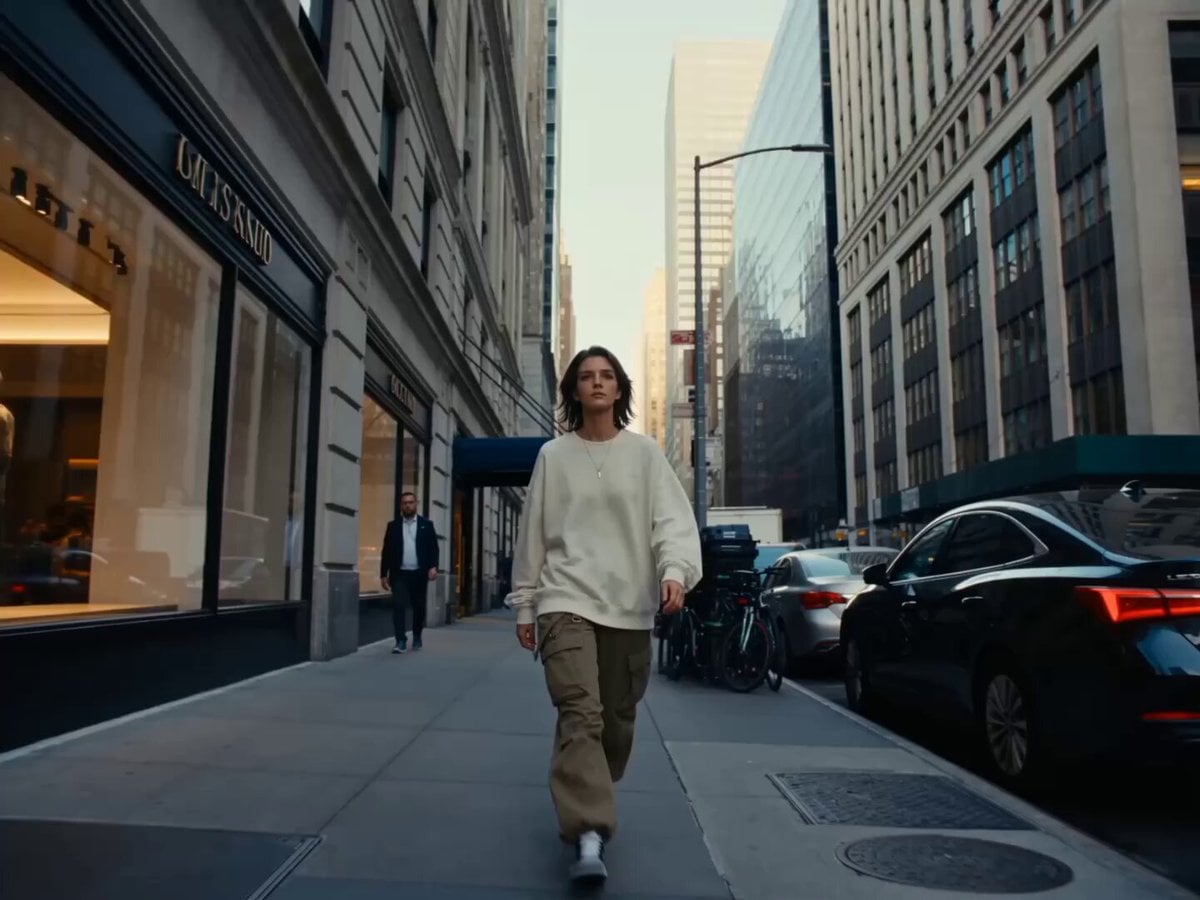
- Prompt included
- Model and format preset
- Premium template
The prompt behind this video
Copy the exact prompt behind Cinematic NYC Hyperlapse Walking Story, or open it in the studio and make it yours.
Generate a video: A young female Oval heart-shaped face, clean bright fair porcelain skin with natural pores and subtle micro imperfections (no over-smoothing), soft almond eyes, refined nose, polished natural makeup with soft highlights, face must remain clearly visible, sharp, and consistently recognizable across all shots (FACE LOCK, no distortion, no blur on face during motion), expression calm, confident, slightly observant urban vibe. Hair natural loose, slight movement from wind, never covering the face. OUTFIT: Streetwear casual — oversized hoodie / tee, relaxed pants, **Nike Air Jordan sneakers**, subtle accessories, realistic fabric movement. ENVIRONMENT: New York City streets — skyscrapers, crosswalks, traffic, crowds, subway entrances, storefront reflections **Time progression: morning → afternoon → golden hour → night (hyperlapse feel)** STYLE CORE: Cinematic urban walking sequence Macro cut + motion camera + hyperlapse transitions Focus: **movement + environment + face tracking** CAMERA SYSTEM (MULTI MOTION + FACE TRACK): - Front tracking cam (primary face lock) - Side tracking cam (walking profile) - Wide cinematic cam (city scale) - Macro cut cam (feet, hands, environment detail) - Overhead drone (brief city reveal) - Push-in / pull-out cam - Whip pan transitions between angles **Face always re-acquired after every cut** AUDIO: Ambient city sound + light cinematic beat Footsteps, traffic, distant voices, wind TIMELINE (10s CINEMATIC WALK + HYPERLAPSE): 0.0–1.5s (MORNING START) Wide NYC street → subject walking into frame → front tracking cam → soft morning light → face calm, natural 1.5–3.0s **Macro cut sequence**: → close-up sneakers stepping (Nike Jordan detail) → hand brushing jacket → quick whip to face close-up → side tracking resumes 3.0–4.5s (MIDDAY SHIFT) Crowd increases → faster movement → side cam + wide cam alternating → subtle hyperlapse effect in background (people blur) → face still sharp 4.5–6.0s Crosswalk moment → overhead + push-in combo → macro: traffic light change → cut to face → sunlight stronger (afternoon) 6.0–7.5s (GOLDEN HOUR) Warm light hits face → orbit side-front cam → reflections on glass buildings → calm confident expression 7.5–9.0s (TRANSITION TO NIGHT) Hyperlapse shift → lights turn on, sky darkens → whip pan transitions → macro: neon sign → cut to face → faster walking energy 9.0–10.0s (NIGHT FINAL) City fully lit → neon + headlights → front tracking close-up → slight slow-down step → **FULL FACE LOCK CLOSE-UP**, confident urban expression PHYSICS & EFFECTS: Hyperlapse background motion, realistic footstep impact, cloth movement, light reflections, motion blur on environment only (NOT face) LOOK & COLOR: Ultra cinematic, NYC tone, high contrast, morning soft light → golden hour warm → neon night glow
How to use Cinematic NYC Hyperlapse Walking Story in 3 steps
- 1
Open
The prompt is already in the box next to the preview, with the template's model and format selected.
- 2…a portrait of your subject in softgolden-hour light, 85mm…
Personalize
Edit the subject and creative details for your destination.
- 3Generate
Generate
Press Generate — your video is created in PicX Studio, so you can compare it with the original and refine one variable at a time.
More like this
Templates with the same subject, style or setup. Open one to see its prompt.

Wholesome Puppy and Kitten Story - Seedance 2.5

Realistic City Street Story Cinematic Video - Seedance

NYC Wingsuit Hot Dog Landing

Pigeon Nemesis Pixar Animation Storyboard
Golden Hour NYC Beach Stroll
Water Walking Xianxia Fraud
Cinematic Spider-Man NYC Action Scene

Cinematic Girl Walking to Bright Open Sky
Stranger in a Strange Land Story Scene

Woman Walking in Sunflowers
Gothic Fairy and Stylish Man Walking
Giant and Glowing Butterfly Story
Make it yours
Cinematic NYC Hyperlapse Walking Story works as-is. These are the safest ways to change it without losing the look.
Change one field
Copy a single group, rewrite it, and generate again so you can see what that field is doing.
Keep the frame, change the subject
Hold the composition and light of Cinematic NYC Hyperlapse Walking Story, then swap wardrobe, props or the person for a new take.
| If the result… | Why | Fix |
|---|---|---|
| The result drifts from the preview | Too many fields changed at once. | Reuse Cinematic NYC Hyperlapse Walking Story as-is first, then change one group — subject, light, or setting. |
| The model over-stylizes the scene | The prose prompt leaves finish and camera underspecified. | Add one camera or lighting sentence and stay on Seedance 2.0. |
More Seedance 2.0 templates
Other prompts made for Seedance 2.0.

Comical Martial Arts Punch Scene

Maglev Train Action Sequence

Martial Arts Fight Sequence

Wuxia Protection and Trust Script

Vintage Korean Arcade MiniDV Vlog

Mercedes 190 SL Luxury Ad

Rainy Night Supernatural Reverse Comedy Video Script

Amazon Civilization Discovery

Futuristic South Asian City Transformation

Cozy Luxury Cafe Commercial
More video prompts
Fresh picks from across the catalog.
Cinematic Gym Training Intensity
Tokyo Consumer DV Camcorder Slice of Life

Fantasy Dragon Bridge Escape Sequence

Xianxia Heavenly Gate Side Door Comedy
Structured Caricature Animation Stack

Advanced Character Consistency Prompt Strategy for Grok Imagine

Seedance 2.0 Prompt: Basketball Block Scene
Nano Banana Pro Prompt: 3D City Diorama Map (Reference)
Annoyed Woman in Hotel Room Scene

Wuxia Emotional Drama "Trust and Dignity"
Browse template categories
Cinematic NYC Hyperlapse Walking Story questions
How do I use the Cinematic NYC Hyperlapse Walking Story template?
Add your photo if the template asks for one, edit the prompt if you like — the template's model and format are already selected — and press Generate. Your version opens in PicX Studio.
Can I customize the Cinematic NYC Hyperlapse Walking Story template?
Yes. You can change the subject, setting, lighting, mood, format, and available model controls before creating your video.
Is the Cinematic NYC Hyperlapse Walking Story template free?
Opening and editing this template is free. Generating uses credits, shown on the Generate button when you are signed in.
Which AI model should I use?
Start with Seedance 2.0, which is the model associated with this template. You can compare another compatible model for a different finish.
Looking for something else? Browse all templates.

Your photo, any look
Thousands of ready templates for every top image and video model, from one credit balance.