How do I use the NYC Wingsuit Hot Dog Landing template?
Edit the prompt in the box under the preview — the template's model and format are already selected — and press Generate. Your version appears right on this page.
NYC Wingsuit Hot Dog Landing is a ready video look for Seedance 2.5.
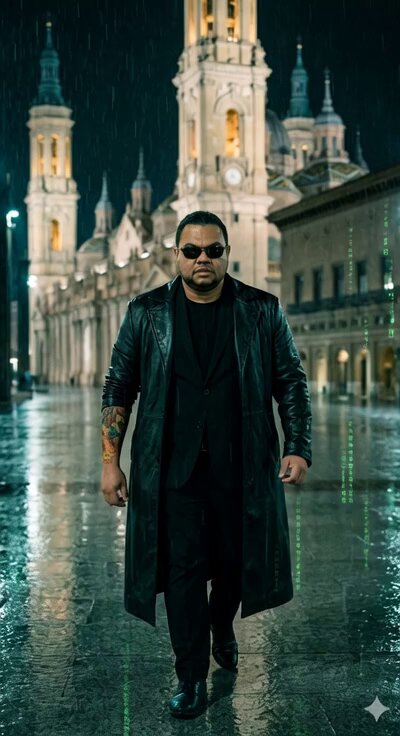
[STYLE + CAMERA + ATMOSPHERE] Gritty, raw handheld 35mm film aesthetic with natural film grain. Harsh direct sunlight creating high-contrast shadows over the NYC skyline. Continuous single-take handheld tracking shot (3rd-person / over-the-shoulder) with no cuts. Atmosphere: high-altitude wind, realistic urban canyon physics, sudden wingsuit deployment. Audio: heavy rhythmic breathing, intense wind howl, fabric snap of wingsuit opening, high-speed air rush between buildings, near-miss whooshes, soft landing roll, street noise, final bite sounds. [IMAGE REFERENCES] Use the provided image as the single strict visual reference for the male character. Exact face, full dark beard, black North Face cap, black sunglasses, white “JUSTFORBALLERS” t-shirt. He wears a backpack at the start. Body proportions, posture and clothing locked from the reference. [TIMELINE SECOND BY SECOND] 0-3s: [Handheld medium] Bearded man in white t-shirt, black cap, sunglasses and backpack stands on the edge of a NYC skyscraper rooftop. He looks straight into the camera with calm intensity, then turns and launches into a clear, controlled forward somersault in slow motion as he leaves the roof. 3-5s: [Continuous freefall] He completes the somersault and falls head-first. At exactly 1.5 seconds into the fall he deploys his wingsuit with a sharp snap. The wingsuit inflates fully and he levels out. 5-12s: [High-speed tracking] Camera stays locked behind him as he rockets at full speed through the urban canyons of midtown Manhattan. He weaves tightly between skyscrapers, banking hard left and right, glass facades and windows streaking past at extreme velocity. 12-18s: [Low-level chaos] He drops lower, flying just above street level. He almost collides with a yellow taxi that suddenly turns the corner, banks hard to avoid it, then narrowly misses a delivery van. He dips under a traffic light and threads between two buses. 18-23s: [Street-level action] Still flying extremely low, he dodges a startled cat that bolts across the sidewalk, skims past a group of pedestrians who scatter, and banks sharply to avoid an open truck door. The camera stays locked behind him through every near-miss. 23-26s: [Landing] He flares the wingsuit hard, touches down with both feet on the sidewalk and immediately rolls forward to kill the speed. He stands up, peels off the wingsuit in one fluid motion and drops it on the ground beside him. 26-28s: [Street level] He walks a few steps still wearing the backpack and stops right in front of a classic NYC hot-dog cart. The vendor hands him a steaming hot dog fresh off the grill. 28-30s: [Close continuous] He turns, looks directly into the camera, takes a big bite of the hot dog and chews with a satisfied expression as the shot holds. [STYLE & QUALITY BOOSTERS] Photorealistic 8K, ultra-detailed textures, cinematic lighting, perfect motion blur, high dynamic range, coherent physics (fabric, air, wingsuit, impact, roll, near-misses), stable character from the reference, realistic urban reflections and wind, no artifacts, movie-level stability, pure single continuous take.
[STYLE + CAMERA + ATMOSPHERE] Gritty, raw handheld 35mm film aesthetic with natural film grain. Harsh direct sunlight creating high-contrast shadows over the NYC skyline. Continuous single-take handheld tracking shot (3rd-person / over-the-shoulder) with no cuts. Atmosphere: high-altitude wind, realistic urban canyon physics, sudden wingsuit deployment. Audio: heavy rhythmic breathing, intense wind howl, fabric snap of wingsuit opening, high-speed air rush between buildings, near-miss whooshes, soft landing roll, street noise, final bite sounds. [IMAGE REFERENCES] Use the provided image as the single strict visual reference for the male character. Exact face, full dark beard, black North Face cap, black sunglasses, white “JUSTFORBALLERS” t-shirt. He wears a backpack at the start. Body proportions, posture and clothing locked from the reference. [TIMELINE SECOND BY SECOND] 0-3s: [Handheld medium] Bearded man in white t-shirt, black cap, sunglasses and backpack stands on the edge of a NYC skyscraper rooftop. He looks straight into the camera with calm intensity, then turns and launches into a clear, controlled forward somersault in slow motion as he leaves the roof. 3-5s: [Continuous freefall] He completes the somersault and falls head-first. At exactly 1.5 seconds into the fall he deploys his wingsuit with a sharp snap. The wingsuit inflates fully and he levels out. 5-12s: [High-speed tracking] Camera stays locked behind him as he rockets at full speed through the urban canyons of midtown Manhattan. He weaves tightly between skyscrapers, banking hard left and right, glass facades and windows streaking past at extreme velocity. 12-18s: [Low-level chaos] He drops lower, flying just above street level. He almost collides with a yellow taxi that suddenly turns the corner, banks hard to avoid it, then narrowly misses a delivery van. He dips under a traffic light and threads between two buses. 18-23s: [Street-level action] Still flying extremely low, he dodges a startled cat that bolts across the sidewalk, skims past a group of pedestrians who scatter, and banks sharply to avoid an open truck door. The camera stays locked behind him through every near-miss. 23-26s: [Landing] He flares the wingsuit hard, touches down with both feet on the sidewalk and immediately rolls forward to kill the speed. He stands up, peels off the wingsuit in one fluid motion and drops it on the ground beside him. 26-28s: [Street level] He walks a few steps still wearing the backpack and stops right in front of a classic NYC hot-dog cart. The vendor hands him a steaming hot dog fresh off the grill. 28-30s: [Close continuous] He turns, looks directly into the camera, takes a big bite of the hot dog and chews with a satisfied expression as the shot holds. [STYLE & QUALITY BOOSTERS] Photorealistic 8K, ultra-detailed textures, cinematic lighting, perfect motion blur, high dynamic range, coherent physics (fabric, air, wingsuit, impact, roll, near-misses), stable character from the reference, realistic urban reflections and wind, no artifacts, movie-level stability, pure single continuous take.
Edit the prompt in the box under the preview — the template's model and format are already selected — and press Generate. Your version appears right on this page.
Yes. You can change the subject, setting, lighting, mood, format, and available model controls before creating your video.
Opening and editing this template is free. Generating uses credits, shown on the Generate button when you are signed in.
Start with Seedance 2.5, which is the model associated with this template. You can compare another compatible model for a different finish.
Follow a topic to a crawlable collection of related PicX Studio templates.