How do I use the Italian Old-Town Time-Freeze Walk template?
Edit the prompt in the box under the preview — the template's model and format are already selected — and press Generate. Your version appears right on this page.
Italian Old-Town Time-Freeze Walk is a ready video look for Seedance 2.5.
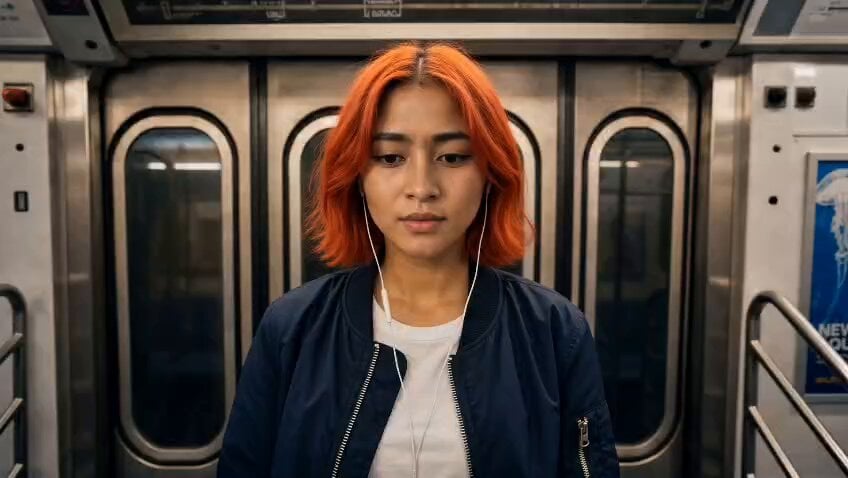
Image1 is the main character. Preserve her identity, face, hairstyle, body proportions and clothing consistently throughout. One character only. Create a 30-second ultra-realistic cinematic time-freeze sequence. A sunlit Italian old-town street with beautiful stone buildings, narrow cobblestone roads, cafés, pedestrians, pigeons and warm afternoon light. The woman walks confidently toward camera as a smooth Steadicam tracks backward. 0–5s: Normal life. Pedestrians cross, bicycles pass, pigeons fly overhead, leaves move in the breeze. She walks calmly through the crowd, looking completely in control. 5–8s: She suddenly stops, raises her hand and snaps her fingers. A powerful but elegant invisible shockwave expands outward from her fingertips. Air bends, dust and leaves ripple outward, then EVERYTHING FREEZES. 8–15s: Absolute stillness. Pedestrians are frozen mid-step, pigeons suspended in flight, a bicycle stopped mid-motion, leaves hanging in the air, a coffee splash frozen above a cup. Only she can move. The camera slowly circles her as she walks through the impossible frozen street. She examines a suspended raindrop-sized water droplet, gently touches it, then continues forward. 15–20s: She notices a pigeon frozen inches above the pavement. She walks underneath it, looks up with an amused smile, then casually walks past a frozen man holding a coffee cup. She subtly moves the cup a few centimeters and walks away. 20–24s: She reaches the center of the street and turns toward camera. Everything behind her remains perfectly frozen. She gives a confident half-smile, raises her hand and snaps again. 24–28s: A second shockwave explodes outward, stronger and more dramatic. Light bends through the air as the frozen world suddenly comes alive again. Pigeons flap away, leaves fall, pedestrians continue their steps, coffee splashes naturally, bicycles move and city ambience instantly returns. 28–30s: She remains completely calm while everyone around her continues as if nothing happened. She turns and walks deeper into the old-town street. The camera rises into a beautiful overhead wide shot and reveals the entire bustling city street. STYLE: Premium cinematic filmmaking, photorealistic, natural sunlight, 50mm cinema lens, shallow depth of field, realistic skin and hair, physically accurate motion and physics, subtle film grain, HDR, sophisticated color grading, smooth Steadicam choreography, dramatic but realistic VFX, natural shadows and reflections. SOUND: Busy Italian street ambience → finger snap → deep cinematic shockwave → complete silence → footsteps and subtle breathing → second shockwave → full city ambience returns. NO face morphing, identity drift, duplicate characters, extra limbs, distorted hands, frozen objects moving, inconsistent physics, cartoon CGI, excessive VFX, text, subtitles, logos or watermark.
Image1 is the main character. Preserve her identity, face, hairstyle, body proportions and clothing consistently throughout. One character only. Create a 30-second ultra-realistic cinematic time-freeze sequence. A sunlit Italian old-town street with beautiful stone buildings, narrow cobblestone roads, cafés, pedestrians, pigeons and warm afternoon light. The woman walks confidently toward camera as a smooth Steadicam tracks backward. 0–5s: Normal life. Pedestrians cross, bicycles pass, pigeons fly overhead, leaves move in the breeze. She walks calmly through the crowd, looking completely in control. 5–8s: She suddenly stops, raises her hand and snaps her fingers. A powerful but elegant invisible shockwave expands outward from her fingertips. Air bends, dust and leaves ripple outward, then EVERYTHING FREEZES. 8–15s: Absolute stillness. Pedestrians are frozen mid-step, pigeons suspended in flight, a bicycle stopped mid-motion, leaves hanging in the air, a coffee splash frozen above a cup. Only she can move. The camera slowly circles her as she walks through the impossible frozen street. She examines a suspended raindrop-sized water droplet, gently touches it, then continues forward. 15–20s: She notices a pigeon frozen inches above the pavement. She walks underneath it, looks up with an amused smile, then casually walks past a frozen man holding a coffee cup. She subtly moves the cup a few centimeters and walks away. 20–24s: She reaches the center of the street and turns toward camera. Everything behind her remains perfectly frozen. She gives a confident half-smile, raises her hand and snaps again. 24–28s: A second shockwave explodes outward, stronger and more dramatic. Light bends through the air as the frozen world suddenly comes alive again. Pigeons flap away, leaves fall, pedestrians continue their steps, coffee splashes naturally, bicycles move and city ambience instantly returns. 28–30s: She remains completely calm while everyone around her continues as if nothing happened. She turns and walks deeper into the old-town street. The camera rises into a beautiful overhead wide shot and reveals the entire bustling city street. STYLE: Premium cinematic filmmaking, photorealistic, natural sunlight, 50mm cinema lens, shallow depth of field, realistic skin and hair, physically accurate motion and physics, subtle film grain, HDR, sophisticated color grading, smooth Steadicam choreography, dramatic but realistic VFX, natural shadows and reflections. SOUND: Busy Italian street ambience → finger snap → deep cinematic shockwave → complete silence → footsteps and subtle breathing → second shockwave → full city ambience returns. NO face morphing, identity drift, duplicate characters, extra limbs, distorted hands, frozen objects moving, inconsistent physics, cartoon CGI, excessive VFX, text, subtitles, logos or watermark.
Edit the prompt in the box under the preview — the template's model and format are already selected — and press Generate. Your version appears right on this page.
Yes. You can change the subject, setting, lighting, mood, format, and available model controls before creating your video.
Opening and editing this template is free. Generating uses credits, shown on the Generate button when you are signed in.
Start with Seedance 2.5, which is the model associated with this template. You can compare another compatible model for a different finish.
Follow a topic to a crawlable collection of related PicX Studio templates.