How do I use the Navy Blue Satin Dress Studio Portrait template?
Choose the primary action to open PicX Studio with the available template settings. Review the model and format, personalize the creative direction, and generate when ready.
A sophisticated studio portrait prompt focusing on a subject in a loose navy blue satin dress with thin straps, featuring dramatic side lighting and a minimalist gray backdrop. Change the subject, setting, or lighting one variable at a time.
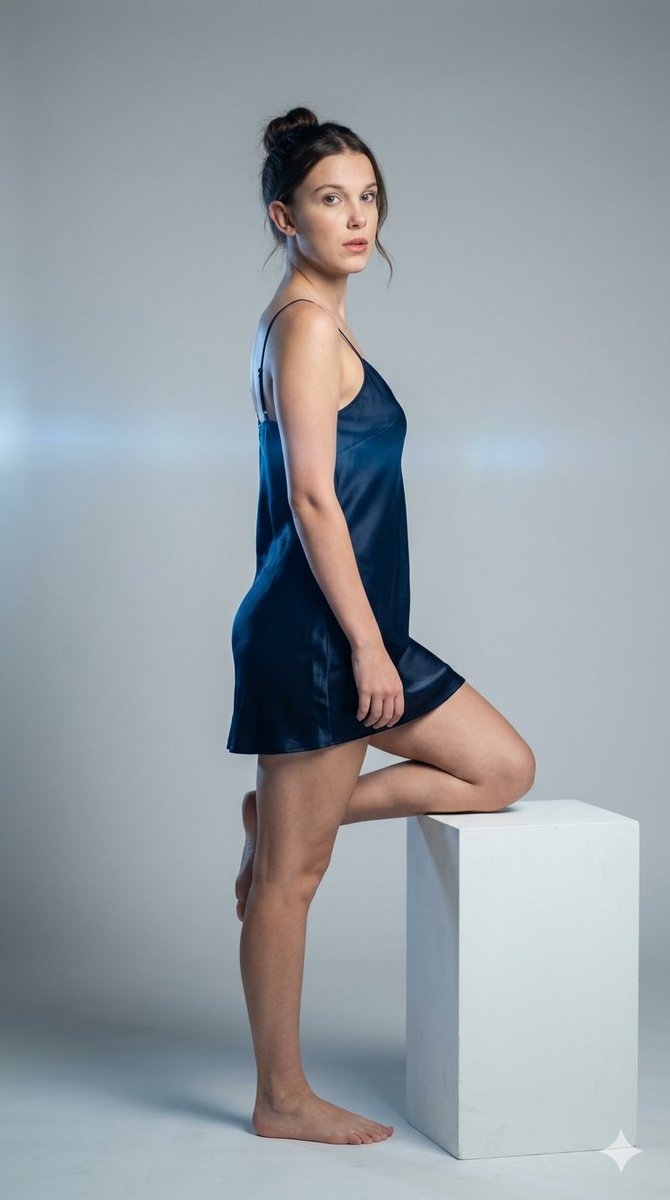
{ "type": "image_prompt", "description": { "subject": { "identity": "{argument name="subject name" default="Millie Bobby Brown"}", "appearance": { "hair": "Hair styled in a messy bun with a few loose strands framing the face", "expression": "Calm and neutral", "gaze": "Looking directly at the camera", "makeup": "Natural-looking makeup with subtle lip color", "skin": "Smooth skin texture" }, "details": "Barefoot" }, "clothing": { "type": "Short satin dress", "color": "Dark navy blue", "finish": "Soft sheen", "straps": "Thin spaghetti straps", "length": "Mid-thigh", "fit": "Loose and fluid drape" }, "pose": { "body_position": "Three-quarter profile facing left", "head_position": "Turned over the shoulder toward the camera", "legs": { "support_leg": "One leg straight, supporting the body on the floor", "raised_leg": "Other leg bent and resting on a white cube pedestal" }, "hips": "Slightly pushed back creating a curved and natural silhouette", "arms": { "front_arm": "Resting softly near the thigh/raised leg", "back_arm": "Bent behind the body near the waist" }, "posture": "Relaxed shoulders, slightly arched back, delicate and sophisticated stance" }, "setting": { "location": "Minimalist indoor studio", "background": "Light gray seamless backdrop", "floor": "Matching gray floor" }, "props": [ "White cube pedestal" ], "lighting": { "style": "Dramatic side lighting", "effect": "Subtle blue anamorphic lens flare" }, "mood": [ "Serene", "Intimate", "Posed", "Minimalist", "Soft" ], "technical": { "camera": "Medium shot", "lens": "135mm", "aperture": "f/1.8", "distance": "4 meters", "depth_of_field": "Background fully blurred with buttery bokeh", "style": "Photorealistic studio portrait photography", "quality": "Highly detailed, sharp focus on subject, smooth background gradient, 8k resolution" } }, "aspect_ratio": "9:16" }
Choose the primary action to open PicX Studio with the available template settings. Review the model and format, personalize the creative direction, and generate when ready.
Yes. You can change the subject, setting, lighting, mood, format, and available model controls before creating your image.
This template is free to open and customize. Generation usage is shown in PicX Studio before you create.
Start with Nano Banana 2, which is the model associated with this template. You can compare another compatible model for a different finish.
Follow a topic to a crawlable collection of related PicX Studio templates.
43,474 public templates available. Verified via the PicX Studio public templates API; refreshed hourly.








![Naive doodle-style subject illustration — A doodle-style {argument name="subject" default="[subject]"}, naive lines, humorous shape exaggeration](https://pbs.twimg.com/media/G6Wl2YxbsAARB2b.jpg)











![Energetic Juice Advertisement Scene — A bold, energetic advertisement scene blending real photography and playful elements, a cheerful Man [Uploaded image] hold](https://cms-assets.youmind.com/media/1777022498756_18n1iq_HGjzN1YbYAA9HMN.jpg)