How do I use the Cinematic Chaos Portrait template?
Choose the primary action to open PicX Studio with the available template settings. Review the model and format, personalize the creative direction, and generate when ready.
A ready image prompt for PicX Studio. Change the subject, setting, or lighting one variable at a time.
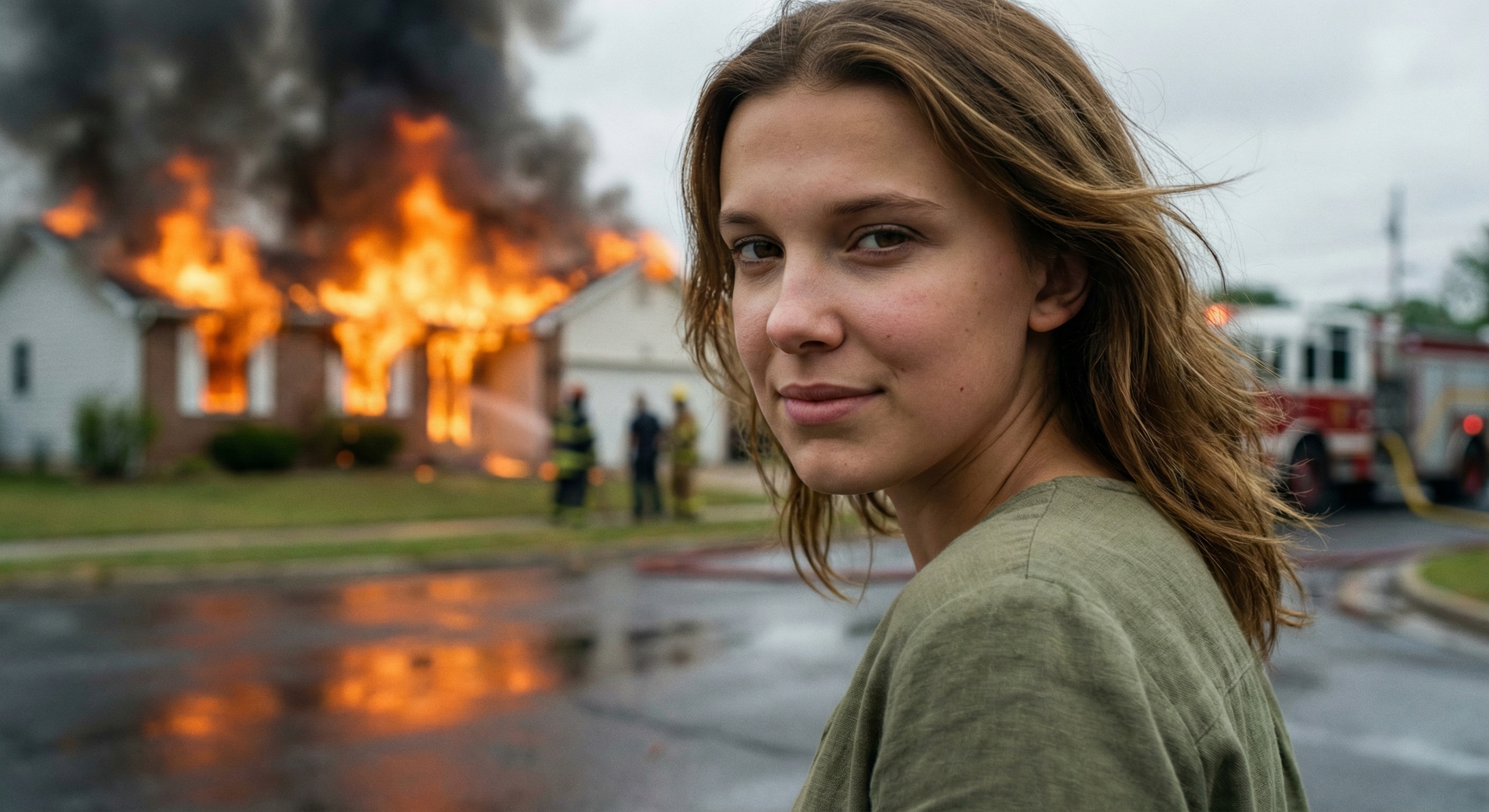
{ "scene": { Subject : " millie bobby brown " "type": "cinematic street emergency scene", "description": "suburban house engulfed in intense flames with active firefighting response, dramatic fire and smoke filling the background, wet asphalt street in foreground reflecting firelight", "aspect_ratio": "16:9" }, "subject": { "type": "female model", "pose": "close-up foreground framing, head slightly tilted down and turned slightly to the side, shoulders relaxed, body facing away from background fire while head subtly angled toward camera", "expression": "subtle controlled smirk with slight asymmetry, lips gently pressed with faint upward curve on one side, eyes looking directly at camera with calm, slightly mischievous and composed emotion contrasting chaotic background", "face": "Use uploaded reference image, keep identity exact. Preserve exact facial structure, proportions, skin texture, eye shape, nose shape, lips, and all unique identity markers. Maintain natural imperfections such as pores, slight asymmetry, and realistic skin detail. Do not beautify or stylize.", "gaze": "direct eye contact with camera, confident and calm" }, "hair": { "style": "natural, slightly messy due to outdoor environment", "movement": "light displacement from subtle wind", "details": "preserve exact hairstyle, length, and color from reference image" }, "clothing": { "type": "casual everyday wear", "details": "simple top with natural fabric texture, slightly muted tones, no distracting patterns", "fit": "natural fit, realistic folds and creases" }, "environment": { "background": "house fully on fire with bright orange flames bursting through windows and roof, thick dark smoke rising into sky", "elements": "firefighters in distance, fire truck partially visible, hose on ground, blurred human silhouettes observing scene", "depth": "strong depth of field separation with subject in sharp focus and background slightly blurred" }, "lighting": { "type": "mixed natural and fire lighting", "key_light": "soft natural daylight illuminating subject face from front/side", "rim_light": "warm orange glow from fire subtly outlining subject edges", "contrast": "high dynamic range between bright flames and cooler foreground tones", "shadows": "soft realistic shadows with slight flicker from firelight" }, "camera": { "angle": "eye-level close-up portrait", "lens": "50mm or 85mm for natural perspective", "focus": "sharp focus on subject face, shallow depth of field", "composition": "rule of thirds with subject positioned off-center, fire occupying background", "quality": "ultra-realistic, high resolution, cinematic detail" }, "mood": { "tone": "contrast between calm confidence and chaotic destruction", "feeling": "unsettling yet controlled, cinematic tension" }, "details": { "skin": "visible pores, realistic texture, slight imperfections, natural tones", "imperfections": "minor asymmetry in expression, subtle lighting inconsistencies from fire flicker", "realism": "no smoothing, no artificial enhancement, photorealistic rendering" } }
Choose the primary action to open PicX Studio with the available template settings. Review the model and format, personalize the creative direction, and generate when ready.
Yes. You can change the subject, setting, lighting, mood, format, and available model controls before creating your image.
This template is free to open and customize. Generation usage is shown in PicX Studio before you create.
Choose a compatible model in PicX Studio based on the style, speed, and output controls your project needs.
Follow a topic to a crawlable collection of related PicX Studio templates.
43,474 public templates available. Verified via the PicX Studio public templates API; refreshed hourly.











![118-google-nano-banana-pro-skincare-product- — A professional skincare shot of a [product container] with [cap/lid], labeled [brand, product, descriptor, volume](/_next/image?url=https%3A%2F%2Fcdn.picxstudio.com%2Fuploads%2Fpost118_img0_332898b8-29ea-42a9-87ab-9ed746a3f944.jpg&w=828&q=100)




![69-untitled — FORMAT: 15s / 145 BPM / 14 SHOTS
SUBJECT: @[image1]
WARDROBE: Clean modern outfit
ENVIRONMENT: Street / indoor transitions
MOOD: Discovery → contr](/_next/image?url=https%3A%2F%2Fcdn.picxstudio.com%2Fuploads%2Fpost69_img0_d45faecf-38c3-4bcb-81a4-f6eb1cf42bb2.jpg&w=828&q=100)











![Neon X-Ray Photorealistic Scan — Neon X-Ray Photorealistic {argument name="object" default="[OBJECT]"} shown as glowing X-ray scan ag…](https://pbs.twimg.com/media/HA-QQVdbcAAz3E1.jpg)