How do I use the Ultra Realistic Pouting Portrait Prompt template?
Choose the primary action to open PicX Studio with the available template settings. Review the model and format, personalize the creative direction, and generate when ready.
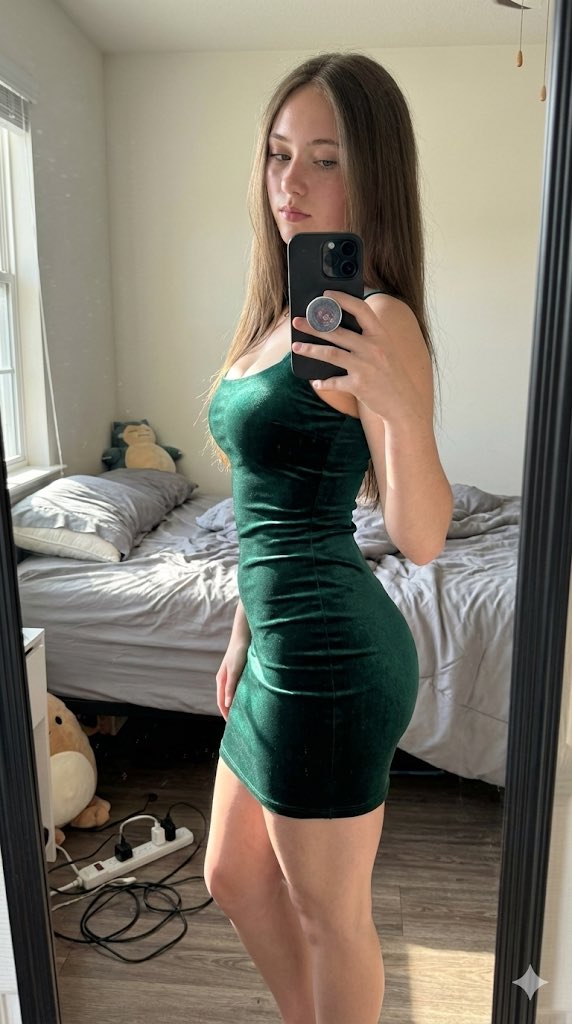
A structured prompt for Gemini Nano Banana Pro to generate an ultra-realistic 9:16 portrait of a young woman posing and pouting, featuring dark hair with bright pink highlights, a black corset, lace gloves, and a hallway background with horse artwork. Change the subject, setting, or lighting one variable at a time.

{ "subject": "Young woman posing and pouting", "hair": "Long dark straight hair with bright {argument name="highlight color" default="pink"} face-framing highlights", "clothing": "Black strapless corset, black lace fingerless gloves", "accessories": "Silver O-ring choker, silver waist chains", "background": "Indoor hallway with beige walls, ceiling lights, and framed horse artwork", "prompt": "Photo of a young woman with dark hair and pink highlights, pouting and holding her hair out. Wearing a black corset, lace gloves, O-ring choker, and waist chains. Hallway background with horse painting. 4k ultra quality, 9:16 canvas" }
Choose the primary action to open PicX Studio with the available template settings. Review the model and format, personalize the creative direction, and generate when ready.
Yes. You can change the subject, setting, lighting, mood, format, and available model controls before creating your image.
This template is free to open and customize. Generation usage is shown in PicX Studio before you create.
Start with Nano Banana 2, which is the model associated with this template. You can compare another compatible model for a different finish.
Follow a topic to a crawlable collection of related PicX Studio templates.
43,474 public templates available. Verified via the PicX Studio public templates API; refreshed hourly.











![118-google-nano-banana-pro-skincare-product- — A professional skincare shot of a [product container] with [cap/lid], labeled [brand, product, descriptor, volume](/_next/image?url=https%3A%2F%2Fcdn.picxstudio.com%2Fuploads%2Fpost118_img0_332898b8-29ea-42a9-87ab-9ed746a3f944.jpg&w=828&q=100)




![69-untitled — FORMAT: 15s / 145 BPM / 14 SHOTS
SUBJECT: @[image1]
WARDROBE: Clean modern outfit
ENVIRONMENT: Street / indoor transitions
MOOD: Discovery → contr](/_next/image?url=https%3A%2F%2Fcdn.picxstudio.com%2Fuploads%2Fpost69_img0_d45faecf-38c3-4bcb-81a4-f6eb1cf42bb2.jpg&w=828&q=100)






![Naive doodle-style subject illustration — A doodle-style {argument name="subject" default="[subject]"}, naive lines, humorous shape exaggeration](https://pbs.twimg.com/media/G6Wl2YxbsAARB2b.jpg)




















![Premium Recipe Poster Template — Create a premium food preparation poster for [ {argument name="dish name" default="DISH NAME"} ], with a beautiful hero dish, w](https://cms-assets.youmind.com/media/1777193308183_px9fgg_HGuK_N8aUAANsXt.jpg)
![Lego Set Design Prompt Template — Create a Lego set for [place, movie, image reference], [type of set, adventure, architecture] set, include box and instruction](https://pbs.twimg.com/media/HCabsmiXIAEklYr.jpg)






![LINE Sticker Generation Prompt — 参照画像[画像1]
プロンプト
[画像1]をベースにして、
手書き風のLINEスタンプを9個まとめて生成してください。
統一感のある9個セットとして仕上げてください。
✅条件
・特徴は必ず保持
・参考テイストの線の太さ・色味・雰囲気を反映
・背景は完](https://pbs.twimg.com/media/G7ThfdxaQAARkop.jpg)