
Extreme Rooftop Jump Viral Video
A cinematic and realistic UGC-style video prompt of a character jumping from a São Paulo rooftop and falling into a stunt pad.
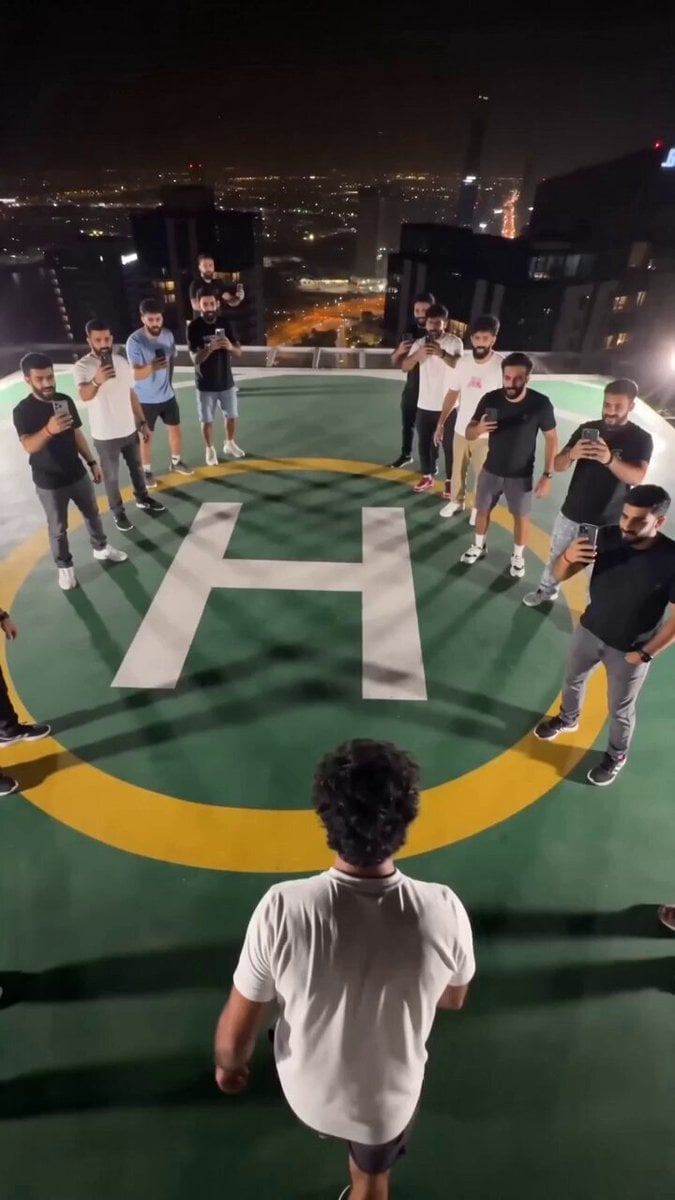
- Prompt included
- Model and format preset
- Free template
The prompt behind this video
Copy the exact prompt behind Extreme Rooftop Jump Viral Video, or open it in the studio and make it yours.
@ Img use attached photo as the main character, preserve exact face and identity throughout. Vertical 9:16 raw smartphone UGC footage, handheld, no stabilization, nighttime in São Paulo, Brazil, dense high-rise skyline with hundreds of lit apartment windows, blinking red tower lights, deep navy-black sky. Rooftop helipad 25 floors high with olive-green surface, white H and yellow circle. Main character stands near the edge while 3–4 male friends cheer and film on phones. He suddenly jumps from the rooftop and enters a fast freefall, camera tracking from above as building facades blur past and the street rushes closer. Aerial view looking straight down reveals a giant rectangular elastic stunt pad on the street surrounded by bright blue and rainbow LED lights; he falls directly toward its center. Massive impact: the elastic surface stretches dramatically downward, LEDs flare, camera shakes, then launches him explosively back upward. Tracking shot follows him soaring alongside the building past floor after floor of lit windows, face visible, exhilarated expression, arms spread, clothes and hair whipping in the wind. He reaches rooftop height and silhouettes briefly against the night sky before landing back on the helipad. Friends rush toward him celebrating, jumping, shouting, filming on phones, ending in a chaotic group hug full of genuine excitement and laughter. Style: authentic viral thrill-seeking UGC, realistic physics, low-light sensor grain, handheld shake in every shot, natural motion blur, dangerous spontaneous energy, no color grading, no filters, no cinematic look, no VFX, no slow motion, no AI faces, no unrealistic physics.
How to use Extreme Rooftop Jump Viral Video in 3 steps
- 1Upload ImagePNG, JPG or paste
Add your photo
Upload the photo the template builds on. The prompt, model and format are already set.
- 2…a portrait of your subject in softgolden-hour light, 85mm…
Personalize
Edit the subject and creative details for your destination.
- 3Generate
Generate
Press Generate — your video is created in PicX Studio, so you can compare it with the original and refine one variable at a time.
More like this
Templates with the same subject, style or setup. Open one to see its prompt.
Rooftop Parkour Motion Control

Luxury Lifestyle Day Vlog
Ankitpatel Time Freeze Viral
Duttasomrat Time Freeze Viral V2
Johnnywang Tokyo Time Freeze
Duttasomrat Time Freeze Viral
Elevencreative Time Freeze
Mayorking Time Freeze Higgsfield
Misa Time Freeze Japanese
Lillyli Time Freeze Avatar
Cuchocapilla Time Freeze
Monetizationdon Time Freeze Higgsfield
Make it yours
Extreme Rooftop Jump Viral Video works as-is. These are the safest ways to change it without losing the look.
Change one field
Copy a single group, rewrite it, and generate again so you can see what that field is doing.
Keep the frame, change the subject
Hold the composition and light of Extreme Rooftop Jump Viral Video, then swap wardrobe, props or the person for a new take.
| If the result… | Why | Fix |
|---|---|---|
| The result drifts from the preview | Too many fields changed at once. | Reuse Extreme Rooftop Jump Viral Video as-is first, then change one group — subject, light, or setting. |
| The model over-stylizes the scene | The prose prompt leaves finish and camera underspecified. | Add one camera or lighting sentence and stay on Seedance 2.0. |
More Seedance 2.0 templates
Other prompts made for Seedance 2.0.

Comical Martial Arts Punch Scene

Maglev Train Action Sequence

Martial Arts Fight Sequence

Wuxia Protection and Trust Script

Vintage Korean Arcade MiniDV Vlog

Mercedes 190 SL Luxury Ad

Rainy Night Supernatural Reverse Comedy Video Script

Amazon Civilization Discovery

Futuristic South Asian City Transformation

Cozy Luxury Cafe Commercial
More video prompts
Fresh picks from across the catalog.
Cat Master Fairy Tale Thriller Video Prompt
Art Deco Futuristic Royal Scene Video Prompt
Colossal Stargate Descent Sci-Fi Thriller
Dreamy Italian Journey
Breaking the Fourth Wall meta-horror video prompt

Sci-Fi Documentary Video Prompt for Orbital Solar Energy System

Cyberpunk Anime Kunoichi Rooftop Battle
Hanok Restaurant Mukbang Vlog
Anime Fashion Short on Route 66

High-End Food Commercial ASMR Cinematography
Browse template categories
Extreme Rooftop Jump Viral Video questions
How do I use the Extreme Rooftop Jump Viral Video template?
Add your photo if the template asks for one, edit the prompt if you like — the template's model and format are already selected — and press Generate. Your version opens in PicX Studio.
Can I customize the Extreme Rooftop Jump Viral Video template?
Yes. You can change the subject, setting, lighting, mood, format, and available model controls before creating your video.
Is the Extreme Rooftop Jump Viral Video template free?
Opening and editing this template is free. Generating uses credits, shown on the Generate button when you are signed in.
Which AI model should I use?
Start with Seedance 2.0, which is the model associated with this template. You can compare another compatible model for a different finish.
Looking for something else? Browse all templates.

Your photo, any look
Thousands of ready templates for every top image and video model, from one credit balance.