
90s Cartoon Horror Story
A creative narrative video prompt for Seedance 2.0 in a 90s hand-drawn animation style, featuring a dark twist on a classic fairy tale character.
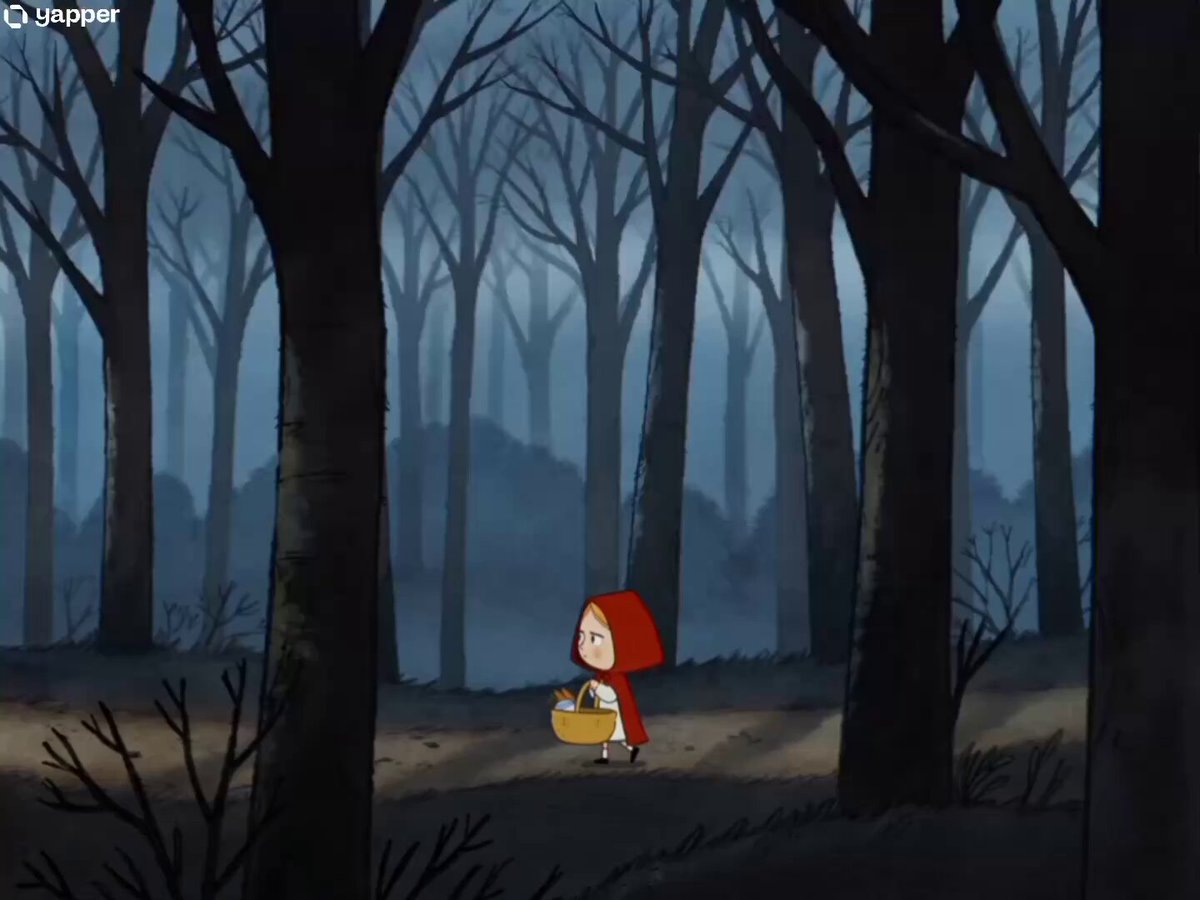
- Prompt included
- Model and format preset
- Free template
The prompt behind this video
Copy the exact prompt behind 90s Cartoon Horror Story, or open it in the studio and make it yours.
90s cartoon illustration style-hand-drawn ink outlines, watercolor textures, muted blue-grey forest tones with warm character accents. No background music score. 0-3s: Wide establishing shot of a dark, misty forest with tall bare trees. The little red-hooded girl from @image1 walks alone on a narrow dirt path, carrying her yellow picnic basket. She looks around nervously, turning her head left and right, clearly lost. Camera follows her with a slow tracking shot. Sound: crunching footsteps on dry leaves, distant wind through trees, soft confused humming from the girl. 4-7s: Medium shot. Rustling bushes beside the path - the black wolf character from @image2 emerges from the shadows between the trees. The wolf tilts his head and speaks with a sly grin: "Kamu tersesat ya?" Camera cuts to close-up of the girl's face - she stares at the wolf with a deadpan expression, unamused. Sound: rustling leaves, twig snaps, wolf's deep gravelly voice. 8-11s: Medium close-up on the girl. Without hesitation, she calmly reaches into her yellow picnic basket, pulls out a comically oversized pistol, and fires it at the wolf - BANG! Cut to the wolf diving behind a bush in panic, eyes wide. The girl answers flatly: "Tidak." She casually puts the pistol back into the basket. Sound: loud cartoon gunshot, wolf yelping, the girl's calm flat voice. 12-15s: Wide shot. The girl continues walking down the forest path alone, basket swinging cheerfully. Her posture is now relaxed and happy, skipping slightly. She hums a carefree little melody to herself as she disappears down the path. Camera holds in a static wide shot as she walks away. Sound: cheerful humming from the girl, birds chirping, fading footsteps. No background music.
How to use 90s Cartoon Horror Story in 3 steps
- 1
Open
The prompt is already in the box next to the preview, with the template's model and format selected.
- 2…a portrait of your subject in softgolden-hour light, 85mm…
Personalize
Edit the subject and creative details for your destination.
- 3Generate
Generate
Press Generate — your video is created in PicX Studio, so you can compare it with the original and refine one variable at a time.
More like this
Templates with the same subject, style or setup. Open one to see its prompt.
Wholesome Puppy and Kitten Story - Seedance 2.5
Slow-Motion 90s Diner Explosion - Seedance 2.5

Realistic City Street Story Cinematic Video - Seedance

Cartoon Donut Heist Bakery Chase

90s Disney Style Animated Storyboard
1990s Horror Zombie Outbreak
Cartoon Bullfight Arena — Girl vs Bull (Seedance)
Rainforest Thriller — Searching the Unseen
Chibi Cave Adventure — He Doesn't Know What's Coming

Asian Woman Cartoon Face Transformation

Pigeon Nemesis Pixar Animation Storyboard
Last Ride Train Outbreak Horror
Make it yours
90s Cartoon Horror Story works as-is. These are the safest ways to change it without losing the look.
Change one field
Copy a single group, rewrite it, and generate again so you can see what that field is doing.
Keep the frame, change the subject
Hold the composition and light of 90s Cartoon Horror Story, then swap wardrobe, props or the person for a new take.
| If the result… | Why | Fix |
|---|---|---|
| The result drifts from the preview | Too many fields changed at once. | Reuse 90s Cartoon Horror Story as-is first, then change one group — subject, light, or setting. |
| The model over-stylizes the scene | The prose prompt leaves finish and camera underspecified. | Add one camera or lighting sentence and stay on Seedance 2.0. |
More Seedance 2.0 templates
Other prompts made for Seedance 2.0.

Comical Martial Arts Punch Scene

Maglev Train Action Sequence

Martial Arts Fight Sequence

Wuxia Protection and Trust Script

Vintage Korean Arcade MiniDV Vlog

Mercedes 190 SL Luxury Ad

Rainy Night Supernatural Reverse Comedy Video Script

Amazon Civilization Discovery

Futuristic South Asian City Transformation

Cozy Luxury Cafe Commercial
More video prompts
Fresh picks from across the catalog.

Seedance 2.0 Short Video Prompt Formula Example
Alien and businessman complex scene
Cinematic Music Podcast and Guitar Technique
Serene Sci-Fi Ringworld Landscape
Cinematic Moonlit Shore Fire
Extraterrestrial Encounter Cinematic Prompt
Futuristic Cat War Society
Dragon Chased by Cows on Drones
Poster-to-Video Fashion Ad
Fantasy Battle Warrior Action Video Prompt
Browse template categories
90s Cartoon Horror Story questions
How do I use the 90s Cartoon Horror Story template?
Add your photo if the template asks for one, edit the prompt if you like — the template's model and format are already selected — and press Generate. Your version opens in PicX Studio.
Can I customize the 90s Cartoon Horror Story template?
Yes. You can change the subject, setting, lighting, mood, format, and available model controls before creating your video.
Is the 90s Cartoon Horror Story template free?
Opening and editing this template is free. Generating uses credits, shown on the Generate button when you are signed in.
Which AI model should I use?
Start with Seedance 2.0, which is the model associated with this template. You can compare another compatible model for a different finish.
Looking for something else? Browse all templates.

Your photo, any look
Thousands of ready templates for every top image and video model, from one credit balance.