
1990s Horror Zombie Outbreak
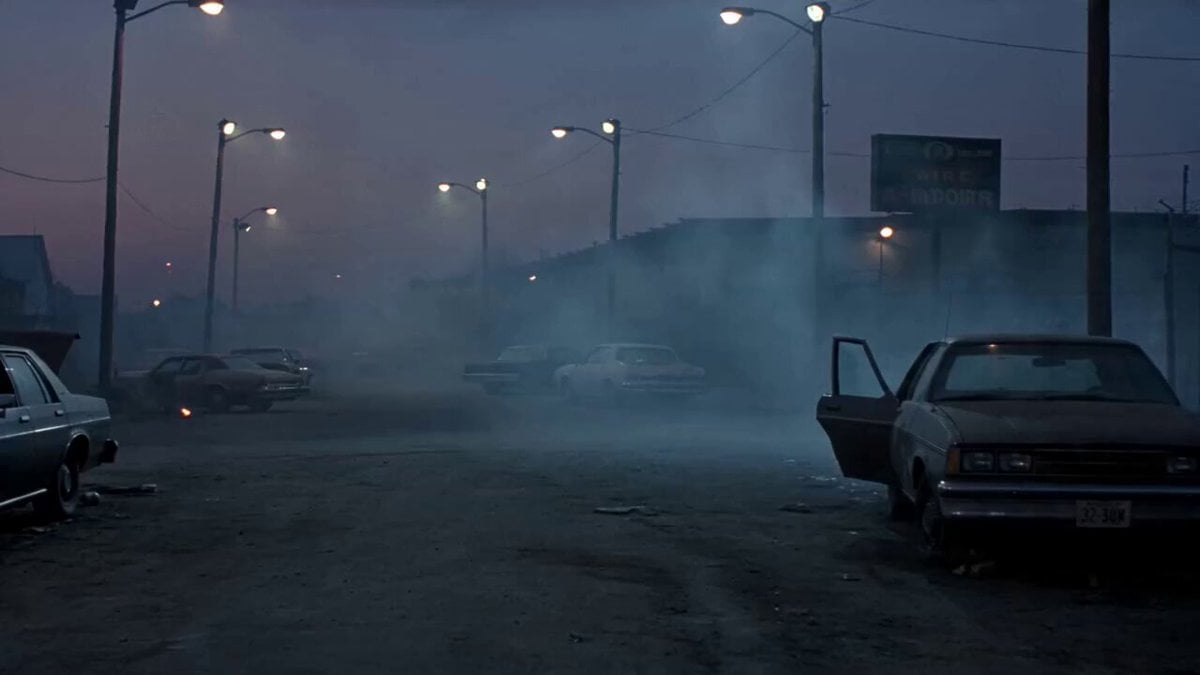
A detailed cinematic video prompt for a 90s-style horror sequence, following a boy fighting zombies with specific camera movements and atmospheric sound design.
- Prompt included
- Model and format preset
- Free template
The prompt behind this video
Copy the exact prompt behind 1990s Horror Zombie Outbreak, or open it in the studio and make it yours.
A fearless young boy sprints through a derelict, fog-choked town at dusk, firing a pump shotgun at a closing horde of zombies as he fights his way toward an escape. 1990s horror film look: heavy 35mm grain, desaturated cold palette, practical-effects gore, handheld camera, flickering sodium streetlights. 0–4s: Wide handheld shot. The boy bursts around a corner onto an abandoned street strewn with wrecked cars; pale, lurching zombies stagger out of the shadows behind him. Cold blue twilight, drifting fog. 4–8s: Medium low-angle. He plants his feet, swings the shotgun up, and fires — muzzle flash lights his determined face, a zombie crumples in the spray. He racks the slide, steam breath in the cold air. 8–12s: Tracking shot following him as he backpedals and keeps moving, firing twice more at zombies grabbing from the side. No fear in his eyes — jaw set, steady. 12–15s: Hero wide shot. He shoulder-barges through a rusted gate into a safe alley, turns, and slams it shut as hands claw the bars. Slow push-in on his unflinching face. Audio: ragged breathing, wet guttural groans, sharp shotgun blasts and shell racks, distant sirens, low dread-filled drone.
How to use 1990s Horror Zombie Outbreak in 3 steps
- 1
Open
The prompt is already in the box next to the preview, with the template's model and format selected.
- 2…a portrait of your subject in softgolden-hour light, 85mm…
Personalize
Edit the subject and creative details for your destination.
- 3Generate
Generate
Press Generate — your video is created in PicX Studio, so you can compare it with the original and refine one variable at a time.
More like this
Templates with the same subject, style or setup. Open one to see its prompt.

Dead End Express Zombie Outbreak
Rainforest Thriller — Searching the Unseen
Chibi Cave Adventure — He Doesn't Know What's Coming

Korean Horror Zombie Convenience Store Attack
Last Ride Train Outbreak Horror

Indian Village Zombie Chase Intercut

1990s Hi8 Home Video Boy
Woman Bicycle Zombie Chase Action Scene
Futuristic Motorcycle Zombie Chase
Zombie Apocalypse Convenience Store Shot
1990s Paris Seine River Home Video
Cinematic Dreamcore Zombie Sequence
Make it yours
1990s Horror Zombie Outbreak works as-is. These are the safest ways to change it without losing the look.
Change one field
Copy a single group, rewrite it, and generate again so you can see what that field is doing.
Keep the frame, change the subject
Hold the composition and light of 1990s Horror Zombie Outbreak, then swap wardrobe, props or the person for a new take.
| If the result… | Why | Fix |
|---|---|---|
| The result drifts from the preview | Too many fields changed at once. | Reuse 1990s Horror Zombie Outbreak as-is first, then change one group — subject, light, or setting. |
| The model over-stylizes the scene | The prose prompt leaves finish and camera underspecified. | Add one camera or lighting sentence and stay on Seedance 2.0. |
More Seedance 2.0 templates
Other prompts made for Seedance 2.0.

Comical Martial Arts Punch Scene

Maglev Train Action Sequence

Martial Arts Fight Sequence

Wuxia Protection and Trust Script

Vintage Korean Arcade MiniDV Vlog

Mercedes 190 SL Luxury Ad

Rainy Night Supernatural Reverse Comedy Video Script

Amazon Civilization Discovery

Futuristic South Asian City Transformation

Cozy Luxury Cafe Commercial
More video prompts
Fresh picks from across the catalog.
Cinematic Hip-Hop Beach Music Video
Pokemon Found Footage Documentary
Mythological Griffin Transformation Sequence

Candid Joyful Woman Football Stadium Portrait
Cinematic KitKat Commercial
Mecha Rockstar Cinematic
Dystopian Surreal Cinematic Video Prompt for Seedance 2.0

Woman Walking in Sunflowers

Second Cinematic Fantasy Epic: Deer Transformation and Camera Work
First-person seamless rollercoaster ride through changing environments
Browse template categories
1990s Horror Zombie Outbreak questions
How do I use the 1990s Horror Zombie Outbreak template?
Add your photo if the template asks for one, edit the prompt if you like — the template's model and format are already selected — and press Generate. Your version opens in PicX Studio.
Can I customize the 1990s Horror Zombie Outbreak template?
Yes. You can change the subject, setting, lighting, mood, format, and available model controls before creating your video.
Is the 1990s Horror Zombie Outbreak template free?
Opening and editing this template is free. Generating uses credits, shown on the Generate button when you are signed in.
Which AI model should I use?
Start with Seedance 2.0, which is the model associated with this template. You can compare another compatible model for a different finish.
Looking for something else? Browse all templates.

Your photo, any look
Thousands of ready templates for every top image and video model, from one credit balance.