How do I use the Candid Suburban Sidewalk Portrait template?
Choose the primary action to open PicX Studio with the available template settings. Review the model and format, personalize the creative direction, and generate when ready.
A detailed lifestyle prompt for creating a realistic portrait of a woman in casual attire on a suburban sidewalk during golden hour. Change the subject, setting, or lighting one variable at a time.
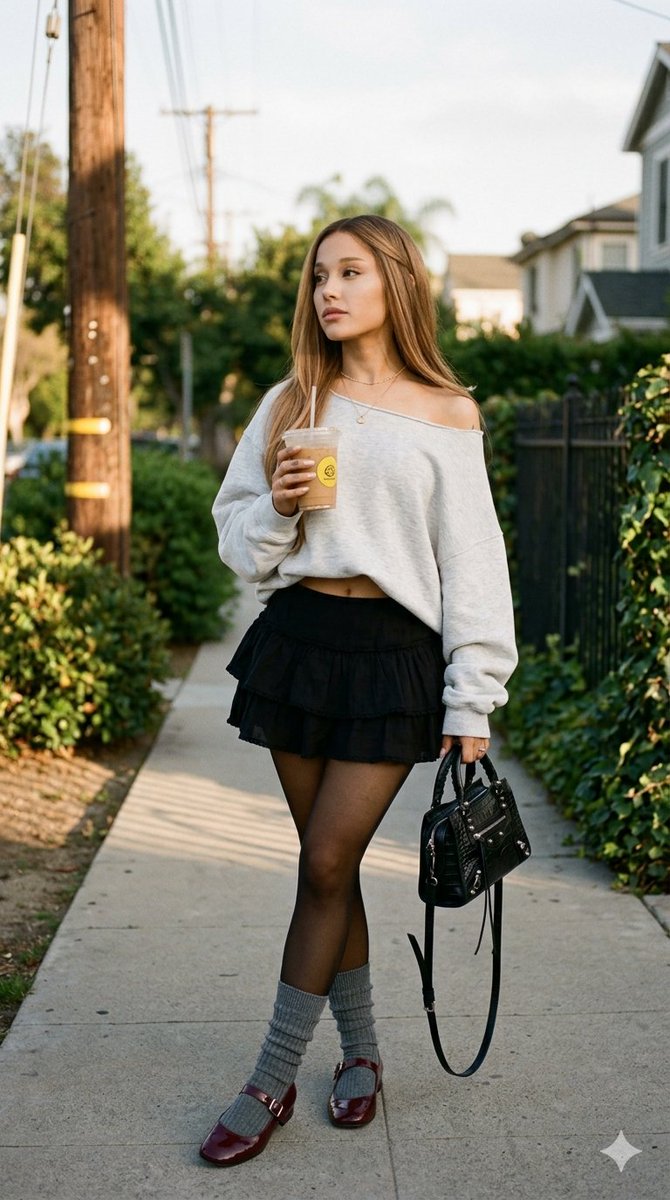
A candid, photorealistic lifestyle portrait of {argument name="subject name" default="[NAME]"} standing on a suburban sidewalk. She has long, straight hair parted in the middle with subtle face-framing highlights. She wears natural everyday makeup with softly defined brows and lips, and a delicate thin gold chain necklace. Her expression is neutral and relaxed as she looks thoughtfully off-camera to her left. She is dressed in a {argument name="top style" default="light heather gray long-sleeve cropped sweatshirt"} worn casually off-the-shoulder, exposing her midriff, paired with a {argument name="skirt style" default="short black layered ruffled skirt"} and sheer black tights. Over the tights, she wears light gray ribbed calf-high socks slightly slouched at the ankles, along with dark burgundy glossy single-strap Mary Jane flats. Her posture is relaxed and slightly angled, with her legs gracefully crossed. Her right arm is bent, holding a clear plastic iced coffee cup—complete with a brown beverage, ice, a straw, and a yellow circular logo sticker—near her torso. Her left arm hangs down, casually holding a small black embossed crocodile-texture leather handbag with two top handles and dangling zipper pulls. The outdoor setting features a weathered wooden utility pole on the left and an iron and wire mesh fence intertwined with lush green foliage. The late afternoon golden hour lighting comes from the left, creating warm highlights on her face, shoulder, and hair, while casting distinct, elongated linear shadows on the concrete sidewalk. Shot in highly detailed 8k resolution with an 85mm lens at f/1.8, medium shot, eye-level angle, sharp focus on the subject, natural colors. Modern, laid-back atmosphere. --ar 9:16
Choose the primary action to open PicX Studio with the available template settings. Review the model and format, personalize the creative direction, and generate when ready.
Yes. You can change the subject, setting, lighting, mood, format, and available model controls before creating your image.
This template is free to open and customize. Generation usage is shown in PicX Studio before you create.
Start with Nano Banana 2, which is the model associated with this template. You can compare another compatible model for a different finish.
Follow a topic to a crawlable collection of related PicX Studio templates.
43,474 public templates available. Verified via the PicX Studio public templates API; refreshed hourly.




![118-google-nano-banana-pro-skincare-product- — A professional skincare shot of a [product container] with [cap/lid], labeled [brand, product, descriptor, volume](/_next/image?url=https%3A%2F%2Fcdn.picxstudio.com%2Fuploads%2Fpost118_img0_332898b8-29ea-42a9-87ab-9ed746a3f944.jpg&w=828&q=100)











![69-untitled — FORMAT: 15s / 145 BPM / 14 SHOTS
SUBJECT: @[image1]
WARDROBE: Clean modern outfit
ENVIRONMENT: Street / indoor transitions
MOOD: Discovery → contr](/_next/image?url=https%3A%2F%2Fcdn.picxstudio.com%2Fuploads%2Fpost69_img0_d45faecf-38c3-4bcb-81a4-f6eb1cf42bb2.jpg&w=828&q=100)





![Naive doodle-style subject illustration — A doodle-style {argument name="subject" default="[subject]"}, naive lines, humorous shape exaggeration](https://pbs.twimg.com/media/G6Wl2YxbsAARB2b.jpg)


























![Micro World Discovery Product Photography Prompt — [PRODUCT] transformed into a colossal structure within a miniature world, tiny people interacting with it, la](https://pbs.twimg.com/media/G-8IOTmXIAAQWhR.jpg)


![Stone-carved statue on a sculptor's workbench prompt — A tiny stone-carved statue of {argument name="name" default="[NAME]"}, with chisel marks and uneven surfa](https://pbs.twimg.com/media/G_NQWYgaIAAC5Z5.jpg)