How do I use the High Fashion Editorial Portrait template?
Choose the primary action to open PicX Studio with the available template settings. Review the model and format, personalize the creative direction, and generate when ready.
An avant-garde editorial portrait prompt featuring a holographic cape, neon lighting, and a surreal studio background with sculptural birds.
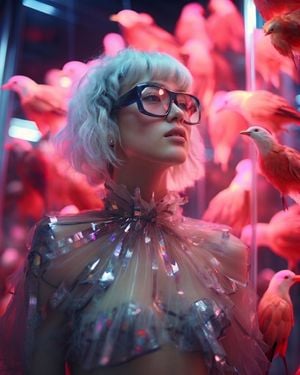
High-fashion editorial portrait of a woman with an {argument name="hair style" default="icy platinum-white wavy bob haircut and textured fringe"}, wearing {argument name="accessories" default="oversized glossy black rectangular sunglasses with subtle pink neon reflections"}. She wears an avant-garde high-concept outfit featuring a translucent sheer organza capelet adorned with pleated, radiating holographic silver foil accents and a ruffled high-neck collar. Surreal studio installation background filled with {argument name="background details" default="glowing coral-pink sculptural birds perched around modern glass display columns"}. Cinematic lighting featuring strong magenta neon backlighting and soft cyan ambient rim light, glossy skin, shallow depth of field, shot on 85mm lens, f/1.8, 8k resolution, photorealistic.
Choose the primary action to open PicX Studio with the available template settings. Review the model and format, personalize the creative direction, and generate when ready.
Yes. You can change the subject, setting, lighting, mood, format, and available model controls before creating your image.
This template is free to open and customize. Generation usage is shown in PicX Studio before you create.
Start with gemini-3-pro-image-preview, which is the model associated with this template. You can compare another compatible model for a different finish.
Follow a topic to a crawlable collection of related PicX Studio templates.