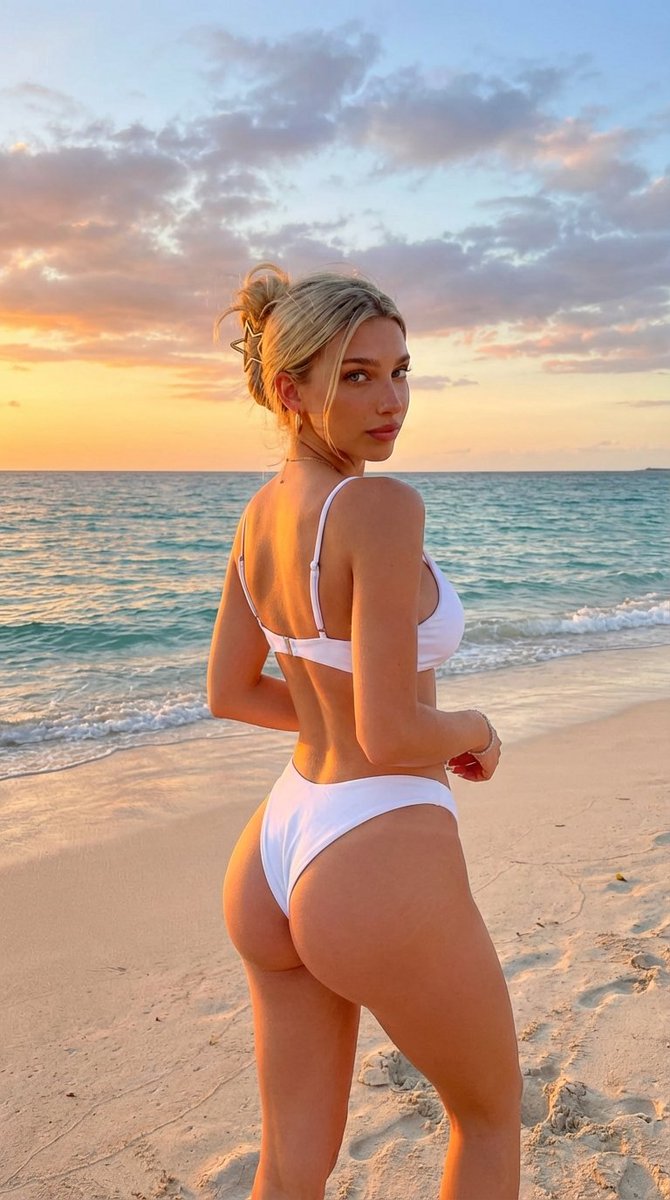

How do I use the Exaggerated Curvy Woman on Beach at Sunset template?
Choose the primary action to open PicX Studio with the available template settings. Review the model and format, personalize the creative direction, and generate when ready.
A highly specific and constrained prompt for generating a vertical, photorealistic image of a beautiful young woman with an extremely exaggerated 'slim-thick' hourglass figure, posing in a white bikini on a sandy beach during golden hour sunset, emphasizing the specific physique and pose. (free to use) — Free AI image template on PicX Studio.
{ “subject”: { “description”: “A vertical photograph of a strikingly beautiful young woman with an exaggerated curvy build, posing on a sandy beach during sunset.”, “body”: { “physique”: “She possesses an incredibly exaggerated ‘slim-thick’ hourglass figure. Her waist is extremely tiny and snatched, transitioning dramatically into massively prominent, round, and wide glutes and thick, shapely thighs. The contrast between her very small waist and exaggerated lower body is the defining feature.”, “pose”: “Standing on the soft sand near the water’s edge. She is twisted slightly, looking back over her right shoulder directly at the viewer, replicating the exact pose from the previous scenarios. Her stance strongly emphasizes the extreme curve of her lower back and glutes.”, “features”: “hair pulled up in a casual messy bun with a gold star-shaped hair clip. Her face is strikingly beautiful and gorgeous but with realistic skin texture, natural pores, and genuine features, not looking artificial. Her body is bare save for the bikini and has NO tattoos.” } }, “wardrobe”: { “outfit”: “She is wearing a modern, minimalist two-piece white bikini. The top is sleek and supportive, and the bottoms are high-cut (cheeky style) to snugly fit and showcase her exaggerated curves.” }, “pose_action”: “Standing at the seaside during golden hour, looking back over her shoulder at the camera.”, “scene”: { “environment”: “A beautiful, scenic sandy beach at sunset.”, “elements”: “She is standing on golden sand with gentle turquoise ocean waves lapping just behind her feet. The background shows the vast ocean horizon with a dramatic sunset sky filled with warm oranges, pinks, and purples. No other people are immediately close.”, “composition”: “Vertical 9:16 aspect ratio. A medium-full shot capturing the subject from the knees up against the beach backdrop.” }, “lighting”: { “setup”: “Beautiful, warm natural golden hour light from the setting sun.”, “details": “The low angle of the sun creates a warm glow on her skin, highlights the texture of the white bikini fabric, and casts soft, long shadows on the sand, enhancing muscle definition and curves.” }, “camera”: { “technical”: “High-resolution professional photograph. Sharp focus on the main subject. Realistic, candid beach style capture.”, “aspect_ratio”: “9:16”, “constraints”: [ “CRITICAL: The subject must have the specific EXAGGERATED hourglass physique with a tiny waist and massive glutes.”, “CRITICAL: The face must be incredibly beautiful but REALISTIC.”, “CRITICAL: There must be NO TATTOOS.”, “CRITICAL: Outfit must be a MODERN WHITE BIKINI.”, “CRITICAL: Scene must be a SEASIDE BEACH AT SUNSET.”, “The final image must be a photorealistic vertical 9:16 photograph.” ] } }
Use Exaggerated Curvy Woman on Beach at Sunset to plan an AI image around nano-banana-2 generation. Match the preview's composition first, then personalize the subject, setting, and mood for your own project.
Use the primary action to load the template settings in PicX Studio.
Adjust the subject and creative details for your destination.
Create the image, compare the result with the preview, and refine one variable at a time.
A continuous mix — similar concepts first, woven with same-model prompts and fresh picks from the catalog.
Choose the primary action to open PicX Studio with the available template settings. Review the model and format, personalize the creative direction, and generate when ready.
Yes. You can change the subject, setting, lighting, mood, format, and available model controls before creating your image.
This template is free to open and customize. Generation usage is shown in PicX Studio before you create.
Start with nano-banana-2, which is the model associated with this template. You can compare another compatible model for a different finish.
Follow a topic to a crawlable collection of related PicX Studio templates.
39,155 public templates available. Verified via the PicX Studio public templates API; refreshed hourly.
A continuous mix — similar concepts first, woven with same-model prompts and fresh picks from the catalog.