How do I use the Introspective sunset supermarket scene template?
Edit the prompt in the box under the preview — the template's model and format are already selected — and press Generate. Your version appears right on this page.
A cinematic anime scene for Grok Imagine depicting characters in a supermarket at sunset with specific dialogue and movement rules.
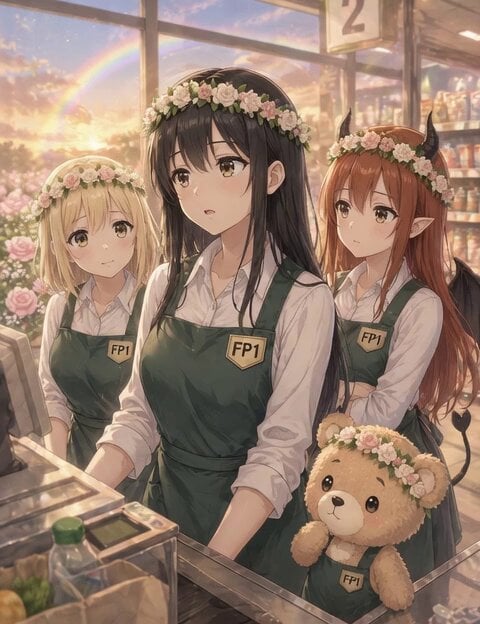
A cinematic slice-of-life anime scene set in a supermarket checkout during sunset. Center: a black-haired adult woman wearing a white blouse and deep green apron with an FP1 badge, calm and slightly introspective expression. Left: a blonde woman with a gentle expression, same uniform and flower accessory. Right: a brown-haired woman with a realistic expression, same uniform and flower accessory. Front: a small teddy bear wearing a deep green apron with an FP1 badge, standing still. All characters wear matching soft flower crowns symbolizing hope. Soft pastel color palette, very thin delicate anime lineart, flat soft shading, minimal rendering, soft ambient sunset lighting, rainbow visible through the window, warm gentle atmosphere. Camera: natural eye-level, soft 45-degree angle. Very subtle micro zoom toward the center (black-haired woman) while she speaks. Dialogue (Japanese voice only): 中央の黒髪女性(落ち着いた大人の女性の声) 「気づいたら、ずっと同じ日を…繰り返してる感じがしてたよ」 Acting: subtle facial expression, small natural movements only. IMPORTANT RULE: only the speaking character moves their mouth, all other characters keep their mouths completely closed, no lip movement for non-speaking characters
A cinematic slice-of-life anime scene set in a supermarket checkout during sunset. Center: a black-haired adult woman wearing a white blouse and deep green apron with an FP1 badge, calm and slightly introspective expression. Left: a blonde woman with a gentle expression, same uniform and flower accessory. Right: a brown-haired woman with a realistic expression, same uniform and flower accessory. Front: a small teddy bear wearing a deep green apron with an FP1 badge, standing still. All characters wear matching soft flower crowns symbolizing hope. Soft pastel color palette, very thin delicate anime lineart, flat soft shading, minimal rendering, soft ambient sunset lighting, rainbow visible through the window, warm gentle atmosphere. Camera: natural eye-level, soft 45-degree angle. Very subtle micro zoom toward the center (black-haired woman) while she speaks. Dialogue (Japanese voice only): 中央の黒髪女性(落ち着いた大人の女性の声) 「気づいたら、ずっと同じ日を…繰り返してる感じがしてたよ」 Acting: subtle facial expression, small natural movements only. IMPORTANT RULE: only the speaking character moves their mouth, all other characters keep their mouths completely closed, no lip movement for non-speaking characters
Edit the prompt in the box under the preview — the template's model and format are already selected — and press Generate. Your version appears right on this page.
Yes. You can change the subject, setting, lighting, mood, format, and available model controls before creating your video.
Opening and editing this template is free. Generating uses credits, shown on the Generate button when you are signed in.
Start with Grok Imagine, which is the model associated with this template. You can compare another compatible model for a different finish.
Follow a topic to a crawlable collection of related PicX Studio templates.