
UFC Pre-fight Crowd Cam
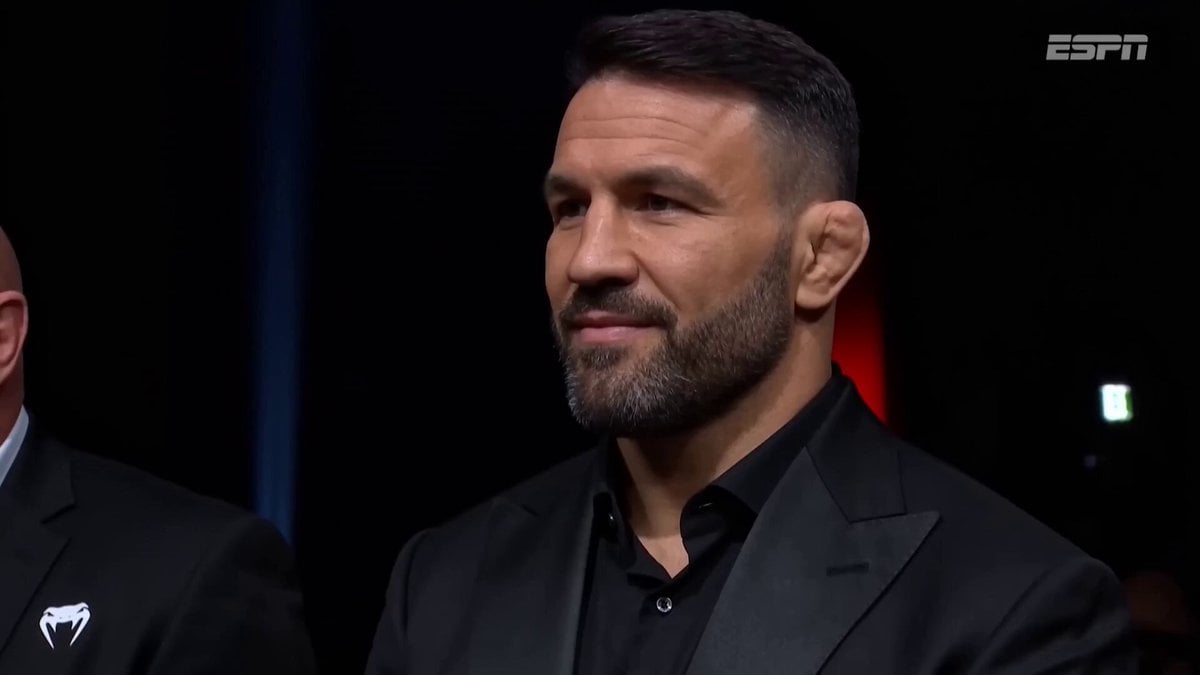
A detailed multi-beat video prompt for a UFC pre-fight broadcast sequence, featuring a crowd-cam montage and interaction with the camera.
- Prompt included
- Model and format preset
- Free template
The prompt behind this video
Copy the exact prompt behind UFC Pre-fight Crowd Cam, or open it in the studio and make it yours.
Ultra-realistic UFC pre-fight broadcast video sequence, crowd-cam montage inside a packed arena with dramatic overhead spotlights, deep shadows, and the signature octagon-side electric atmosphere. Handheld broadcast camera feel with subtle motion, moody arena lighting, deep blacks, shallow depth of field, 16:9 composition, authentic live PPV aesthetic.Beat 1 (0:00–0:03): Camera finds a famous MMA fighter sitting cage-side in a sharp suit, nodding approvingly at the action, cage visible behind him. Announcer voice-over begins, casual and energetic: "And look who's in the building tonight — always great to see the champ cage-side..."Beat 2 (0:03–0:05): Smooth camera pan across cheering fans, phone screens glowing, a brief blur of motion as it sweeps to the next subject.Beat 3 (0:05–0:10): Camera settles on a lean, athletic bald man seated in the crowd — fitted black compression shirt with red contrast stitching and a small circular chest logo, thin black cord necklace, closely trimmed salt-and-pepper goatee, piercing light blue-grey eyes, intricate geometric blackwork tattoo sleeves with mandala and sacred-geometry patterns covering both arms. He's mid-conversation, leaning slightly toward another well-known fighter seated next to him, gesturing with one hand, laughing at something, fully unaware of the camera. Announcer continues: "...and right next to him, Ori Silver is here in the house —"Beat 4 (0:10–0:12): Ori catches the camera in his peripheral vision, head turns toward the lens, eyes go wide in a playful "oh — me?" expression, eyebrows shooting up, mouth slightly open in mock surprise. Announcer, perfectly timed with the look: "— looking jacked..."Beat 5 (0:12–0:15): Expression shifts into a confident grin, he raises his right arm and flexes his bicep hard, the compression shirt straining against the muscle, tattoos shifting with the movement. He holds the flex while locking eyes with the camera. Announcer lands the punchline: "...dangerous man, this guy."Broadcast overlay lower-third with fight card graphics, ESPN/UFC-style watermark top-right. Detailed skin texture, sweat-sheen highlights from arena lights, slight zoom-in on the flex beat, natural reaction timing throughout — no rushed cuts, let each beat breathe.
How to use UFC Pre-fight Crowd Cam in 3 steps
- 1
Open
The prompt is already in the box next to the preview, with the template's model and format selected.
- 2…a portrait of your subject in softgolden-hour light, 85mm…
Personalize
Edit the subject and creative details for your destination.
- 3Generate
Generate
Press Generate — your video is created in PicX Studio, so you can compare it with the original and refine one variable at a time.
More like this
Templates with the same subject, style or setup. Open one to see its prompt.
Cartoon Bullfight Arena — Girl vs Bull (Seedance)

Cinematic Istanbul Night Fight - Seedance 2.5
Lonely Crowd One-Shot Through Seasons

IPL Broadcast Crowd Camera Video
Museum Crowd Phone Camera Aesthetic
Swordsman vs Shadow Monster — Bamboo Forest Battle
Hyperrealistic Orc vs Human UFC Fight
Hidden Cam Bedroom Dance
Vintage Camcorder Runner Vlog
Live Sports News Crowd Surge Report
Subway Crowd Reading Scene
90s Camcorder Japanese Seaside Village
Make it yours
UFC Pre-fight Crowd Cam works as-is. These are the safest ways to change it without losing the look.
Change one field
Copy a single group, rewrite it, and generate again so you can see what that field is doing.
Keep the frame, change the subject
Hold the composition and light of UFC Pre-fight Crowd Cam, then swap wardrobe, props or the person for a new take.
| If the result… | Why | Fix |
|---|---|---|
| The result drifts from the preview | Too many fields changed at once. | Reuse UFC Pre-fight Crowd Cam as-is first, then change one group — subject, light, or setting. |
| The model over-stylizes the scene | The prose prompt leaves finish and camera underspecified. | Add one camera or lighting sentence and stay on Seedance 2.0. |
More Seedance 2.0 templates
Other prompts made for Seedance 2.0.

Comical Martial Arts Punch Scene

Maglev Train Action Sequence

Martial Arts Fight Sequence

Wuxia Protection and Trust Script

Vintage Korean Arcade MiniDV Vlog

Mercedes 190 SL Luxury Ad

Rainy Night Supernatural Reverse Comedy Video Script

Amazon Civilization Discovery

Futuristic South Asian City Transformation

Cozy Luxury Cafe Commercial
More video prompts
Fresh picks from across the catalog.

Wasteland Battle Cinematic Video Sequence

Anime World Transformation Scene
High-Speed Anime Battle with Multiple Character References
Explosive Space Decompression Scene
High-Speed Cheetah Chase Cam
Cinematic 4K Bridal Video

Torpedo vs Megalodon Ocean Chase

Iris Dew Drop Macro Video
Extreme Snowboarder FPV Avalanche Chase
Spider-Man vs Custom Hero Rooftop Battle
Browse template categories
UFC Pre-fight Crowd Cam questions
How do I use the UFC Pre-fight Crowd Cam template?
Add your photo if the template asks for one, edit the prompt if you like — the template's model and format are already selected — and press Generate. Your version opens in PicX Studio.
Can I customize the UFC Pre-fight Crowd Cam template?
Yes. You can change the subject, setting, lighting, mood, format, and available model controls before creating your video.
Is the UFC Pre-fight Crowd Cam template free?
Opening and editing this template is free. Generating uses credits, shown on the Generate button when you are signed in.
Which AI model should I use?
Start with Seedance 2.0, which is the model associated with this template. You can compare another compatible model for a different finish.
Looking for something else? Browse all templates.

Your photo, any look
Thousands of ready templates for every top image and video model, from one credit balance.