
Neon City Heavy Bike Ride
A cinematic multi-shot sequence of a girl riding a heavy motorcycle through neon-lit city streets at night.
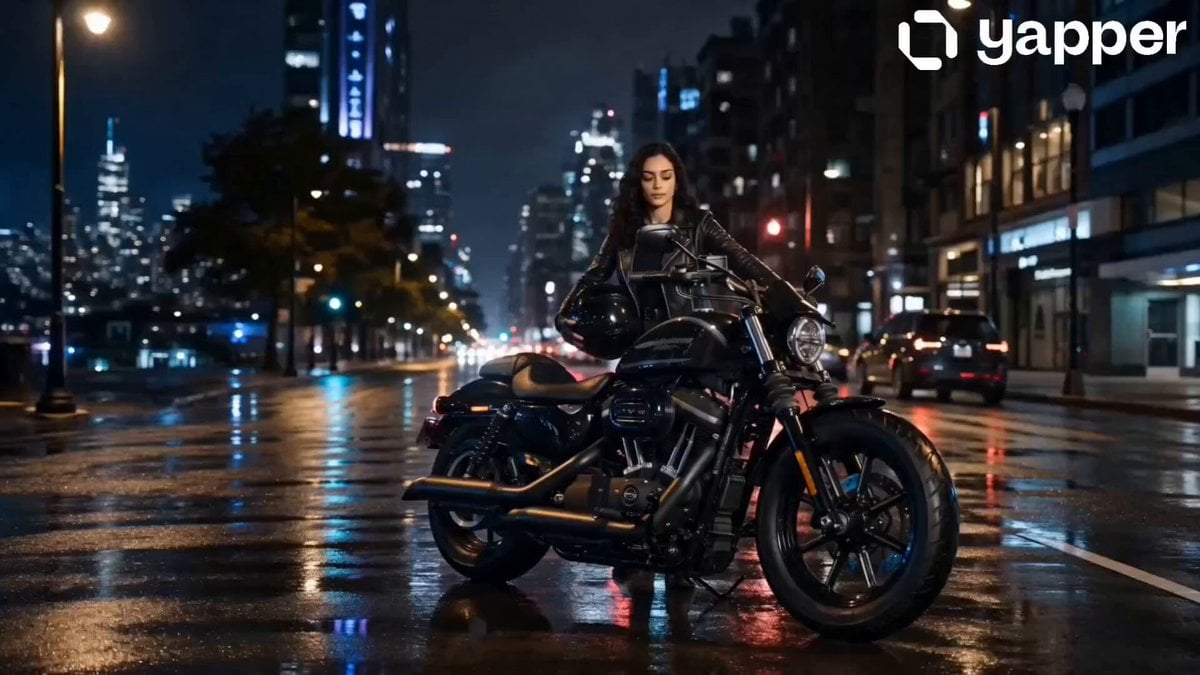
- Prompt included
- Model and format preset
- Premium template
The prompt behind this video
Copy the exact prompt behind Neon City Heavy Bike Ride, or open it in the studio and make it yours.
0s – 4s (Introduction Shot) A wide cinematic shot of a quiet city at night, wet roads reflecting neon lights. A powerful heavy bike engine sound fades in.The girl slowly enters frame, mounting her heavy bike with calm confidence.Helmet adjustment, close-up on hands gripping the throttle. 4s – 8s (Ignition & Start) Close-up of ignition turning ON. Bike headlights flare dramatically into the dark street. She revs the engine once strong vibration, cinematic slow motion. Camera rotates around her showing determined expression (face consistent with reference image). 8s – 12s (Ride Begins) Fast tracking shot from behind as she speeds through empty neon-lit streets. Wind motion, jacket movement, light streaks reflecting on the bike. Low angle shots emphasize power and dominance of the heavy bike. City feels alive but silent around her. 12s – 16s (Climax Shot) High speed cinematic side tracking shot. She rides confidently into a glowing tunnel of light. Slow motion transition as her face briefly turns toward camera calm, powerful expression (reference face consistency maintained). Fade out into neon glow + engine sound fading.
How to use Neon City Heavy Bike Ride in 3 steps
- 1Upload ImagePNG, JPG or paste
Add your photo
Upload the photo the template builds on. The prompt, model and format are already set.
- 2…a portrait of your subject in softgolden-hour light, 85mm…
Personalize
Edit the subject and creative details for your destination.
- 3Generate
Generate
Press Generate — your video is created in PicX Studio, so you can compare it with the original and refine one variable at a time.
More like this
Templates with the same subject, style or setup. Open one to see its prompt.

Cyberpunk Neon City Bike Ride
Porsche 911 GT3 RS Night Racing — Neon City Streets

Neon Velocity Cyberpunk Bike Race
Stone Colossus Desert Riders — Golden Fire Reveal

Realistic City Street Story Cinematic Video - Seedance
Rainy Night Neon City
Handheld Neon Chaos Motion Blur — Kling 3.0 v3 Pro

Luxury Lifestyle Day Vlog

NYC Wingsuit Hot Dog Landing

Luxury Airport Travel Vlog

Iced Coffee Dog Good-News Montage

Italian Old-Town Time-Freeze Walk
Make it yours
Neon City Heavy Bike Ride works as-is. These are the safest ways to change it without losing the look.
Change one field
Copy a single group, rewrite it, and generate again so you can see what that field is doing.
Keep the frame, change the subject
Hold the composition and light of Neon City Heavy Bike Ride, then swap wardrobe, props or the person for a new take.
| If the result… | Why | Fix |
|---|---|---|
| The result drifts from the preview | Too many fields changed at once. | Reuse Neon City Heavy Bike Ride as-is first, then change one group — subject, light, or setting. |
| The model over-stylizes the scene | The prose prompt leaves finish and camera underspecified. | Add one camera or lighting sentence and stay on Seedance 2.0. |
More Seedance 2.0 templates
Other prompts made for Seedance 2.0.

Comical Martial Arts Punch Scene

Maglev Train Action Sequence

Martial Arts Fight Sequence

Wuxia Protection and Trust Script

Vintage Korean Arcade MiniDV Vlog

Mercedes 190 SL Luxury Ad

Rainy Night Supernatural Reverse Comedy Video Script

Amazon Civilization Discovery

Futuristic South Asian City Transformation

Cozy Luxury Cafe Commercial
More video prompts
Fresh picks from across the catalog.
Soccer Knuckleball Free Kick Simulation
Desert Adventurer Horse Riding
Live football broadcast video prompt

Comic book illustration of Superman flying
Multiverse Dimensional Portal Fall
Twin Idol Anime Concert Drone Footage
Chibi Cave Adventure — He Doesn't Know What's Coming

Pixar Style Rabbit Football Heroics
Warrior and Wolf in Snow
Premium Lifestyle Lipstick Commercial Video
Browse template categories
Neon City Heavy Bike Ride questions
How do I use the Neon City Heavy Bike Ride template?
Add your photo if the template asks for one, edit the prompt if you like — the template's model and format are already selected — and press Generate. Your version opens in PicX Studio.
Can I customize the Neon City Heavy Bike Ride template?
Yes. You can change the subject, setting, lighting, mood, format, and available model controls before creating your video.
Is the Neon City Heavy Bike Ride template free?
Opening and editing this template is free. Generating uses credits, shown on the Generate button when you are signed in.
Which AI model should I use?
Start with Seedance 2.0, which is the model associated with this template. You can compare another compatible model for a different finish.
Looking for something else? Browse all templates.

Your photo, any look
Thousands of ready templates for every top image and video model, from one credit balance.