How do I use the Red Lit Editorial Fashion Portrait template?
Choose the primary action to open PicX Studio with the available template settings. Review the model and format, personalize the creative direction, and generate when ready.
A high-contrast cinematic fashion portrait of a woman in black attire set against a saturated red studio environment. Change the subject, setting, or lighting one variable at a time.
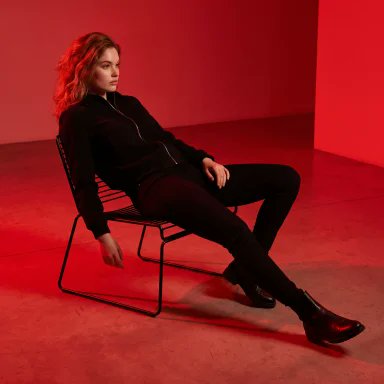
PHOTO OF A {argument name="subject" default="CONFIDENT, ELEGANT WOMAN WEARING A BLACK ZIP-UP JACKET, BLACK FITTED PANTS, AND BLACK LEATHER BOOTS"}, SITTING RELAXED AND RECLINED ON A {argument name="furniture" default="MODERN THIN METAL-FRAME CHAIR IN A MINIMALIST STUDIO"}. SHE IS LEANING BACK WITH HER LEGS STRETCHED FORWARD, ONE HAND RESTING ON THE CHAIR ARM AND THE OTHER ON HER THIGH, LOOKING TO THE SIDE WITH A CALM, COMPOSED EXPRESSION. {argument name="lighting" default="DRAMATIC FULL-SCENE RED LIGHTING"} ILLUMINATES THE ENTIRE SET, WITH BOTH THE BACKGROUND AND FLOOR BATHED IN AN INTENSE SATURATED RED GLOW. HIGH-CONTRAST CINEMATIC LIGHTING, SUBTLE SHADOWS, ULTRA-REALISTIC DETAILS, SHARP FOCUS, LUXURY EDITORIAL FASHION PHOTOGRAPHY, CLEAN MINIMALIST COMPOSITION, PREMIUM MAGAZINE COVER AESTHETIC, POWERFUL YET SOPHISTICATED PRESENCE, 8K, HYPER-REALISTIC.
Choose the primary action to open PicX Studio with the available template settings. Review the model and format, personalize the creative direction, and generate when ready.
Yes. You can change the subject, setting, lighting, mood, format, and available model controls before creating your image.
This template is free to open and customize. Generation usage is shown in PicX Studio before you create.
Start with Nano Banana 2, which is the model associated with this template. You can compare another compatible model for a different finish.
Follow a topic to a crawlable collection of related PicX Studio templates.
43,474 public templates available. Verified via the PicX Studio public templates API; refreshed hourly.















![Naive doodle-style subject illustration — A doodle-style {argument name="subject" default="[subject]"}, naive lines, humorous shape exaggeration](https://pbs.twimg.com/media/G6Wl2YxbsAARB2b.jpg)
















![Hand-drawn isometric landmark schematic — Create a hand drawn isometric schematic diagram of {argument name="landmark" default="[LANDMARK]"}. {argument name="di](https://pbs.twimg.com/media/G6inJYdXcAAtK84.jpg)