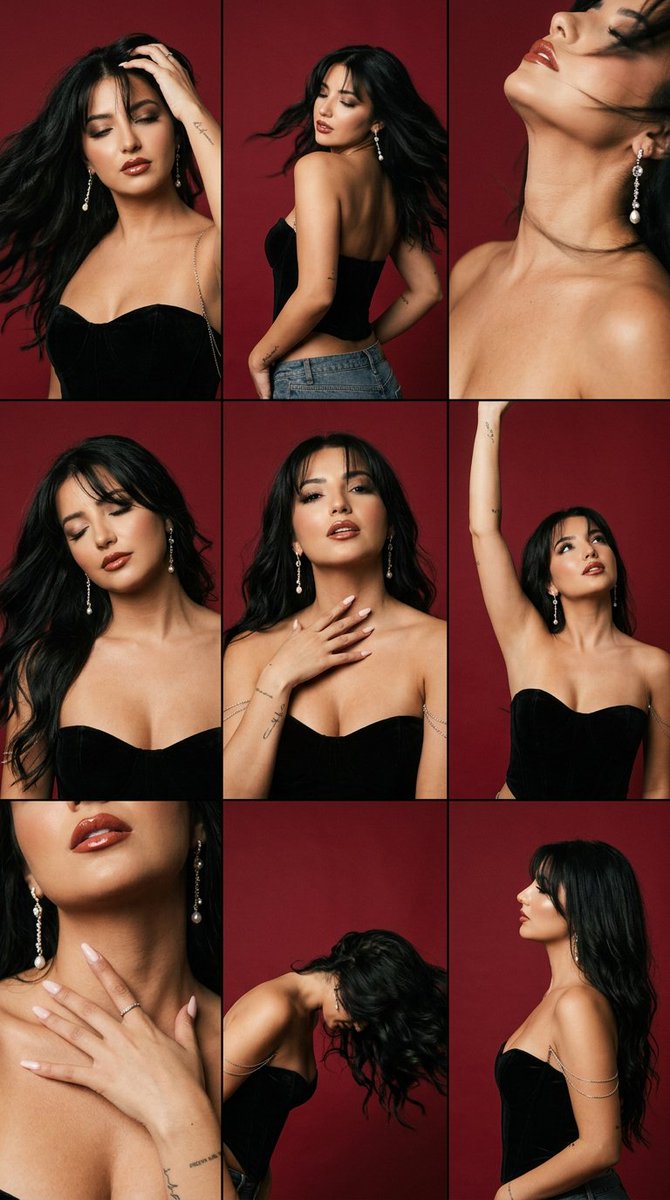
How do I use the Crimson Studio Contact Sheet template?
Choose the primary action to open PicX Studio with the available template settings. Review the model and format, personalize the creative direction, and generate when ready.
An advanced structured prompt for generating a consistent 3x3 editorial contact sheet featuring a woman in a crimson studio setting with realistic motion. (free to use) — Free AI image template on PicX Studio.
{ "format": "3x3 contact sheet grid, 9 panels, same woman across all panels, candid dance-motion editorial, consistent crimson studio session", "wardrobe": "{argument name="outfit" default="black strapless velvet corset top"}, clean matte finish, fine delicate silver chain draping from one shoulder across the collarbone, no lace", "hair_makeup": "{argument name="hairstyle" default="long dark textured wavy hair"} with soft curtain bangs, soft smoky eyeshadow, defined natural brows, glossy brick-red lips, long dangling silver earrings with pearl and crystal drops", "skin": "hyper-realistic skin texture, visible pores, faint peach fuzz, natural sheen on collarbone and shoulders, fine-line tattoos on the forearms", "panels": { "1": "close three-quarter, one hand pushing through hair, hair mid-swing, eyes half-closed, dynamic", "2": "full torso turned away, back arched, jeans-style low waist hint, hair flying, motion blur in hair", "3": "extreme close on jaw and bare shoulder, head tilted back, throat exposed, blurred hair across frame", "4": "eyes closed, head dropped to one side, long hair sweeping across the face, serene mid-motion", "5": "hand resting on collarbone/throat, chin lifted, soft parted lips, intimate centered crop", "6": "arm raised overhead reaching, body stretched upward, gaze up, energetic dance gesture", "7": "tight close on neck and hand, fingers spread across collarbone, glossy lips just in frame", "8": "bent forward flipping hair down, face hidden behind hair, dynamic silhouette", "9": "waist-up profile, torso elongated, hair falling like a curtain down the side" }, "lighting": "warm directional key raking across the body, soft rim light separating hair from the crimson backdrop, small specular glints on the silver chain, candid in-motion feel", "color_grade": "{argument name="background color" default="deep saturated crimson"} seamless background, muted desaturated skin tones, lifted blacks, fine 35mm film grain, subtle halation, soft motion blur in fast-moving hair", "lens": "85mm, f/2.0, shallow depth of field, varied crops per panel", "identity_lock": true, "wardrobe_lock": true, "anatomy_guard": "correct hands, natural shoulder and collarbone structure, no extra fingers, anatomically accurate arms, no fused limbs across panels", "face_reference": "uploaded image", "negative_prompt": "plastic skin, over-smoothing, blown highlights, neon saturation, harsh flash, distorted hands, deformed earrings, tangled chains, cartoonish, AI gloss, watermark, text, lace, frills, inconsistent face across panels", "forbid": "bright/clean lighting, white or gradient background, modern beauty-filter look, oversaturated colors outside the crimson palette, heavy gold jewelry" }
Use Crimson Studio Contact Sheet to plan an AI image around nano-banana-2 generation. Match the preview's composition first, then personalize the subject, setting, and mood for your own project.
Use the primary action to load the template settings in PicX Studio.
Adjust the subject and creative details for your destination.
Create the image, compare the result with the preview, and refine one variable at a time.
A continuous mix — similar concepts first, woven with same-model prompts and fresh picks from the catalog.
Choose the primary action to open PicX Studio with the available template settings. Review the model and format, personalize the creative direction, and generate when ready.
Yes. You can change the subject, setting, lighting, mood, format, and available model controls before creating your image.
This template is free to open and customize. Generation usage is shown in PicX Studio before you create.
Start with nano-banana-2, which is the model associated with this template. You can compare another compatible model for a different finish.
A continuous mix — similar concepts first, woven with same-model prompts and fresh picks from the catalog.
Follow a topic to a crawlable collection of related PicX Studio templates.
32,032 public templates available. Verified via the PicX Studio public templates API; refreshed hourly.


