

How do I use the Surreal Desert Road Fashion Editorial Prompt template?
Choose the primary action to open PicX Studio with the available template settings. Review the model and format, personalize the creative direction, and generate when ready.
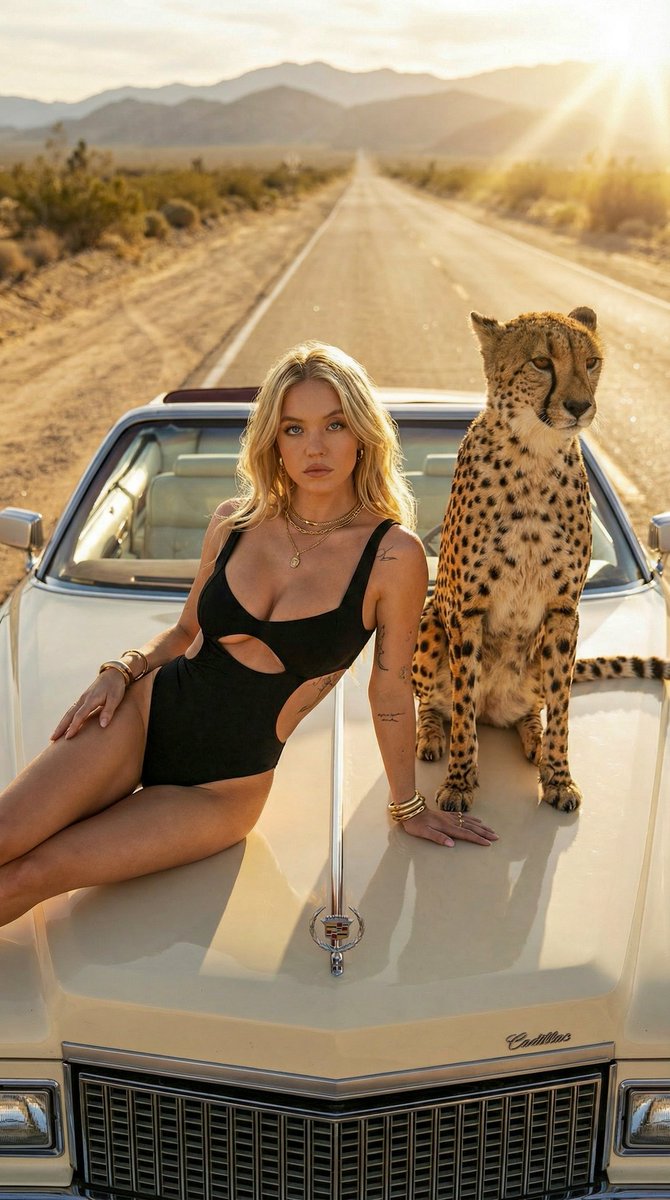
A photorealistic prompt for a high-fashion editorial image set on a desert highway at golden hour. It features a tattooed woman posing on a vintage convertible with a calm cheetah, emphasizing luxury, dramatic lighting, and a surreal mood. (free to use) — Free AI image template on PicX Studio.
{ "prompt": "Cinematic desert road scene at golden hour. A confident tattooed woman with long blonde hair poses on the hood of a vintage luxury convertible, wearing a black cutout one-piece swimsuit and gold jewelry. A calm cheetah sits beside her on the car hood. Warm sunlight, dusty highway stretching into distant mountains, dramatic shadows, sun flare, high fashion editorial style, surreal yet realistic mood.", "style": "photorealistic", "lighting": "golden hour, cinematic contrast", "camera": { "angle": "eye-level", "lens": "85mm", "depth_of_field": "shallow" }, "environment": "desert highway, mountains in background", "mood": "bold, luxurious, surreal", "quality": "ultra high resolution, sharp focus, professional photography", "negative_prompt": "blurry, low resolution, extra limbs, distorted anatomy, cartoon, illustration, watermark, text" }
Use Surreal Desert Road Fashion Editorial Prompt to plan an AI image around nano-banana-2 generation. Match the preview's composition first, then personalize the subject, setting, and mood for your own project.
Use the primary action to load the template settings in PicX Studio.
Adjust the subject and creative details for your destination.
Create the image, compare the result with the preview, and refine one variable at a time.
A continuous mix — similar concepts first, woven with same-model prompts and fresh picks from the catalog.
Choose the primary action to open PicX Studio with the available template settings. Review the model and format, personalize the creative direction, and generate when ready.
Yes. You can change the subject, setting, lighting, mood, format, and available model controls before creating your image.
This template is free to open and customize. Generation usage is shown in PicX Studio before you create.
Start with nano-banana-2, which is the model associated with this template. You can compare another compatible model for a different finish.
Follow a topic to a crawlable collection of related PicX Studio templates.
39,155 public templates available. Verified via the PicX Studio public templates API; refreshed hourly.
A continuous mix — similar concepts first, woven with same-model prompts and fresh picks from the catalog.