How do I use the French Riviera Fashion Film Poster template?
Choose the primary action to open PicX Studio with the available template settings. Review the model and format, personalize the creative direction, and generate when ready.
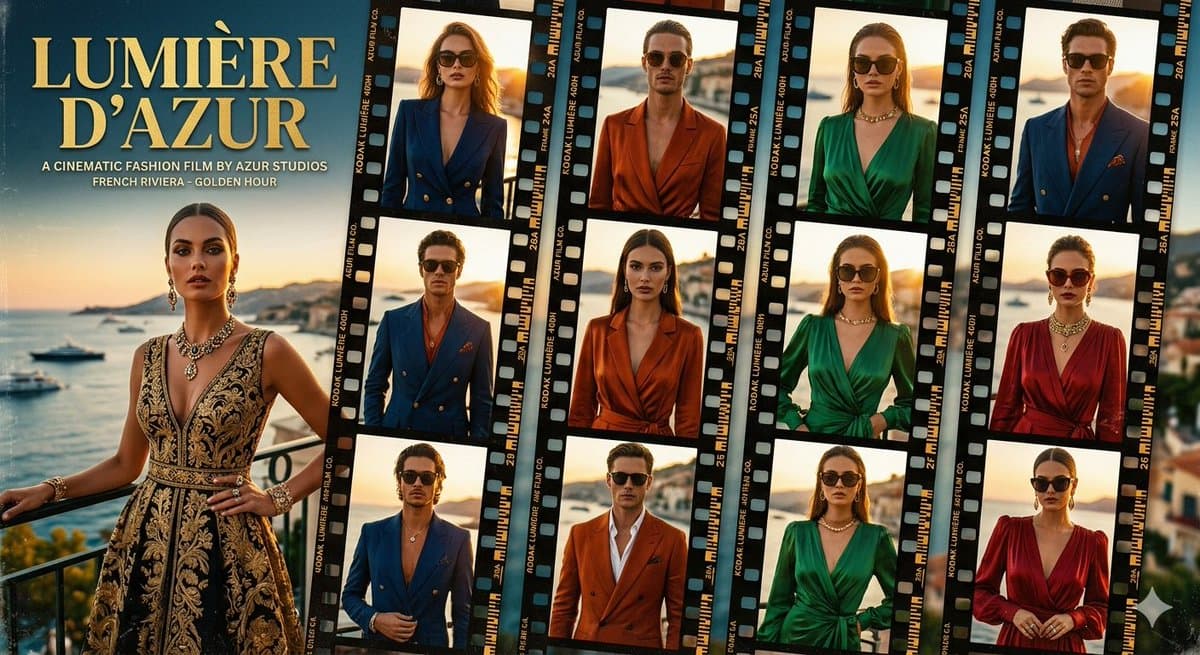
A cinematic luxury fashion poster with a golden-hour Riviera backdrop, serif title typography, and 15 anonymized editorial portraits arranged in analog film strips. (free to use) — Free AI image template on PicX Studio.
Goal: Create a glamorous cinematic fashion film poster and contact-sheet collage for {argument name="film title" default="LUMIÈRE D’AZUR"}, evoking the French Riviera at golden hour with luxury resort styling. Canvas: Wide horizontal 16:9 poster, warm sunset color grading, high-end editorial fashion look, slightly grainy analog film texture. Background shows the Côte d’Azur coastline with calm sea, yachts, distant hills, pastel sky, and sunlit Mediterranean architecture. Layout: Left third is a finished movie-poster panel; right two-thirds are filled with overlapping vertical 35mm film strips tilted slightly at different angles. The film strips should have black sprocket borders, Kodak-style edge markings, frame numbers, tiny technical text, and warm backlit portrait frames. Left poster panel: Place the large serif title “{argument name="film title" default="LUMIÈRE D’AZUR"}” in pale gold at the upper left, stacked on two lines. Under it, add small uppercase subtitle text: “A CINEMATIC FASHION FILM BY {argument name="studio name" default="AZUR STUDIOS"}” and “FRENCH RIVIERA · GOLDEN HOUR”. Below the title, show one full-body or three-quarter fashion model standing on a balcony overlooking the Riviera, wearing an ornate black-and-gold embroidered sleeveless evening gown, statement necklace, earrings, bracelets, and rings. Her face is intentionally obscured by a soft square blur/mosaic privacy mask. Film strip section: Include exactly 5 vertical film strips, each containing exactly 3 portrait frames, for a total of 15 framed fashion portraits. The 15 frames should show alternating male and female models with faces obscured by the same soft square blur/mosaic mask. Count and styling of the 15 frames: 1 woman in a navy double-breasted blazer, 2 man in a burnt-orange satin blazer, 3 woman in an emerald green plunging dress with gold necklace, 4 man in a blue double-breasted suit with red shirt, 5 man in a blue suit close-up, 6 woman in a rust-orange wrap blazer dress, 7 woman in an emerald green wrap dress, 8 woman in a deep red wrap dress with layered necklaces, 9 man in a blue blazer adjusting jacket, 10 man in a burnt-orange suit with open white shirt, 11 woman in an emerald green belted dress, 12 woman in a red satin dress clasping hands, 13 woman in navy blazer at sunset, 14 woman in orange blazer at seaside, 15 man in blue suit at golden hour. Each frame should have golden-hour seaside backgrounds, shallow depth of field, and editorial lighting. Visual style: Luxe French Riviera fashion campaign, cinematic film stills, warm amber highlights, teal-blue sea shadows, elegant serif typography, premium magazine layout, realistic photography, glossy contact sheet aesthetic, analog film grain, subtle vignetting, crisp fabric textures, jewelry sparkle. Constraints: Use exactly 1 large poster model on the left and exactly 15 portrait frames inside exactly 5 film strips on the right. Keep all faces anonymized with square blur blocks. Do not add logos or watermarks beyond the fictional film-edge markings and the specified title/subtitle text.
Use French Riviera Fashion Film Poster to plan an AI image around gpt-image-2 generation, themes such as en and gpt-image-2. Match the preview's composition first, then personalize the subject, setting, and mood for your own project.
Use the primary action to load the template settings in PicX Studio.
Adjust the subject and creative details for your destination.
Create the image, compare the result with the preview, and refine one variable at a time.
A continuous mix — similar concepts first, woven with same-model prompts and fresh picks from the catalog.
Choose the primary action to open PicX Studio with the available template settings. Review the model and format, personalize the creative direction, and generate when ready.
Yes. You can change the subject, setting, lighting, mood, format, and available model controls before creating your image.
This template is free to open and customize. Generation usage is shown in PicX Studio before you create.
Start with gpt-image-2, which is the model associated with this template. You can compare another compatible model for a different finish.
Follow a topic to a crawlable collection of related PicX Studio templates.
39,157 public templates available. Verified via the PicX Studio public templates API; refreshed hourly.
A continuous mix — similar concepts first, woven with same-model prompts and fresh picks from the catalog.