How do I use the Night Car Selfie via iPhone Screen template?
Choose the primary action to open PicX Studio with the available template settings. Review the model and format, personalize the creative direction, and generate when ready.
A unique cinematic prompt showing a woman's face through an iPhone camera interface inside a dark car at night. Change the subject, setting, or lighting one variable at a time.
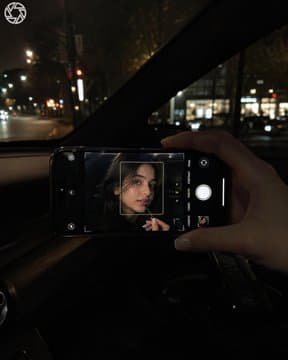
The photo was taken inside a car at night; the frame reveals only {argument name="subject detail" default="a woman's hand and an iPhone"}, while the young woman's face is visible solely on the phone screen. The camera is positioned on the passenger side, framed to capture the windshield and the phone, which is being held in one hand directly in front of the person. The hand holds a black, latest-model iPhone Pro in a horizontal orientation; the screen displays the iPhone's front-facing camera interface, complete with visible shutter buttons, focus frames, and UI elements. A close-up of the young woman's face inside the car interior is visible on the phone screen: her lips are slightly parted as she touches her lower lip with a slender black object resembling a lip liner pencil. The woman on the screen is wearing {argument name="clothing color" default="black"} clothing, and the light from the phone softly illuminates her face. The hand holding the phone features long fingers and a short, square-shaped French manicure. The rest of the frame is dark; the car's interior is a premium black finish, with parts of the window and dashboard visible. Outside the window lies a night street—warm, blurred city lights, dark silhouettes of trees, and faint light reflections on the glass. The shot is heavily darkened, evoking a "cinematic night" aesthetic and a "rich lifestyle" mood. (9:16 aspect ratio). Shot on an iPhone at night without flash; realistic photo style with slight motion blur and high-contrast shadows. No filters; do not completely blur the background. The hair appears voluminous.
Choose the primary action to open PicX Studio with the available template settings. Review the model and format, personalize the creative direction, and generate when ready.
Yes. You can change the subject, setting, lighting, mood, format, and available model controls before creating your image.
This template is free to open and customize. Generation usage is shown in PicX Studio before you create.
Start with GPT Image 2, which is the model associated with this template. You can compare another compatible model for a different finish.
© 2026 PicX Studio. All rights reserved.

Follow a topic to a crawlable collection of related PicX Studio templates.
43,474 public templates available. Verified via the PicX Studio public templates API; refreshed hourly.












![Minimalist Flat Vector Travel Poster — Premium minimalist flat-vector travel poster for {argument name="city name" default="[CITY_NAME]"}, 3:4 vertical format.](https://cms-assets.youmind.com/media/1787917359711_3ug846_HQX205cbMAA6F6S-300x400.jpg)

























![Cozy Knit Industrial Design Prompt — An {argument name="object" default="[OBJECT]"} rendered as if entirely hand-knitted from chunky wool…](https://pbs.twimg.com/media/G-7ORciXsAAtAR7.jpg)