
How do I use the High-Fashion Chess Editorial template?
Choose the primary action to open PicX Studio with the available template settings. Review the model and format, personalize the creative direction, and generate when ready.
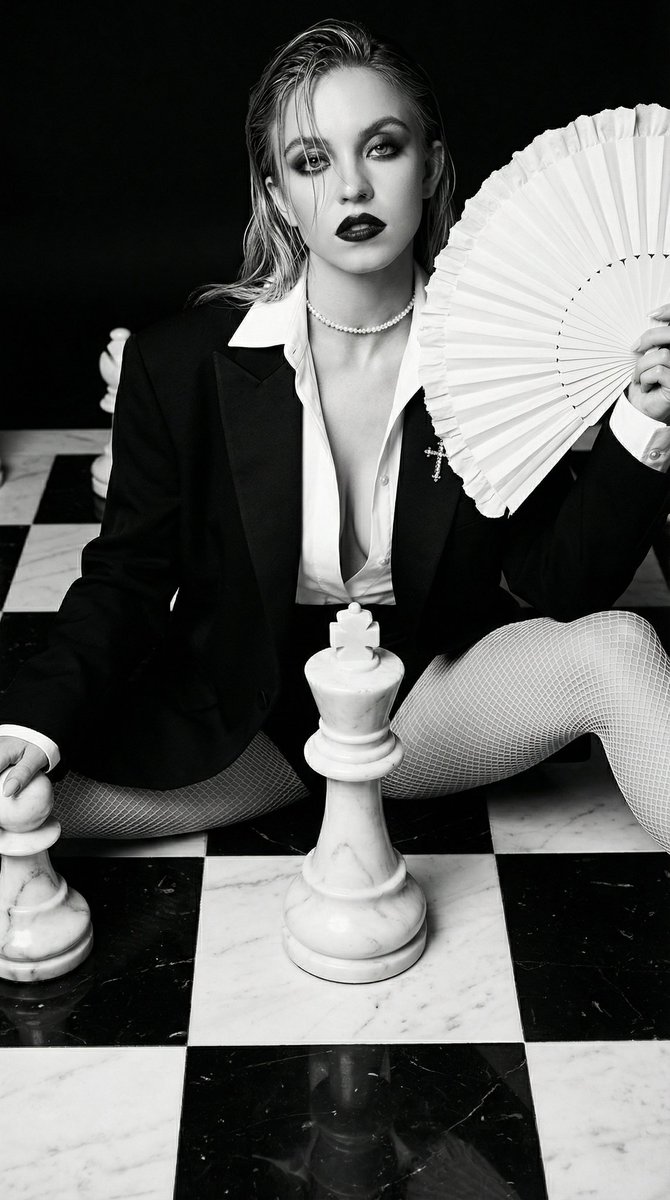
A detailed prompt for generating a high-fashion editorial image in the style of Vogue, featuring a woman with dramatic makeup and platinum hair, sitting seductively on a giant marble chessboard surrounded by oversized chess pieces. The prompt specifies clothing (black blazer, white fishnets), accessories (pearl choker, white fan), and dramatic high-contrast lighting. (free to use) — Free AI image template on PicX Studio.
{ "prompt_structure": { "main_subject": { "description": "a beautiful young woman with pale skin, sharp angular features, intense sultry expression, direct gaze at viewer", "hair": "long platinum hair, wet-look, slicked back with strands falling over forehead", "makeup": "dramatic editorial makeup, heavy black smoky eyeshadow, thick eyeliner, bold matte red lipstick" }, "clothing": { "upper_body": "oversized open black blazer with lace under, deep plunging V-neckline revealing cleavage, crisp white high-collared shirt underneath, structured tailoring", "lower_body": "white fishnet stockings covering full legs", "footwear": "white high heels partially visible", "details": "white ruffled cuffs at wrists" }, "accessories": { "necklace": "delicate pearl choker", "handheld": "large folded white paper fan with ruffled edges held in right hand near shoulder", "other": "small white cross-shaped brooch or pendant on chest" }, "pose": "seated on the floor with legs spread apart and knees slightly bent, seductive and dominant posture, torso leaning slightly back, left hand resting near a chess piece", "setting": { "environment": "giant life-sized chessboard with black and white checkered marble floor", "props": "oversized white marble chess pieces surrounding the subject, including multiple pawns, rooks, and a prominent king piece positioned centrally between her legs", "prop_details": "chess pieces made of veined white marble with realistic texture and subtle yellow/gold veining" }, "lighting_and_mood": { "lighting": "dramatic high-contrast lighting from above and side, strong shadows emphasizing form and texture, moody atmosphere", "color_palette": "monochromatic with dominant black, white, and neutral tones, high saturation on red lipstick" }, "style": { "artistic_style": "high-fashion editorial photography, Vogue magazine cover style, avant-garde fashion shoot", "photography_technique": "professional studio shot, sharp focus, high resolution, cinematic composition", "inspirations": "surreal fashion, chess-themed symbolism, powerful feminine energy" }, "quality_enhancers": "highly detailed, masterpiece, 8k resolution, intricate textures on marble and fabric, photorealistic, sharp depth of field, professional color grading" }, "combined_positive_prompt_example": "a beautiful young woman with pale skin, sharp features, wet slicked-back platinum blonde hair, dramatic smoky eye makeup and bold red lipstick, intense sultry gaze, wearing a open oversized black blazer, white high collar with open shirt exhalting big bust and lace underwear, deep plunging neckline, pearl choker, white fishnet stockings, holding large white ruffled fan, seductive pose sitting with legs spread on gian" }
Use High-Fashion Chess Editorial to plan an AI image around nano-banana-2 generation. Match the preview's composition first, then personalize the subject, setting, and mood for your own project.
Use the primary action to load the template settings in PicX Studio.
Adjust the subject and creative details for your destination.
Create the image, compare the result with the preview, and refine one variable at a time.
A continuous mix — similar concepts first, woven with same-model prompts and fresh picks from the catalog.
Choose the primary action to open PicX Studio with the available template settings. Review the model and format, personalize the creative direction, and generate when ready.
Yes. You can change the subject, setting, lighting, mood, format, and available model controls before creating your image.
This template is free to open and customize. Generation usage is shown in PicX Studio before you create.
Start with nano-banana-2, which is the model associated with this template. You can compare another compatible model for a different finish.
Follow a topic to a crawlable collection of related PicX Studio templates.
39,155 public templates available. Verified via the PicX Studio public templates API; refreshed hourly.
A continuous mix — similar concepts first, woven with same-model prompts and fresh picks from the catalog.