
Macro Arrow Shaft Micro-World War
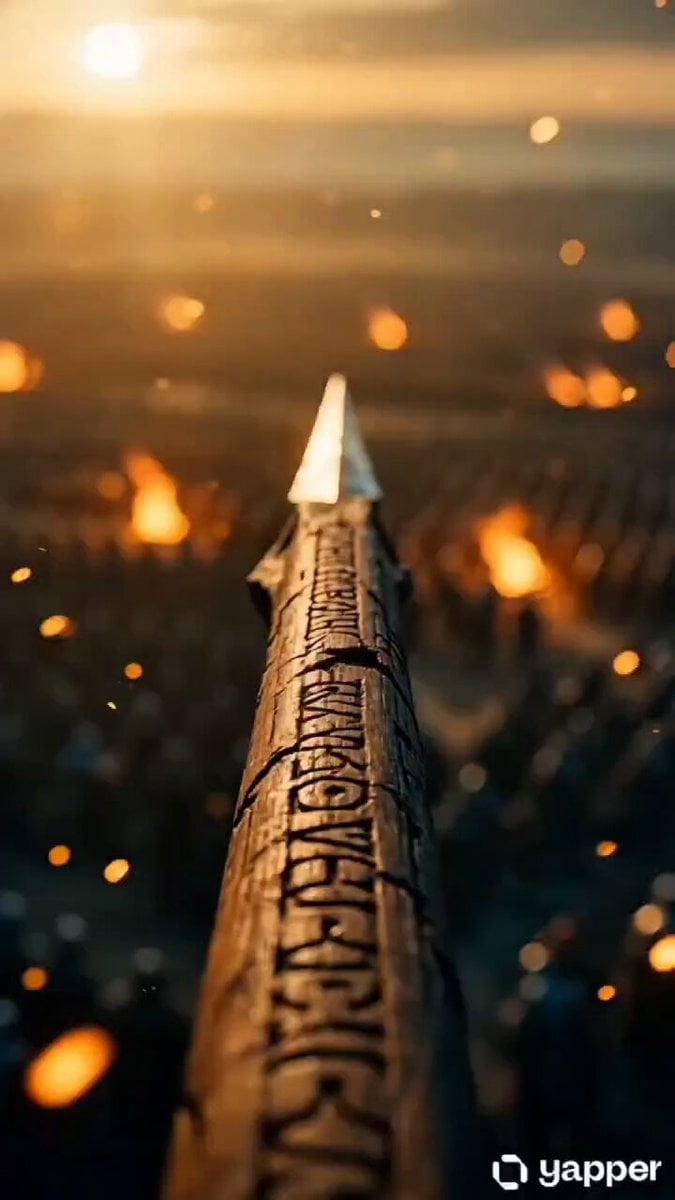
A poetic cinematic prompt featuring an extreme macro transition from an arrow shaft into a hidden micro-civilization fighting its own war.
- Prompt included
- Model and format preset
- Premium template
The prompt behind this video
Copy the exact prompt behind Macro Arrow Shaft Micro-World War, or open it in the studio and make it yours.
seconds, photoreal cinematic live-action with seamless macro scale transition, anamorphic lens feel, extreme shallow depth of field, volumetric light, golden embers and dust particles drifting through frame, warm amber and gold highlights with deep teal shadows. No subtitles, no text, no narration. Opening frame: extreme close-up on the wooden shaft of a flying arrow that fills the entire frame, soft-blurred ancient battlefield glowing in the background, embers drifting past in slow motion at 120fps feel. 0-4s — Macro push-in on the shaft: Camera pushes slowly forward along the arrow shaft. Focus racks across the surface, revealing intricate carved runes, lacquer cracks, and weathered wood grain. Light glints off the iron arrowhead in the distance of frame. A seamless, imperceptible scale shift begins — the grain of the wood deepens into canyon-like ridges, the carved runes become massive cliff walls, lacquer flakes turn into stone slabs. Sound design morphs from muffled battlefield roar into a deeper, echoing micro-world ambience. 4-9s — Microscopic civilization on the arrow: Full macro reveal. A tiny civilization of splinter-sized warriors wages its own war across the fletching and shaft. Miniature soldiers in matching East Asian lamellar armor scale the carved runes like canyon walls using ropes and ladders. Tiny catapults along the shaft hurl fragments of dust and wood splinters that arc through the air in slow motion. Rows of micro-banners in red and blue wave between the feather barbs of the fletching, which tower overhead like enormous plumes. Tiny torches flicker along the shaft, casting warm pinpoint glows. Two opposing micro-formations clash near a rune carving, swords sparking. Camera does a slow lateral dolly along the shaft, revealing more of this hidden world, then settles on a single micro-warrior raising his banner triumphantly. Final frame holds on this tiny hero against the blurred, glowing battlefield far below as the arrow continues its endless slow-motion flight through golden embers. Cinematography: single continuous macro take, smooth weighty camera motion, no jitter, no cuts. Believable miniature physics — tiny cloth banners, ropes, sparks, dust all behave at micro scale. Atmosphere: dreamlike and mythic, the discovery of an entire hidden world living on a single arrow in flight. The vast battlefield and the micro-civilization mirror each other.
How to use Macro Arrow Shaft Micro-World War in 3 steps
- 1
Open
The prompt is already in the box next to the preview, with the template's model and format selected.
- 2…a portrait of your subject in softgolden-hour light, 85mm…
Personalize
Edit the subject and creative details for your destination.
- 3Generate
Generate
Press Generate — your video is created in PicX Studio, so you can compare it with the original and refine one variable at a time.
More like this
Templates with the same subject, style or setup. Open one to see its prompt.
Product Ad Drink Can 110° Orbit
World War I Trench Warfare Video Prompt
Fairy FPV Flight Macro World
Pearl Harbor Attack — Seedance 2.0 FPV
Macro Golden Morphing Animation

Crusader Battlefield War Sequence
Seedance Micro-Expression Emotional Sequence
Wuxia micro-expression comedy prompt
Desert Battle Wasteland Warriors Collision

Desert War Zone Action Sequence
Astronaut Spacesuit Mission Patch Macro
Italian World Cup Reaction
Make it yours
Macro Arrow Shaft Micro-World War works as-is. These are the safest ways to change it without losing the look.
Change one field
Copy a single group, rewrite it, and generate again so you can see what that field is doing.
Keep the frame, change the subject
Hold the composition and light of Macro Arrow Shaft Micro-World War, then swap wardrobe, props or the person for a new take.
| If the result… | Why | Fix |
|---|---|---|
| The result drifts from the preview | Too many fields changed at once. | Reuse Macro Arrow Shaft Micro-World War as-is first, then change one group — subject, light, or setting. |
| The model over-stylizes the scene | The prose prompt leaves finish and camera underspecified. | Add one camera or lighting sentence and stay on Seedance 2.0. |
More Seedance 2.0 templates
Other prompts made for Seedance 2.0.

Comical Martial Arts Punch Scene

Maglev Train Action Sequence

Martial Arts Fight Sequence

Wuxia Protection and Trust Script

Vintage Korean Arcade MiniDV Vlog

Mercedes 190 SL Luxury Ad

Rainy Night Supernatural Reverse Comedy Video Script

Amazon Civilization Discovery

Futuristic South Asian City Transformation

Cozy Luxury Cafe Commercial
More video prompts
Fresh picks from across the catalog.
Laundromat Sci-Fi Armor Transformation

Nightclub Flyer Atmospheric Animation

Piano Player Singing Personalized Greeting
Anime Fluffy Cat Morning Routine
Food VFX Matrix Burger Commercial
Taipei Street Scene with Sudden Event
Vintage Japanese MiniDV Travel Memory
Realistic Lifestyle Supermarket Vlog
1980s Retro Aesthetic Video Prompt
Sci-Fi Transformation Scene
Browse template categories
Macro Arrow Shaft Micro-World War questions
How do I use the Macro Arrow Shaft Micro-World War template?
Add your photo if the template asks for one, edit the prompt if you like — the template's model and format are already selected — and press Generate. Your version opens in PicX Studio.
Can I customize the Macro Arrow Shaft Micro-World War template?
Yes. You can change the subject, setting, lighting, mood, format, and available model controls before creating your video.
Is the Macro Arrow Shaft Micro-World War template free?
Opening and editing this template is free. Generating uses credits, shown on the Generate button when you are signed in.
Which AI model should I use?
Start with Seedance 2.0, which is the model associated with this template. You can compare another compatible model for a different finish.
Looking for something else? Browse all templates.

Your photo, any look
Thousands of ready templates for every top image and video model, from one credit balance.