
Cat Monk Dark Comedy Animation
A detailed 15-second animation script for a dark comedy scene featuring an orange cat monk, a mysterious white cat, and a bear ronin in a fight over a rice ball near Mount Fuji.
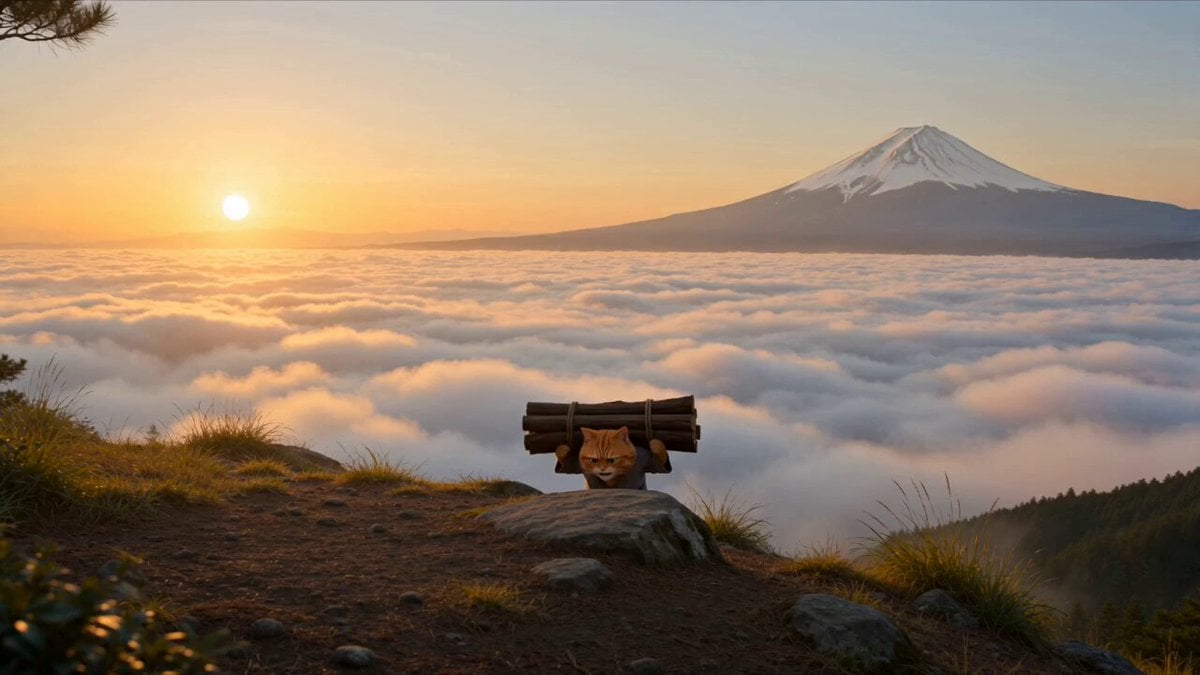
- Prompt included
- Model and format preset
- Premium template
The prompt behind this video
Copy the exact prompt behind Cat Monk Dark Comedy Animation, or open it in the studio and make it yours.
STORY FORMAT: 15s / 150 BPM / MULTI-CUT / American dark comedy / fast physical comedy with ironic twist TONE: exhaustion → temptation → eerie interruption → sudden threat → misdirection → absurd dominance twist SETTING: Mountain slope at sunrise near Mount Fuji, golden light, dramatic sea of clouds, cliffside edge, light wind moving trees CHARACTERS: Orange cat monk: wearing a gray Taoist robe, sweaty, exhausted, carrying a heavy bundle of firewood White cat (mysterious woman): wearing a purple kimono, light purple eyeshadow, vivid red lips, sly and playful Black bear ronin: wearing ancient Japanese ronin outfit, black sword sheath at waist, aggressive, intimidating CAMERA STYLE: cinematic wide landscapes, quick reaction cuts, sudden whip pans, exaggerated impact physics, dark comedy timing SCENE 0–3s Wide cinematic shot: mountain slope The orange cat struggles uphill, carrying firewood on his back, breathing heavily Cliff edge beside him, vast sea of clouds and sunrise near Mount Fuji in the distance He stops… slowly turns His eyes soften at the beautiful view He drops the firewood Sits down Pulls out a hidden rice ball Orange cat (relieved, whispering): “…Finally.” 3–5s Close-up: he’s about to eat A distant female voice echoes softly White cat (O.S., playful, eerie): “Cat master… I’m hungry too…” The orange cat freezes Rice grains stuck on his lips He looks around, nervous Orange cat (muttering): “…Nope. Don’t like that.” 5–7s Cut to forest behind him Through the shadows: the white cat in a purple kimono watches silently, smirking Suddenly a black bear ronin steps into frame He sees the rice ball Drool slowly drips Black bear (deep growl): “…Hand it over.” 7–10s The orange cat sighs, annoyed He places the rice ball on the firewood Rolls his shoulders Orange cat: “Fine. Let’s do this.” He charges the bear HAND-TO-HAND COMBAT begins Fast, chaotic, exaggerated strikes 10–12s Sudden blur from the side The white cat dashes out of the forest She grabs the rice ball instantly Shoves the whole thing into her mouth Her cheeks puff up comically She chews mid-chaos, amused 12–14s Both the orange cat and black bear stop mid-fight They slowly turn Staring at her Silence Orange cat + Black bear (simultaneously): “…Wait.” 14–15s FINAL The white cat bursts into laughter She dashes forward Two rapid kicks Both the orange cat and black bear are launched violently into the forest Heavy impact sounds She turns to camera, smug, still chewing White cat (grinning): “I’m the real master.” Freeze-frame energy Wind blows through her kimono as distant crash echoes
How to use Cat Monk Dark Comedy Animation in 3 steps
- 1
Open
The prompt is already in the box next to the preview, with the template's model and format selected.
- 2…a portrait of your subject in softgolden-hour light, 85mm…
Personalize
Edit the subject and creative details for your destination.
- 3Generate
Generate
Press Generate — your video is created in PicX Studio, so you can compare it with the original and refine one variable at a time.
More like this
Templates with the same subject, style or setup. Open one to see its prompt.
Dim Sum Chase — Shrimp Dumpling Monster
Monk Cat Wuxia Comedy

Dark Tokusatsu Transformation - Seedance 2.5
Viking in Modern America Comedy - Seedance 2.5

3D Animated Cat and Old Man - Seedance

3D Glossy Fairy Animation - Seedance 2.5
Comedy Coke Bottle Prank Reel — Kling 3.0 O3 Pro

Silk Road Pomegranate Folk Animation

Multilingual Creative Typography Loop
Miniature 3D Animation Snowfield Comedy

Cartoon Donut Heist Bakery Chase
Dark Fantasy Cathedral Action Scene
Make it yours
Cat Monk Dark Comedy Animation works as-is. These are the safest ways to change it without losing the look.
Change one field
Copy a single group, rewrite it, and generate again so you can see what that field is doing.
Keep the frame, change the subject
Hold the composition and light of Cat Monk Dark Comedy Animation, then swap wardrobe, props or the person for a new take.
| If the result… | Why | Fix |
|---|---|---|
| The result drifts from the preview | Too many fields changed at once. | Reuse Cat Monk Dark Comedy Animation as-is first, then change one group — subject, light, or setting. |
| The model over-stylizes the scene | The prose prompt leaves finish and camera underspecified. | Add one camera or lighting sentence and stay on Seedance 2.0. |
More Seedance 2.0 templates
Other prompts made for Seedance 2.0.

Comical Martial Arts Punch Scene

Maglev Train Action Sequence

Martial Arts Fight Sequence

Wuxia Protection and Trust Script

Vintage Korean Arcade MiniDV Vlog

Mercedes 190 SL Luxury Ad

Rainy Night Supernatural Reverse Comedy Video Script

Amazon Civilization Discovery

Futuristic South Asian City Transformation

Cozy Luxury Cafe Commercial
More video prompts
Fresh picks from across the catalog.
3D Animation: Anubis Tickle Story
Grok Imagine Prompt: Render two kids outside dressed in winter coats and toques in traditional Easte
Zeus vs Hades Arcade Fight
Luxury Streetwear Fashion Runway Film
Cinematic tsunami city chase
Glossy Cyborg Woman in Abandoned Warehouse
Grok Imagine Prompt: Ethereal 70s skating woman
Peach Blossom Sword Dance Performance
Minimalist Fashion City Walk
Gag Anime Comedy Reaction Scene
Browse template categories
Cat Monk Dark Comedy Animation questions
How do I use the Cat Monk Dark Comedy Animation template?
Add your photo if the template asks for one, edit the prompt if you like — the template's model and format are already selected — and press Generate. Your version opens in PicX Studio.
Can I customize the Cat Monk Dark Comedy Animation template?
Yes. You can change the subject, setting, lighting, mood, format, and available model controls before creating your video.
Is the Cat Monk Dark Comedy Animation template free?
Opening and editing this template is free. Generating uses credits, shown on the Generate button when you are signed in.
Which AI model should I use?
Start with Seedance 2.0, which is the model associated with this template. You can compare another compatible model for a different finish.
Looking for something else? Browse all templates.

Your photo, any look
Thousands of ready templates for every top image and video model, from one credit balance.