How do I use the FIFA World Cup TV Broadcast Simulation template?
Choose the primary action to open PicX Studio with the available template settings. Review the model and format, personalize the creative direction, and generate when ready.
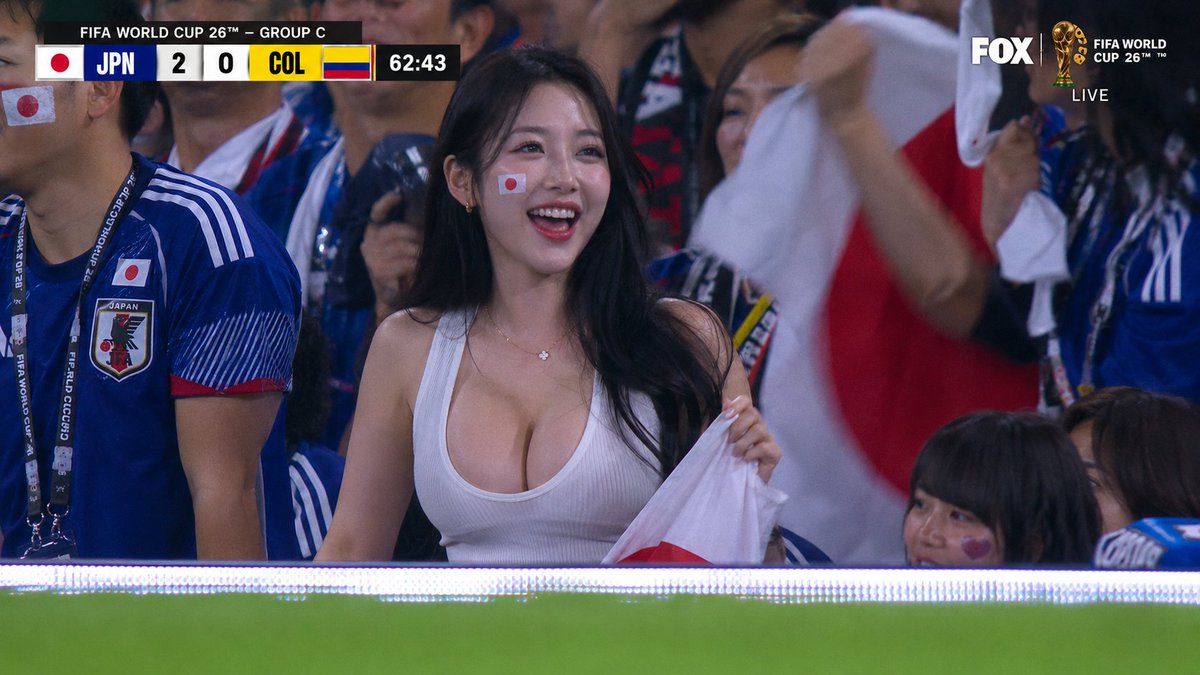
A specialized prompt to generate a realistic 1080i TV broadcast frame from the FIFA World Cup, complete with network graphics, lens compression, and authentic artifacts. (free to use) — Free AI image template on PicX Studio.
A live TV broadcast screenshot from a {argument name="sporting event" default="FIFA World Cup 2026"} match on FOX Sports, crowd reaction cut. Telephoto camera from across the stadium zooms in on a spectator: a {argument name="spectator description" default="gorgeous Asian woman in her 20s, long black hair, perfect features, stunning figure in a tight low-cut top"}, standing in the front row of the stands. Strong telephoto compression — the bottom edge of the frame shows a soft blurred band of green pitch and LED ad boards, heat-haze shimmer from the long lens. Around her, out-of-focus fans wave national flags. She laughs and cheers, unaware she is on camera. Authentic FOX Sports World Cup broadcast graphics: scorebug top-left with team abbreviations and match clock, {argument name="competition logo" default="FIFA World Cup 26 logo"}, small network watermark in the corner, 16:9. Shot looks exactly like a paused 1080i TV frame — broadcast color grading, slight motion blur on waving flags, MPEG compression artifacts, faint interlacing lines.
Use FIFA World Cup TV Broadcast Simulation to plan an AI image around nano-banana-2 generation. Match the preview's composition first, then personalize the subject, setting, and mood for your own project.
Use the primary action to load the template settings in PicX Studio.
Adjust the subject and creative details for your destination.
Create the image, compare the result with the preview, and refine one variable at a time.
A continuous mix — similar concepts first, woven with same-model prompts and fresh picks from the catalog.
Choose the primary action to open PicX Studio with the available template settings. Review the model and format, personalize the creative direction, and generate when ready.
Yes. You can change the subject, setting, lighting, mood, format, and available model controls before creating your image.
This template is free to open and customize. Generation usage is shown in PicX Studio before you create.
Start with nano-banana-2, which is the model associated with this template. You can compare another compatible model for a different finish.
A continuous mix — similar concepts first, woven with same-model prompts and fresh picks from the catalog.
Follow a topic to a crawlable collection of related PicX Studio templates.
32,032 public templates available. Verified via the PicX Studio public templates API; refreshed hourly.


