
Surreal Floating Park Editorial
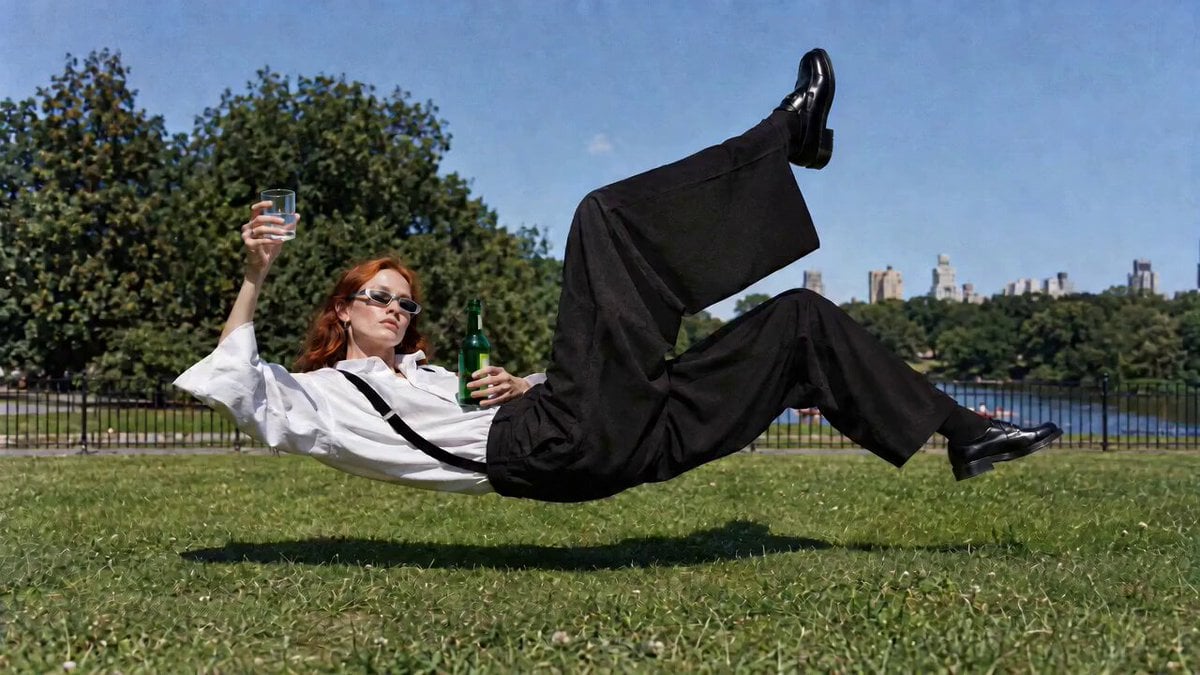
A surreal fashion-style video prompt of a woman floating in a park, designed for a smooth 360-degree orbital camera movement.
- Prompt included
- Model and format preset
- Premium template
The prompt behind this video
Copy the exact prompt behind Surreal Floating Park Editorial, or open it in the studio and make it yours.
Scene & Mood: Surreal daytime park editorial with calm anti-gravity elegance. A red-haired woman floats horizontally above a bright green lawn as if reclining in invisible air, holding a clear glass in one hand and a green bottle in the other. The mood is stylish, dry, playful, and cinematic, with the impossible levitation treated as completely real inside a sunny city park. Frame Map: Begin in a full-body side-profile composition. image1 floats horizontally across the center of frame, suspended roughly two feet above the grass, head on the left side, legs lifted diagonally toward the upper right. Keep her full body visible with clean space between her shadow and the grass below. The lawn fills the lower foreground, trees and park railing sit in the midground, and the lake with distant city skyline sits in the background. Maintain a medium-wide environmental fashion frame with enough negative blue sky above her raised shoe and enough grass below to show the floating shadow. Subject Lock image1: image1 keeps the same face, hair, wardrobe, body shape, and silhouette throughout. Preserve her red hair, narrow sunglasses, calm facial expression, oversized white button-up shirt, black crossbody strap, black wide-leg trousers, black loafers, clear drinking glass in her raised left hand, and green bottle held near her torso. Keep her reclining floating pose, composed attitude, slim silhouette, and dry editorial expression. Do not change her hair color, sunglasses, shirt volume, trouser shape, shoe style, bottle color, or glass shape. Cross-Frame Rules: Keep image1 as the only person and main subject. Maintain the same levitation height, horizontal body orientation, wardrobe, props, and calm expression for all 15 seconds. The glass stays in her left hand and the green bottle stays in her other hand. No spilling, no dropped props, no duplicated limbs, no body warping, no floating extra objects, no sudden pose reset. The 360 camera orbit may reveal different sides of the park, but the subject remains centered, stable, and fully readable. No on-screen text, no captions, no signage typography, no rendered text in the frame. Movement: 15 seconds total. image1 floats steadily above the grass with a slow, subtle hover drift, as if held by invisible air. Her legs remain lifted and relaxed; one shoe points slightly upward while the other leg bends naturally. Micro-motion: slow breathing, a tiny wrist adjustment holding the glass, slight fingers tightening around the bottle, hair moving gently in the breeze, shirt fabric puffing and settling, trouser hems swaying softly, sunglasses catching small sky reflections. Environmental motion: grass blades ripple, tree leaves move in light wind, lake water shimmers, distant park life stays soft and indistinct, and her shadow glides lightly over the lawn beneath her. Camera motion: one smooth 360-degree orbit around her over the full 15 seconds, keeping her centered and full body visible, with a controlled low-to-mid camera height that circles from her side profile, around her feet, past the opposite side, and back toward the starting angle. Last Frame: At 15 seconds, the camera completes the 360 orbit and settles close to the original side-profile composition. image1 remains floating calmly above the grass, head left, legs raised right, glass lifted with relaxed confidence and green bottle held near her torso. Her shadow sits clearly on the lawn below, trees and skyline softly behind her, expression unchanged behind sunglasses. Camera eases to a steady centered frame with no visible shake. No on-screen text, no captions, no signage typography, no rendered text in the frame. World Plate: Sunny city park in clear daylight with vivid green grass, leafy trees, black park railing, a calm lake, and distant skyline softened by atmospheric depth. Bright blue sky with natural daylight, soft shadows under the floating body, realistic grass texture, mild heat shimmer over the lawn, and gentle background softness. The environment stays believable and grounded, making the levitation feel clean, practical, and photographed. Sound Bed: Diegetic audio only: soft park breeze, grass rustle, faint leaf movement, distant lake ambience, subtle glass liquid movement, tiny bottle-and-glass contact, light fabric flutter, distant indistinct park sounds. No music, no soundtrack, no score, no lyrics. Capture Realism: Natural skin texture, matte skin, realistic red hair movement, real cotton shirt folds, believable trouser weight, grounded shoe reflections, soft highlight rolloff, lifted shadows, mild 35mm grain, realistic floating shadow, clean daylight exposure, and gentle background softness. Avoid AI gloss, plastic skin, over-sharp grass, warped hands, melted props, duplicated body parts, crushed blacks, clipped whites, and fake levitation blur. Camera Capture: 15 seconds, 24fps, 180-degree shutter, wide-latitude cinema capture, smooth stabilized 360-degree orbit with subtle handheld breath, 35mm lens for full-body environmental fashion framing, fine 35mm grain, soft highlight rolloff, natural daylight color grade, realistic motion blur, stable subject tracking, and practical editorial realism.
How to use Surreal Floating Park Editorial in 3 steps
- 1
Open
The prompt is already in the box next to the preview, with the template's model and format selected.
- 2…a portrait of your subject in softgolden-hour light, 85mm…
Personalize
Edit the subject and creative details for your destination.
- 3Generate
Generate
Press Generate — your video is created in PicX Studio, so you can compare it with the original and refine one variable at a time.
More like this
Templates with the same subject, style or setup. Open one to see its prompt.
Giant Seahorse City Destruction — Flova AI
Floating Desert Museum Cinematic Film
Surreal Floating Mountains Eye Zoom Video Prompt
Surreal Giant Woman Fashion Editorial Prompt
Nano Banana Seedance Environment Render Walk
Whale in the Sky — City Shadows (Kling AI)
Realistic Korean Man Park Vlog
High Fashion Editorial Video
3D Cartoon Park Scene
Anime Editorial Fashion Film
Amusement Park Time Stop Cinematic
Floating Woman Sunset Cloudscape
Make it yours
Surreal Floating Park Editorial works as-is. These are the safest ways to change it without losing the look.
Change one field
Copy a single group, rewrite it, and generate again so you can see what that field is doing.
Keep the frame, change the subject
Hold the composition and light of Surreal Floating Park Editorial, then swap wardrobe, props or the person for a new take.
| If the result… | Why | Fix |
|---|---|---|
| The result drifts from the preview | Too many fields changed at once. | Reuse Surreal Floating Park Editorial as-is first, then change one group — subject, light, or setting. |
| The model over-stylizes the scene | The prose prompt leaves finish and camera underspecified. | Add one camera or lighting sentence and stay on Seedance 2.0. |
More Seedance 2.0 templates
Other prompts made for Seedance 2.0.

Comical Martial Arts Punch Scene

Maglev Train Action Sequence

Martial Arts Fight Sequence

Wuxia Protection and Trust Script

Vintage Korean Arcade MiniDV Vlog

Mercedes 190 SL Luxury Ad

Rainy Night Supernatural Reverse Comedy Video Script

Amazon Civilization Discovery

Futuristic South Asian City Transformation

Cozy Luxury Cafe Commercial
More video prompts
Fresh picks from across the catalog.
Necromancer Queen Siege Warfare
Abstract time and entropy video prompt
Visual Journey Project
Celestial Giant Formation Over Mountain Range Video Prompt
Godzilla vs Mechzilla Battle
Ultra Emotional Art Deco Maternal Masterpiece
Nostalgic Childhood Memory Video Prompt for Seedance 2.0
sunset
80s Underground Drummer Life
Seedance 2.5 - @oggii_0 - 307648

Browse template categories
Surreal Floating Park Editorial questions
How do I use the Surreal Floating Park Editorial template?
Add your photo if the template asks for one, edit the prompt if you like — the template's model and format are already selected — and press Generate. Your version opens in PicX Studio.
Can I customize the Surreal Floating Park Editorial template?
Yes. You can change the subject, setting, lighting, mood, format, and available model controls before creating your video.
Is the Surreal Floating Park Editorial template free?
Opening and editing this template is free. Generating uses credits, shown on the Generate button when you are signed in.
Which AI model should I use?
Start with Seedance 2.0, which is the model associated with this template. You can compare another compatible model for a different finish.
Looking for something else? Browse all templates.

Your photo, any look
Thousands of ready templates for every top image and video model, from one credit balance.