How do I use the Minimalist Sage Green Studio Portrait template?
Choose the primary action to open PicX Studio with the available template settings. Review the model and format, personalize the creative direction, and generate when ready.
A structured JSON-formatted prompt for a high-fashion studio portrait with a large brimmed hat and neon background elements. Change the subject, setting, or lighting one variable at a time.
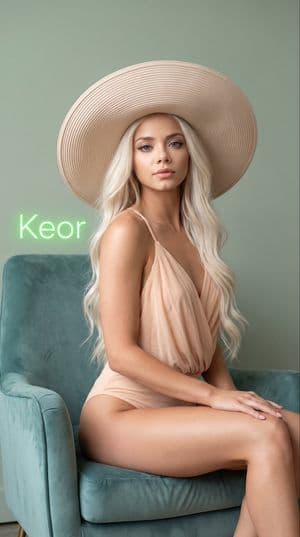
{ "subject": { "description": "{argument name="subject description" default="Young woman with fair porcelain skin, long wavy platinum-blonde hair cascading over her shoulders"}", "hair": "Long, soft wavy blonde hair flowing down past the shoulders", "body": "Slender figure with smooth skin", "pose": "Seated upright in an armchair, legs together, arms resting gently along the sides of her body, facing the camera", "expression": "Neutral and elegant, soft direct gaze" }, "outfit": { "main": "{argument name="clothing" default="Light peach/beige draped one-piece garment with thin straps"}", "headwear": "Large wide-brimmed light beige/peach structured hat with concentric ridge details" }, "setting": { "location": "Minimalist indoor studio space", "background": "{argument name="wall color" default="Soft muted sage-green wall"}", "added_element": "Neon green written 'Keor' glowing on the wall in the backdrop" }, "lighting": { "type": "Soft diffused studio lighting", "effects": "Gentle highlights on the skin and hat, smooth even illumination with minimal shadows, elegant and refined atmosphere" }, "camera": { "angle": "Eye-level frontal view", "framing": "Upper-body to mid-thigh portrait shot, subject centered in the chair", "style": "Photorealistic, high-detail fashion portrait, soft focus on background" }, "additional_details": { "skin": "Smooth, luminous fair skin with natural soft glow", "atmosphere": "Elegant, minimalist, high-fashion studio portrait" } }
Choose the primary action to open PicX Studio with the available template settings. Review the model and format, personalize the creative direction, and generate when ready.
Yes. You can change the subject, setting, lighting, mood, format, and available model controls before creating your image.
This template is free to open and customize. Generation usage is shown in PicX Studio before you create.
Start with gemini-3-pro-image-preview, which is the model associated with this template. You can compare another compatible model for a different finish.
Follow a topic to a crawlable collection of related PicX Studio templates.
43,449 public templates available. Verified via the PicX Studio public templates API; refreshed hourly.



![118-google-nano-banana-pro-skincare-product- — A professional skincare shot of a [product container] with [cap/lid], labeled [brand, product, descriptor, volume](/_next/image?url=https%3A%2F%2Fcdn.picxstudio.com%2Fuploads%2Fpost118_img0_332898b8-29ea-42a9-87ab-9ed746a3f944.jpg&w=828&q=100)

















![Urban Street Mixed Media Portrait — Transform this image [Upload Your Image] into a 64K DSLR shot resolution of A creative urban street portrait featuring a you](https://cms-assets.youmind.com/media/1785137834120_1a6fgj_HOH_vMobUAAAZf1-300x224.jpg)