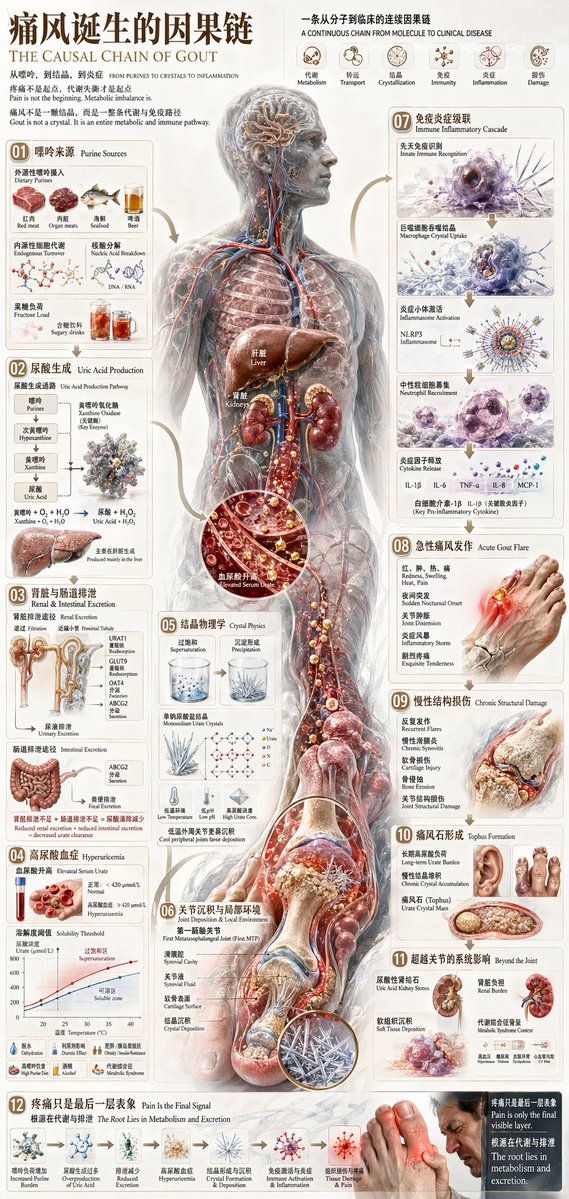
Chinese Medical Gout Infographic Poster
medical infographic poster · gout pathogenesis and progression · ultra-detailed 3D biomedical illustration blended with editorial infographic design · Chinese with smaller English subtitles · vertical · approximately 2:1 · warm off-white paper texture with subtle aging and clinical poster aesthetics · 痛风诞生的因果链 · THE CAUSAL CHAIN OF GOUT · A continuous chain from purines to crystals to inflammation, showing the full-body metabolic and immune pathway · a semi-transparent full-body human anatomical figure, front view, from head to feet, with the face intentionally obscured by a soft rectangular blur; visible muscles, bones, arteries, veins, nerves, lungs outline, digestive tract, kidneys, liver, bladder region, and lower limb structures; glowing internal pathways and directional flow arrows connect metabolic stages; several circular cutaway zoom-ins show urate crystals, blood components, inflamed tissue, and joint damage · 4 · 肝脏, 肾脏, 尿酸循环, 结晶沉积 · 一条从分子到临床的连续因果链 · A CONTINUOUS CHAIN FROM MOLECULE TO CLINICAL DISEASE · 6 · 代谢, 转运, 结晶, 免疫, 炎症, 损伤 · 01 · 嘌呤来源 · Purine Sources · upper left · 6 · 外源性嘌呤摄入: 红肉, 外源性嘌呤摄入: 内脏, 外源性嘌呤摄入: 海鲜, 外源性嘌呤摄入: 啤酒, 内源性细胞代谢, 果糖负荷 / 含糖饮料 · 02 · 尿酸生成 · Uric Acid Production · left upper-mid · 5 · 嘌呤, 次黄嘌呤, 黄嘌呤, 尿酸, 黄嘌呤氧化酶 pathway with oxygen and hydrogen peroxide byproducts · 03 · 肾脏与肠道排泄 · Renal & Intestinal Excretion · left middle · 2 · 肾脏排泄 with renal tubule transporters including GLUT9, OAT4, ABCG2, reabsorption and urinary excretion, 肠道排泄 with intestinal excretion and ABCG2 secretion · 04 · 高尿酸血症 · Hyperuricemia · left lower-mid · 4 · 血尿酸水平 comparison, 正常 range threshold, 高尿酸血症 threshold, 溶解度阈值 / supersaturation line graph · 05 · 结晶物理学 · Crystal Physics · lower left-center · 5 · 过饱和 supersaturation, 沉淀形成 precipitation, 单钠尿酸盐结晶 monohydrate urate crystals, 低温诱导 lower temperature effect, 低 pH effect and ion microenvironment · 06 · 关节沉积与局部环境 · Joint Deposition & Local Environment · bottom left-center · 5 · 第一跖趾关节 first metatarsophalangeal joint focus, 寒冷/低温, 滑液环境, 软骨表面, 结晶沉积 · 07 · 免疫炎症级联 · Immune Inflammatory Cascade · upper right · 6 · 先天免疫识别 innate immune recognition, 巨噬细胞吞噬结晶 macrophage crystal uptake, 炎症小体激活 NLRP3 inflammasome, 中性粒细胞募集 neutrophil recruitment, 炎症因子释放 cytokine release, 白细胞介素 labels: IL-1β, IL-6, TNF-α, IL-8, MCP-1 · 08 · 急性痛风发作 · Acute Gout Flare · right middle · 5 · 红、肿、热、痛 heel/big toe illustration, 夜间突发 sudden onset, 关节肿胀 joint distention, 剧烈疼痛 exquisite tenderness, 足部局部发红发光 · 09 · 慢性结构损伤 · Chronic Structural Damage · right lower-mid · 4 · 反复发作 recurrent flares, 慢性滑膜炎 chronic synovitis, 软骨损伤 cartilage injury, 骨侵蚀 / 关节结构损伤 bone erosion and joint structural damage · 10 · 痛风石形成 · Tophus Formation · right lower · 4 · 长期尿酸负荷 long-term urate burden, 慢性晶体积聚 chronic crystal accumulation, 痛风石 urate crystal mass, 手指与组织结节示意 multiple clinical examples · 11 · 超越关节的系统影响 · Beyond the Joint · lower right · 4 · 尿酸性肾结石 uric acid kidney stones, 间质性肾损伤 / 肾脏受累, 软组织沉积 soft tissue deposition, 代谢综合征相关 systemic metabolic association · 12 · 疼痛只是最后一层表象 · Pain Is the Final Signal · bottom full width · 6 · 嘌呤负荷增加, 尿酸生成过多或排泄不足, 高尿酸血症, 结晶形成与沉积, 免疫激活与炎症, 急性疼痛与临床表现 · curved tan-gold arrows linking sections in a clockwise and downward causal flow · hyperreal organs and joints, glossy translucent skin, microscopic crystal closeups, immune cell scenes, medical textbook precision · sepia beige, ivory, muted red, dark brown, vascular blue and red, amber highlights, inflammatory crimson, crystal white · large Chinese serif-like heading, smaller English uppercase subtitle, boxed numbered modules with thin borders and rounded corners · no modern flat vector style, no cartoon anatomy, no bright neon sci-fi palette, no black background · Create a premium Chinese medical education poster explaining the complete causal chain of gout from purine intake and uric acid metabolism to crystal formation, immune activation, acute flare, chronic damage, tophi, and systemic complications, centered on a transparent full-body anatomical figure with 12 numbered infographic panels and 6 top process icons.





![118-google-nano-banana-pro-skincare-product- — A professional skincare shot of a [product container] with [cap/lid], labeled [brand, product, descriptor, volume](/_next/image?url=https%3A%2F%2Fcdn.picxstudio.com%2Fuploads%2Fpost118_img0_332898b8-29ea-42a9-87ab-9ed746a3f944.jpg&w=828&q=100)











![Naive doodle-style subject illustration — A doodle-style {argument name="subject" default="[subject]"}, naive lines, humorous shape exaggeration](https://pbs.twimg.com/media/G6Wl2YxbsAARB2b.jpg)