How do I use the Nano Banana - Porsche Forest Cinematic template?
Choose the primary action to open PicX Studio with the available template settings. Review the model and format, personalize the creative direction, and generate when ready.
A ready image prompt for PicX Studio. Change the subject, setting, or lighting one variable at a time.
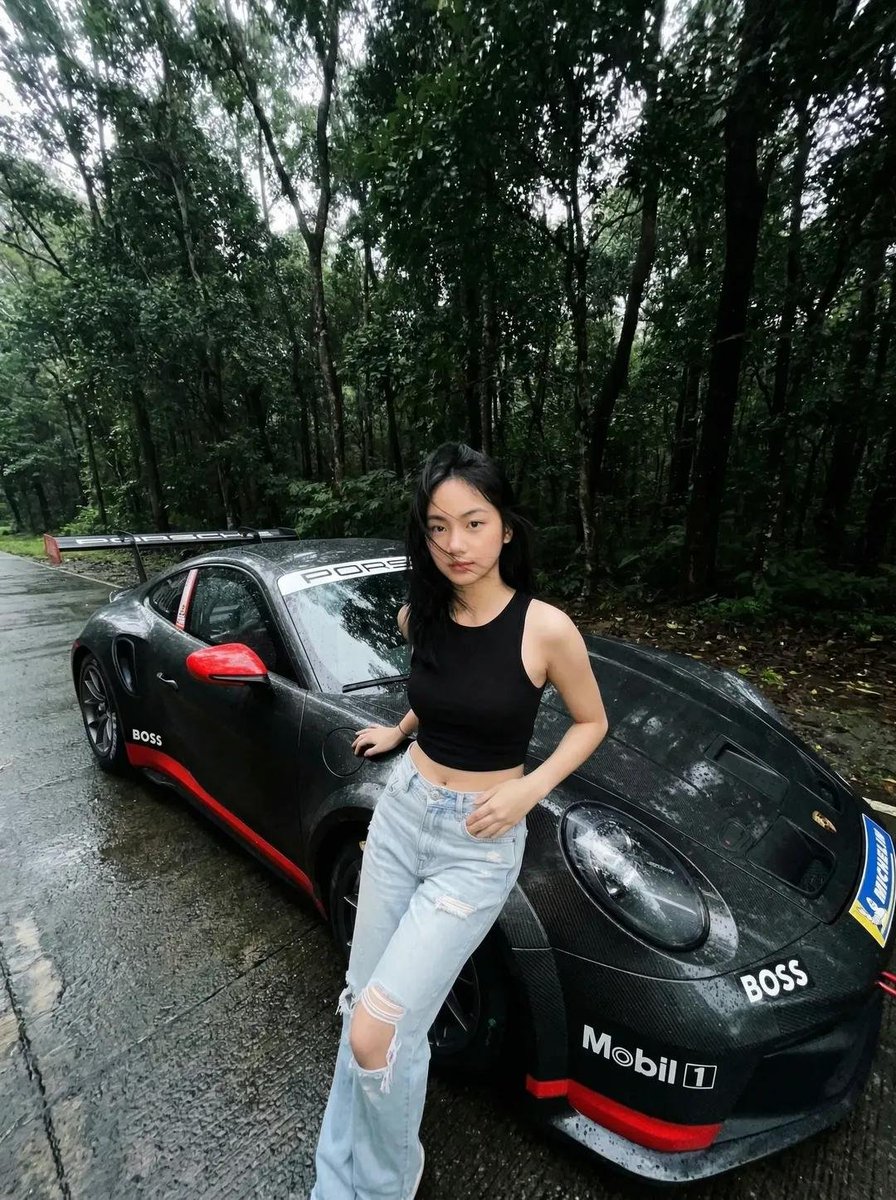
A cinematic, ultra-realistic photo of a young Asian woman standing beside a black Porsche sports car on a wet forest road after rain. She is wearing a black sleeveless crop top and light blue ripped jeans. Her hair is slightly messy, blowing naturally, and her expression is calm and confident as she looks directly at the camera. The car is a black Porsche 911 with racing decals (Mobil 1, BOSS), red side mirrors, and a large rear wing. The surface of the car is wet with visible raindrops. The environment is a lush, dense green forest with tall trees on both sides of a narrow asphalt road. The road is wet and reflective, with subtle puddles. The lighting is soft and overcast, creating a moody, cinematic atmosphere. Shot with a wide-angle lens (slight fisheye distortion), low perspective, subject centered near the car. High detail, realistic textures, shallow depth of field, natural color grading, 4K quality.
Choose the primary action to open PicX Studio with the available template settings. Review the model and format, personalize the creative direction, and generate when ready.
Yes. You can change the subject, setting, lighting, mood, format, and available model controls before creating your image.
This template is free to open and customize. Generation usage is shown in PicX Studio before you create.
Choose a compatible model in PicX Studio based on the style, speed, and output controls your project needs.
© 2026 PicX Studio. All rights reserved.

Follow a topic to a crawlable collection of related PicX Studio templates.
43,474 public templates available. Verified via the PicX Studio public templates API; refreshed hourly.
Prompt stories that include this template.





![118-google-nano-banana-pro-skincare-product- — A professional skincare shot of a [product container] with [cap/lid], labeled [brand, product, descriptor, volume](/_next/image?url=https%3A%2F%2Fcdn.picxstudio.com%2Fuploads%2Fpost118_img0_332898b8-29ea-42a9-87ab-9ed746a3f944.jpg&w=828&q=100)













![75-cinematic-sport-in-midjourney-v7 — [close-up] of [an athlete performing a key action] in [sport-specific environment],
with dramatic lighting, high-speed ph](/_next/image?url=https%3A%2F%2Fcdn.picxstudio.com%2Fuploads%2Fpost75_img0_29c96604-31bd-49f1-88dd-2396ed946239.jpg&w=828&q=100)