
IMAGEBlack Forest Labs · from 20 credits / image
Black Forest Labs' production-grade FLUX
FLUX.2 AI Image Generator: Pro and Flex
Pro or Flex. Up to 8 references. 1K or 2K. Seven aspect ratios.
FLUX.2 follows long, multi-part prompts, writes readable text and keeps a product or character consistent across up to eight reference images. Pro is the everyday tier; Flex puts its effort into lettering and fine detail.
- 1K–2K
Built for briefs, not party tricks
Text you can actually read
Lettering was one of the main targets for this generation, so posters, packaging, infographics and interface mockups come back with small print you can read. Wrap each line of copy in quotation marks, name its position and type style, and switch to Flex when the words matter more than the picture.
Brand colours by hex code
Write a hex value next to the object it belongs to, such as a label in hex #C8811A, and FLUX.2 uses it. It is the quickest way to keep packaging, logos and campaign graphics on brand without fixing colours afterwards.
Edit with up to 8 references
Upload a product, a face or a style and describe the change. Give each image a role in the prompt, like the subject from image 1 and the palette from image 2. Auto aspect matches your first upload.
FLUX.2 (Pro and Flex), from its maker
Official release video by Black Forest Labs
FLUX.2 (Pro and Flex)
Pro or Flex. Up to 8 references. 1K or 2K. Seven aspect ratios.
Made for the work you ship
Ads with headlines Campaign visuals that carry their own copy, set in the type style you describe.
Packaging and labels Label mockups with your product name in quotes and brand colours as hex codes.
Infographics and diagrams Explainers with several labelled parts, laid out from a structured prompt.
Lifestyle photography Name the lens or film stock and FLUX.2 shoots it with steady, natural light.
Seasonal and scene edits Change the weather, season or setting of an existing photo and keep the rest.
Why pick FLUX.2
- TypeLegible textHeadlines, labels and small print rendered from quoted text.
- #HEXExact coloursTie a hex code to an object and it lands in the image.
- 8 refsMulti-reference editsHold a product, character or style across up to eight uploads.
- JSONStructured promptsDescribe scene, subjects, lighting and camera as fields, or as prose.
- 2 tiersPro or FlexPro for everyday work, Flex for typography and small detail.
- 2K1K or 2K outputSeven aspect ratios from 1:1 to 9:16, plus auto when editing.
What FLUX.2 (Pro and Flex) costs
Billed per image, at the resolution you pick. The same prices the generator shows before you run it.
- 1K20credits / imageOn Starter≈ 180 images / mo
- 2K28credits / imageOn Starter≈ 128 images / mo
Every model on every planCredits never expireSee plans
Pay for FLUX.2 (Pro and Flex) with crypto
Buy credits with Bitcoin, USDT, USDC, ETH, Solana and more — no card, nothing auto-renews, packs from $5, and 15% extra credits on crypto payments.
FLUX.2 Pro vs FLUX.2 Flex
Both tiers create from text and edit from references in the same generator. The difference is where the model spends its effort.
FLUX.2 [max], [dev] and [klein], 10-image references and 4MP editing are not available on PicX yet. See the pricing table below for what each tier and size costs today.
How to use FLUX.2 (Pro and Flex) in 3 steps
- 1
Lead with the subject
FLUX.2 weighs the first words most, so open with the subject and action, then style and setting. Quote any text, and add hex codes for exact colours.
- 2
Add references to edit (optional)
Upload up to eight images and say what each one contributes: the product, the person, the style or the background.
- 3
Pick Pro or Flex and generate
Choose Pro for most images or Flex when lettering matters, set 1K or 2K and an aspect ratio, then refine the prompt rather than asking for what to avoid.
FLUX.2 (Pro and Flex) prompts to copy
Real prompts and what they made. Copy one, or open it in the generator with the model already picked.
Film-stock landscape
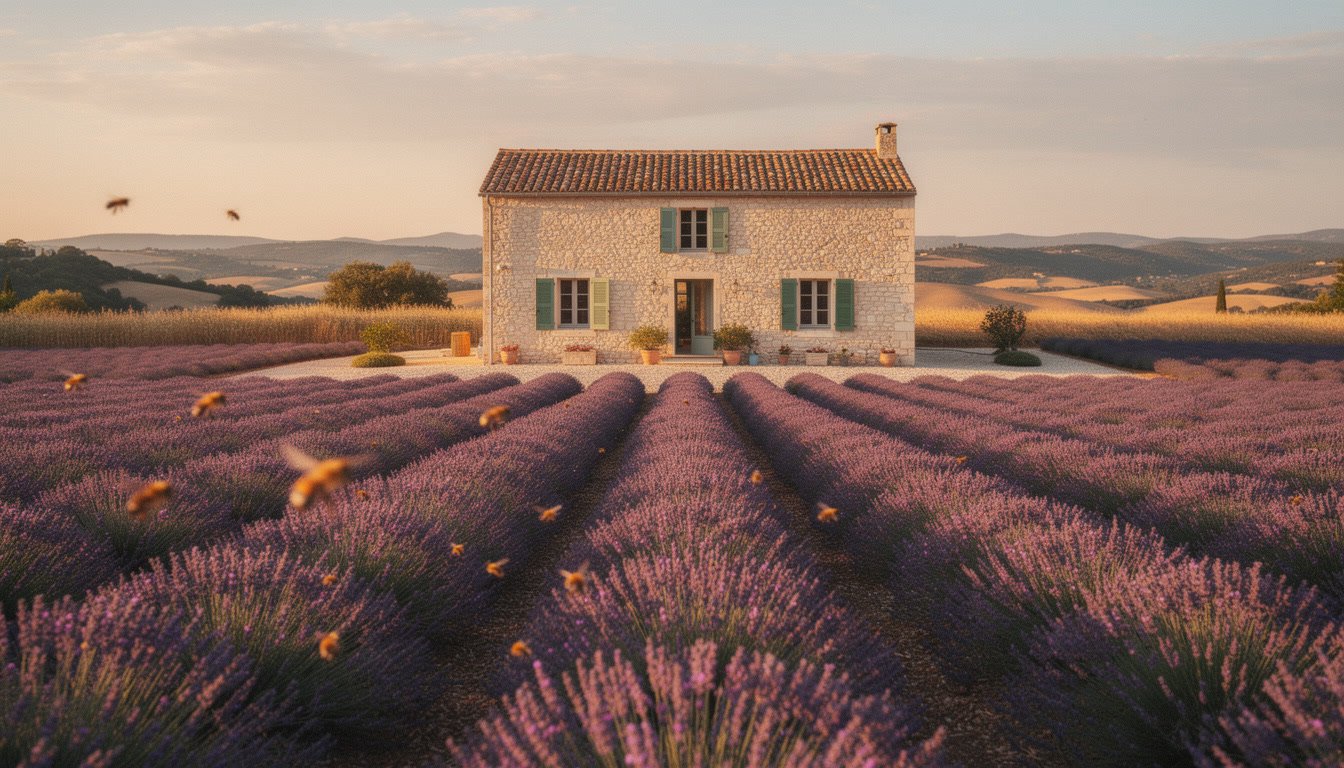
Rows of lavender running toward a stone farmhouse in Provence at golden hour, bees in the soft foreground, warm haze over distant hills, shot on Kodak Portra 400 with a 35mm lens, gentle grain
Perfume ad with headline (Flex)
Luxury perfume advertisement: a faceted glass bottle among peonies on pale pink silk, soft diffused studio light. Large elegant serif headline 'BLOOM No. 7' centred at the top in deep rose hex #8E2F4F, and the small line 'Eau de Parfum' below the bottle
Paper-cut infographic
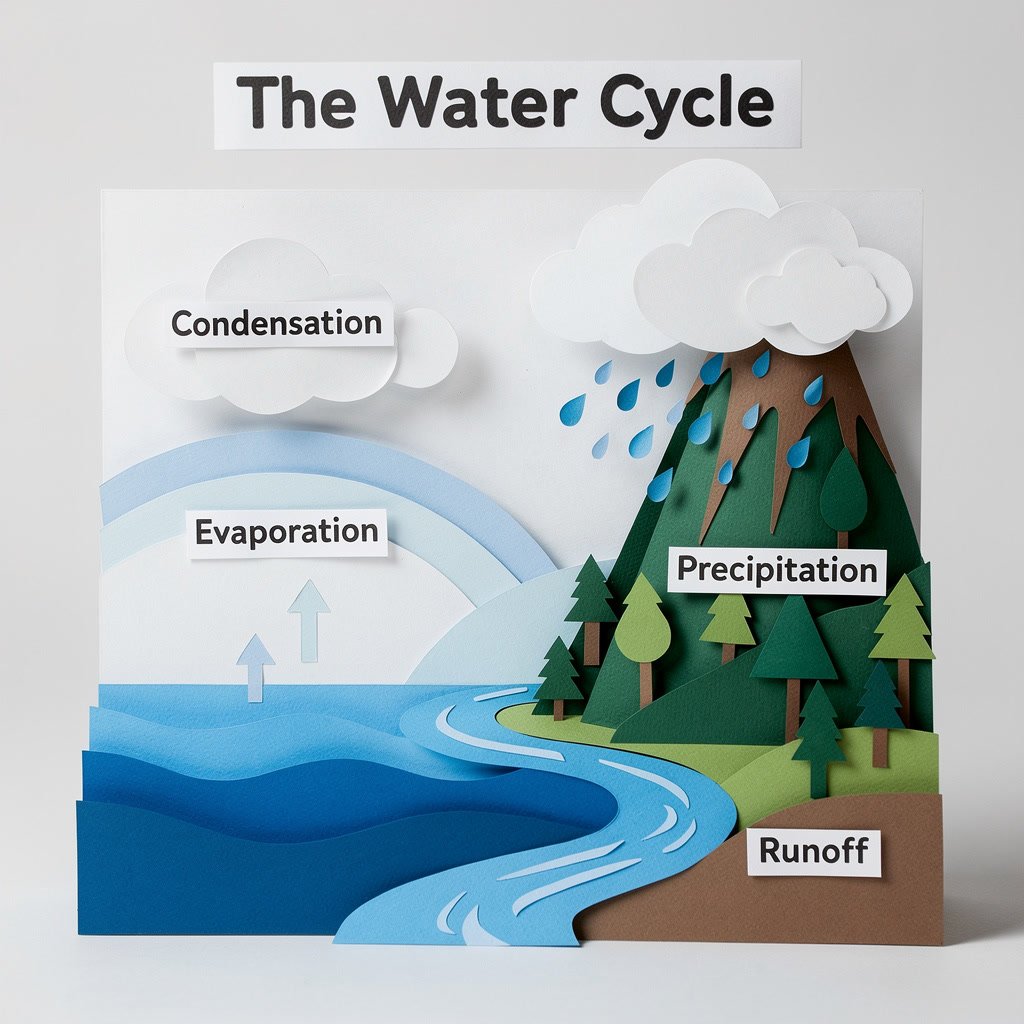
Layered paper-cut diorama explaining the water cycle: ocean, rising vapour, a cloud, rain over a mountain and a river flowing back to the sea. Four small printed labels: 'Evaporation', 'Condensation', 'Precipitation', 'Runoff'. Bold title 'The Water Cycle' at the top, soft shadows between layers
Honey label in brand colours
Product photo of a glass honey jar on a linen cloth, morning side light. Vintage label in cream hex #F4E8D0 with an amber hex #C8811A border, reading 'Wildflower Honey' in bold letterpress type and 'Raw & Unfiltered' underneath, hand-drawn bees and clover around the text
Templates to start from
Browse all templates







FLUX.2 (Pro and Flex) questions
What is FLUX.2?
FLUX.2 is the second generation of Black Forest Labs' FLUX image models, announced in November 2025. It handles text-to-image and reference-based editing in one model, with a focus on readable text, complex prompts, realistic lighting and consistency across several reference images. PicX offers the Pro and Flex tiers.
What is the difference between FLUX.2 Pro and FLUX.2 Flex?
Pro is the faster, cheaper tier for most work. Black Forest Labs pitches Flex at lettering and fine detail, and it is the pricier of the two. Here either tier generates from text, edit with up to eight references, and output at 1K or 2K. Flex's step and guidance settings are not exposed on PicX yet.
How do I write good FLUX.2 prompts?
Start with the subject and action, since the earliest words carry the most weight, then add style, setting and lighting. Put any text in quotes and say where it sits, attach hex codes to the objects that need exact colours, and name a camera, lens or film stock for photo looks. For busy scenes you can also write the prompt as JSON with fields like scene, subjects, lighting and camera.
Does FLUX.2 support negative prompts?
No. Black Forest Labs' prompting guide says FLUX.2 does not use negative prompts. Describe what you want instead: ask for sharp focus throughout rather than writing no blur.
Can FLUX.2 edit images with reference photos?
Yes. Upload one to eight images and describe the change. With several references, say what each one is for, such as the person from image 1 and the outfit from image 2. Choose auto aspect to keep the shape of your first image.
Is FLUX.2 open source?
Partly. FLUX.2 [dev] is an open-weight model you can run locally, with a commercial licence needed for commercial use, and Black Forest Labs announced a smaller Apache 2.0 [klein] model. Pro, Flex and [max] are hosted models. On PicX you use Pro and Flex straight from the generator without a GPU, and [dev] and [klein] are not available on PicX yet.
How much does FLUX.2 cost per image?
Each FLUX.2 image costs a set number of PicX credits that depends on two choices: Pro or Flex, and 1K or 2K. Flex costs more than Pro at either size. The pricing table on this page lists the current credits for all four combinations.
Is FLUX.2 free to use?
FLUX.2 is a paid model on PicX: both Pro and Flex spend credits on every image. New accounts do get a single free starter image, but it is generated with Nano Banana 2 rather than FLUX.2. Credits you buy stay in your account with no expiry date and can be spent on FLUX.2 or any other model.

Create with FLUX.2
Readable text, exact colours and edits from up to eight references, in Pro or Flex.