
2D Stickman Battle Animation Prompt for Seedance 2.0
A highly detailed, multi-scene prompt for generating a brutal, stylish, and fluid old-school internet stick-fight animation using Seedance 2.0.
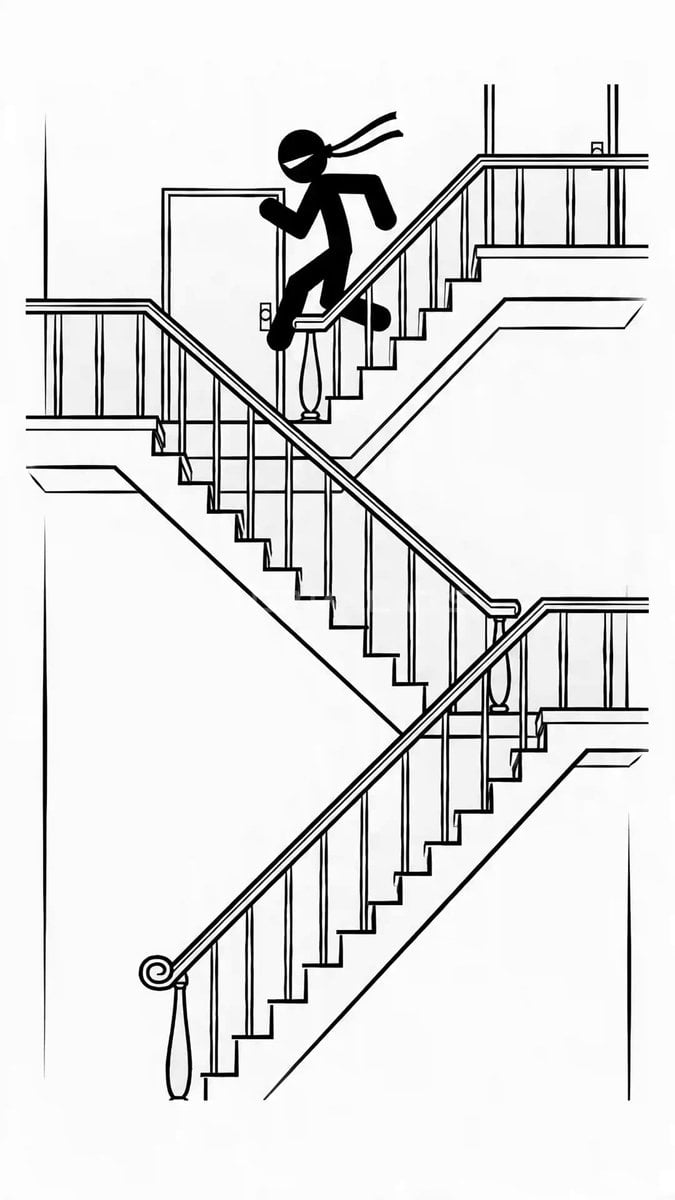
- Prompt included
- Model and format preset
- Free template
The prompt behind this video
Copy the exact prompt behind 2D Stickman Battle Animation Prompt for Seedance 2.0, or open it in the studio and make it yours.
STYLE: Clean 2D stickman animation with thin confident lines, no shading, no textures, no dialogue, no subtitles. Only speed lines, smear frames, impact rings, skid marks, and small sharp red blood accents on the hardest hits. Brutal, stylish, fluid, old-school internet stick-fight energy. MAIN CHARACTER: A solid black stickman martial artist with a tied kung-fu headband on his forehead, long headband tails trailing during motion. He is calm, precise, deadly, and never stops moving downward through the stairwell. His style blends kung fu, taekwondo kicks, elbows, redirects, wall steps, stair-assisted counters, and fast chained combos. ENVIRONMENT: A simple cross-section building interior drawn with thin black lines on a white background. Visible stairs, landings, doors, and corridors. The hero keeps descending floor by floor while fighting nonstop. Defeated enemies may remain as colored bodies on upper floors. ENEMIES: Each floor has a new colored stickman with a unique style. Purple - acrobatic aerial fighter, spinning kicks, wall rebounds. Red - boxer, heavy hooks, pressure combos. Blue - evasive counter-fighter, sweeps, slips, intercept strikes. Green - long-range kicker, whipping legs, lunging attacks. Yellow - grappler, clinch, tackle, slam attempts. Orange - berserker striker, rushing elbows and shoulder crashes. Final enemy - dark elite mirror-opponent with a thin white outline, calm and technical. CAMERA: Mostly side-view wide shots showing clear stair geometry. Fast but readable cuts, occasional whip pan, short push-in, crash emphasis. TIMELINE: 0:00-0:02 - Wide shot. Hero runs down from the top floor. Purple enemy flips in from above. Hero ducks a flying kick, steps on the rail, rotates, and lands a hard side kick that throws Purple across the landing. 0:02-0:04 - Cut on action. Hero slides down the handrail and lands on the next floor. Red enemy bursts through a door throwing hooks. Hero slips, parries, drives a knee into the ribs, then finishes with a spinning back kick. Small red fleck on impact. 0:04-0:06 - Whip pan down. Blue enemy attacks low on the stairs with a sweep. Hero hops over it, runs two steps along the wall, drops back with an elbow, redirects Blue's counter, and throws Blue over the rail. 0:06-0:08 - Smash cut. Green enemy attacks with long-range kicks on the landing. Hero ducks a whip kick, traps the leg, stomps the support knee, then launches a rising kick that sends Green backward through the doorway. 0:08-0:10 - Cut on impact. Yellow enemy ambushes from the corner and grabs the hero in a clinch. Hero drives short elbows, steps on the rail, flips over the grip, and slams Yellow face-first onto the stairs. 0:10-0:12 - Hard whip down. Orange enemy charges upward like a battering ram. They clash on the staircase in a savage rapid combo: block, elbow, knee, duck, kick, shove, rail-bounce, straight punch, spinning elbow, stomp, cross, final chest kick. Orange crashes into the w
How to use 2D Stickman Battle Animation Prompt for Seedance 2.0 in 3 steps
- 1
Open
The prompt is already in the box next to the preview, with the template's model and format selected.
- 2…a portrait of your subject in softgolden-hour light, 85mm…
Personalize
Edit the subject and creative details for your destination.
- 3Generate
Generate
Press Generate — your video is created in PicX Studio, so you can compare it with the original and refine one variable at a time.
More like this
Templates with the same subject, style or setup. Open one to see its prompt.
Swordsman vs Shadow Monster — Bamboo Forest Battle
Ice Queen — Frozen Battlefield Time Control (Seedance)
Sea Serpent vs Crab Titan — Ocean Battle

Wholesome Puppy and Kitten Story - Seedance 2.5

Mysterious Home Exploration Vlog - Seedance 2.5

Dark Tokusatsu Transformation - Seedance 2.5

Cinematic Xinjiang Drone Landscapes - Seedance 2.5

Late Night Kitchen Phone Recording - Seedance 2.5

3D Animated Cat and Old Man - Seedance

Realistic City Street Story Cinematic Video - Seedance
Magic City Fantasy Battle Animation

Seedance 2.0 First Test — Dynamic Motion Showcase
Make it yours
2D Stickman Battle Animation Prompt for Seedance 2.0 works as-is. These are the safest ways to change it without losing the look.
Change one field
Copy a single group, rewrite it, and generate again so you can see what that field is doing.
Keep the frame, change the subject
Hold the composition and light of 2D Stickman Battle Animation Prompt for Seedance 2.0, then swap wardrobe, props or the person for a new take.
| If the result… | Why | Fix |
|---|---|---|
| The result drifts from the preview | Too many fields changed at once. | Reuse 2D Stickman Battle Animation Prompt for Seedance 2.0 as-is first, then change one group — subject, light, or setting. |
| The model over-stylizes the scene | The prose prompt leaves finish and camera underspecified. | Add one camera or lighting sentence and stay on Seedance 2.0. |
More Seedance 2.0 templates
Other prompts made for Seedance 2.0.

Comical Martial Arts Punch Scene

Maglev Train Action Sequence

Martial Arts Fight Sequence

Wuxia Protection and Trust Script

Vintage Korean Arcade MiniDV Vlog

Mercedes 190 SL Luxury Ad

Rainy Night Supernatural Reverse Comedy Video Script

Amazon Civilization Discovery

Futuristic South Asian City Transformation

Cozy Luxury Cafe Commercial
More video prompts
Fresh picks from across the catalog.
Porsche 911 GT3 RS Night Racing — Neon City Streets
Sitcom Dialogue Scene Prompt
Tesseract Star Cube Incursion Video Prompt

Schooner in Growing Storm Waves Prompt

Cinematic Sci-Fi Blockbuster Video Prompt
Anime Storyboard and Character Design
Laundromat Rave Phone Camera Aesthetic

Robotic Ninja Maid vs Samurai Lizardman
Laundromat Blues Folk Trio
Chaotic Office Deadline Thriller
Browse template categories
2D Stickman Battle Animation Prompt for Seedance 2.0 questions
How do I use the 2D Stickman Battle Animation Prompt for Seedance 2.0 template?
Add your photo if the template asks for one, edit the prompt if you like — the template's model and format are already selected — and press Generate. Your version opens in PicX Studio.
Can I customize the 2D Stickman Battle Animation Prompt for Seedance 2.0 template?
Yes. You can change the subject, setting, lighting, mood, format, and available model controls before creating your video.
Is the 2D Stickman Battle Animation Prompt for Seedance 2.0 template free?
Opening and editing this template is free. Generating uses credits, shown on the Generate button when you are signed in.
Which AI model should I use?
Start with Seedance 2.0, which is the model associated with this template. You can compare another compatible model for a different finish.
Looking for something else? Browse all templates.

Your photo, any look
Thousands of ready templates for every top image and video model, from one credit balance.