
How do I use the Oiran-Style Photoshoot Transformation Prompt template?
Choose the primary action to open PicX Studio with the available template settings. Review the model and format, personalize the creative direction, and generate when ready.
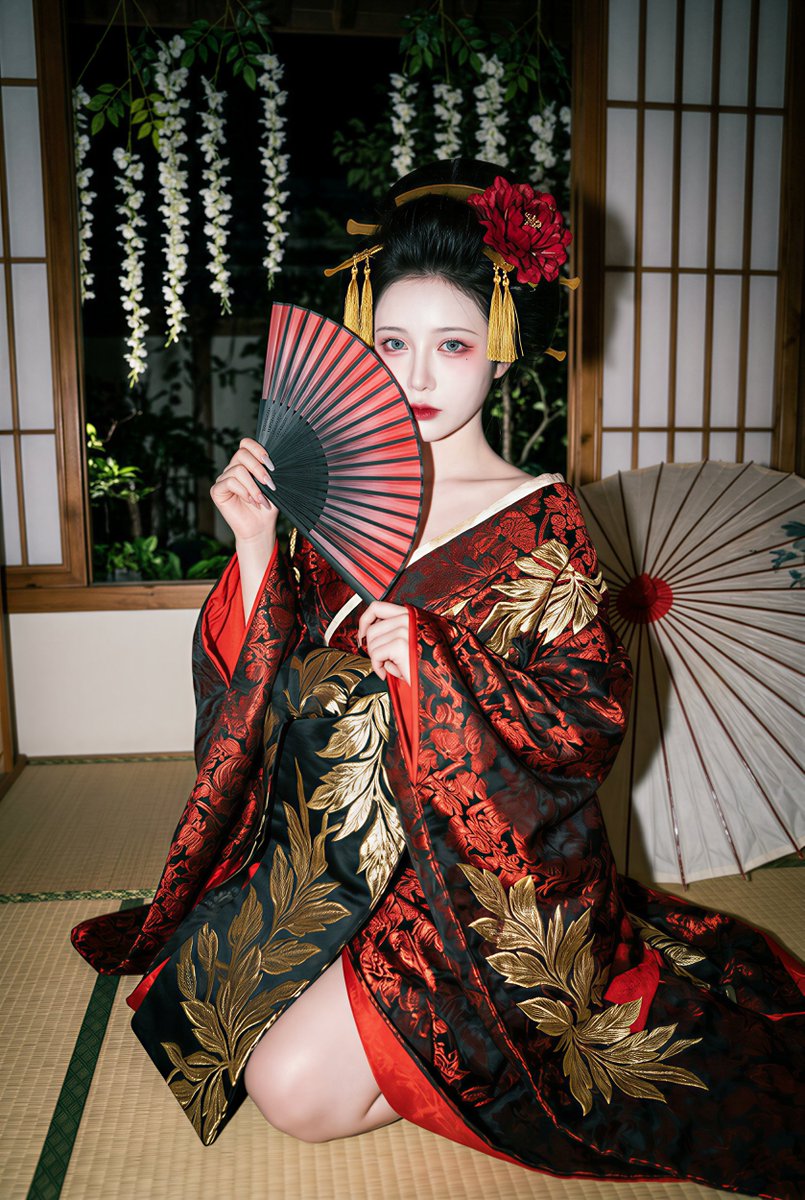
A comprehensive, multi-section prompt designed to transform a character reference image into a 'nighttime oiran-style photoshoot' aesthetic. It specifies the setting (Japanese tatami room), lighting (strong direct flash), costume (red-and-black brocade kimono), props (folding fan, paper umbrella), composition, pose, and detailed makeup instructions, while strictly maintaining the character's facial identity. (free to use) — Free AI video template on PicX Studio.
任何一张人像,一键变装-日式花魁。 [Task] Transform the person in 【Character Reference Image】 into a “nighttime oiran-style photoshoot in a Japanese tatami room” aesthetic: an indoor tatami room setting, with a strong on-camera direct flash creating a high-contrast, slightly dirty/gritty nighttime snapshot texture. The subject wears a red-and-black brocade kimono / oiran-style ornate outfit, holds a black-and-red folding fan partially covering the face, with an opened paper umbrella behind them. Outside the wooden window is a nighttime garden with hanging strands of white flowers. The character’s identity must remain consistent (facial features and face shape unchanged). [Identity Consistency] * Strictly preserve 【Character Reference Image】: face shape contour, facial feature proportions (brows/eyes / nose bridge / lips), sense of age, gender, and skin tone base * Allowed: makeup, hairstyle, clothing, pose, props, environment, and lighting reconstruction * Forbidden: face swapping, generic influencer-face beautification, anime stylization, excessive smoothing / plastic skin [Aspect Ratio & Composition] * Vertical 2:3 * Framing: seated half-body to two-thirds body shot (including legs and the spread of the garment hem), with the subject occupying the lower-middle area of the frame * Composition: subject positioned slightly below center; wooden window lattice clearly visible in the background; an opened paper umbrella appears in the rear-left area as a compositional counterweight * Camera angle: slightly high angle with a gentle downward tilt, carrying a casual “handheld night snapshot” realism, not a formal studio setup [Pose & Body Language] * Pose: kneeling / side-seated on tatami (hips on the floor, legs bent and extending outward to one side), with the upper body leaning slightly forward * Shoulders / neck: exposed shoulder or a slipped collar, visible collarbones, with a subtle sensual undertone * Hands: one hand raises a black-and-red folding fan, covering a small portion of the face; the other hand supports the fan or gathers the sleeve * Head & gaze: head slightly lowered, eyes glancing toward the camera from the edge of the fan or half-lidded (seductive, dangerous, provocative, but restrained) * Expression: no smile; cold beauty with a teasing undertone [Makeup — sensual oiran / geisha-inspired makeup] * Base makeup: pale, cool-toned powdered complexion (while retaining real skin texture, no plastic skin smoothing) * Eye makeup: red eyeshadow / flushed red tones spreading across the upper eyelids and lower eyelids, elongated eyeliner, creating an overall “drunken red / yandere-like” atmosphere * Lip makeup: deep red or dark crimson, with sharply defined lip shape * Optional: slight facial blush, red shading under the eyes (to intensify the eerie sensuality) [Hairstyle & Hair Accessories] * Hairstyle: high updo / large traditional coiffure * Hair accessories: golden tassel hairpins + a large red flower on the side (must be clearly visible), wit
Use Oiran-Style Photoshoot Transformation Prompt to plan an AI video around seedance-2.0 generation. Match the preview's composition first, then personalize the subject, setting, and mood for your own project.
Use the primary action to load the template settings in PicX Studio.
Adjust the subject and creative details for your destination.
Create the video, compare the result with the preview, and refine one variable at a time.
A continuous mix — similar concepts first, woven with same-model prompts and fresh picks from the catalog.
Choose the primary action to open PicX Studio with the available template settings. Review the model and format, personalize the creative direction, and generate when ready.
Yes. You can change the subject, setting, lighting, mood, format, and available model controls before creating your video.
This template is free to open and customize. Generation usage is shown in PicX Studio before you create.
Start with seedance-2.0, which is the model associated with this template. You can compare another compatible model for a different finish.
Follow a topic to a crawlable collection of related PicX Studio templates.
39,155 public templates available. Verified via the PicX Studio public templates API; refreshed hourly.
A continuous mix — similar concepts first, woven with same-model prompts and fresh picks from the catalog.


