
Anime Character Profile Sheet
Generates a polished Japanese anime-style character reference poster with portraits, profile data, expressions, personality notes, and a stat chart for character presentation or fan-style profile pages.
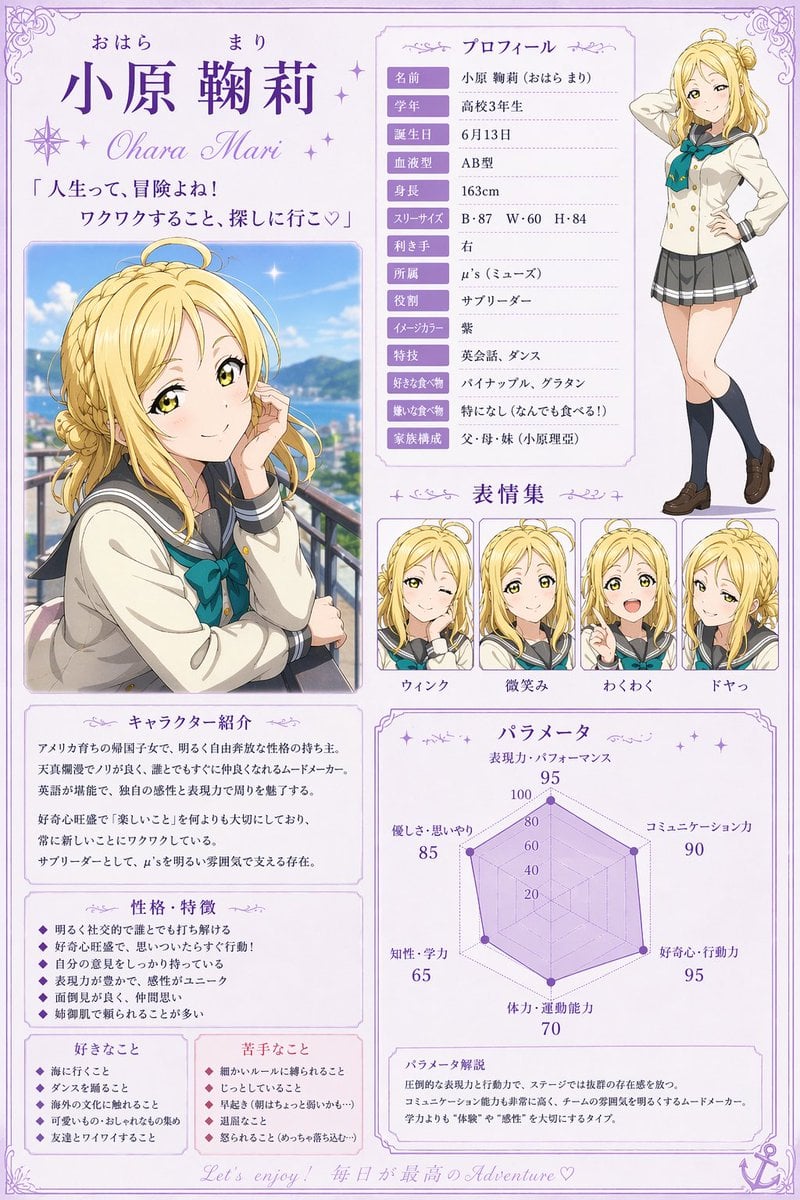
- Prompt included
- Model and format preset
- Free template
The prompt behind this image
Copy the exact prompt behind Anime Character Profile Sheet, or open it in the studio and make it yours.
- Type
- anime character profile sheet poster
- Style
- clean polished Japanese anime illustration with pastel lavender design accents, white background, decorative filigree border, elegant school-idol reference sheet layout, high readability Japanese typography, soft shading, glossy eyes, refined line art
- Subject › Name
- {argument name="character name" default="小原 鞠莉"}
- Subject › Romanized Name
- Ohara Mari
- Subject › Series Style
- school idol anime character sheet
- Subject › Character › Gender
- female
- Subject › Character › Age Appearance
- high school girl, older teen
- Subject › Character › Hair › Color
- {argument name="hair color" default="golden blonde"}
- Subject › Character › Hair › Style
- long wavy hair with a loose side braid and curled strands, small ahoge, half-up twin bun feel at the top in the full-body view
- Subject › Character › Expression
- bright, confident, adventurous
- Subject › Character › Outfit › Count
- 6
- Subject › Character › Outfit › Pieces
- cream sailor-style school blazer, teal bow at the chest, gray sailor collar with navy trim, gray pleated skirt with white stripe near the hem, dark knee-high socks, brown loafers
- Layout › Orientation
- portrait
- Layout › Sections › 0 › Title
- プロフィール
- Layout › Sections › 0 › Position
- upper right
- Layout › Sections › 0 › Count
- 12
- Layout › Sections › 0 › Labels
- 名前, 学年, 誕生日, 血液型, 身長, スリーサイズ, 利き手, 所属, 役割, イメージカラー, 特技, 好きな食べ物
- Layout › Sections › 1 › Title
- 表情集
- Layout › Sections › 1 › Position
- middle right
- Layout › Sections › 1 › Count
- 4
- Layout › Sections › 1 › Labels
- ウィンク, 微笑み, わくわく, ドヤっ
- Layout › Sections › 2 › Title
- キャラクター紹介
- Layout › Sections › 2 › Position
- lower left
- Layout › Sections › 2 › Count
- 1
Raw JSON
{"type":"anime character profile sheet poster","style":"clean polished Japanese anime illustration with pastel lavender design accents, white background, decorative filigree border, elegant school-idol reference sheet layout, high readability Japanese typography, soft shading, glossy eyes, refined line art","subject":{"name":"{argument name=\"character name\" default=\"小原 鞠莉\"}","romanized_name":"Ohara Mari","series_style":"school idol anime character sheet","character":{"gender":"female","age_appearance":"high school girl, older teen","hair":{"color":"{argument name=\"hair color\" default=\"golden blonde\"}","style":"long wavy hair with a loose side braid and curled strands, small ahoge, half-up twin bun feel at the top in the full-body view"},"expression":"bright, confident, adventurous","outfit":{"count":6,"pieces":["cream sailor-style school blazer","teal bow at the chest","gray sailor collar with navy trim","gray pleated skirt with white stripe near the hem","dark knee-high socks","brown loafers"]}}},"layout":{"orientation":"portrait","sections":[{"title":"プロフィール","position":"upper right","count":12,"labels":["名前","学年","誕生日","血液型","身長","スリーサイズ","利き手","所属","役割","イメージカラー","特技","好きな食べ物"]},{"title":"表情集","position":"middle right","count":4,"labels":["ウィンク","微笑み","わくわく","ドヤっ"]},{"title":"キャラクター紹介","position":"lower left","count":1,"labels":["character introduction text block"]},{"title":"性格・特徴","position":"lower left below introduction","count":6,"labels":["bright and sociable","curious and impulsive","has her own opinions","emotionally expressive","good at taking care of others","often teased for being innocent"]},{"title":"好きなこと","position":"bottom left","count":5,"labels":["going to the beach","dancing","experiencing foreign culture","fun exciting events","chatting with friends"]},{"title":"苦手なこと","position":"bottom center-left","count":5,"labels":["being bound by detailed rules","staying still","very cold places","boring atmosphere","being seriously scolded"]},{"title":"パラメータ","position":"lower right","count":6,"labels":["表現力・パフォーマンス 95","コミュニケーション力 90","好奇心・行動力 95","体力・運動能力 70","知性・学力 65","優しさ・思いやり 85"]}],"main_images":{"count":2,"items":["large waist-up portrait on the left, leaning on a balcony railing outdoors with blue sky, distant green mountains, and sparkling highlights","full-body standing pose on the upper right with one hand on hip and one hand raised behind the head"]},"footer":{"count":1,"text":"Let’s enjoy! 毎日が最高のAdventure♡"}},"text_details":{"headline_quote":"「人生って、冒険よね! ワクワクすること、探しに行こ♡」","profile_values":{"名前":"{argument name=\"profile name text\" default=\"小原 鞠莉 (おはら まり)\"}","学年":"高校3年生","誕生日":"6月13日","血液型":"AB型","身長":"163cm","スリーサイズ":"B・87 W・60 H・84","利き手":"右","所属":"μ’s(ミューズ)","役割":"サブリーダー","イメージカラー":"紫","特技":"英会話、ダンス","好きな食べ物":"パイナップル、グラタン"}},"color_palette":{"count":5,"colors":["lavender purple","white","golden blonde","teal green","soft gray"]},"composition":"balanced magazine-style character dossier with ornate purple frames, large bold kanji name at top left, romanized name beneath, text-heavy profile card to the right, expression thumbnails centered right, stats radar chart in the lower right, and decorative anchor icon in the bottom-right corner","quality":"high-resolution, crisp print-ready layout, neat alignment, elegant and cute idol aesthetic"}How to use Anime Character Profile Sheet in 3 steps
- 1Upload ImagePNG, JPG or paste
Add your photo
Upload the photo the template builds on. The prompt, model and format are already set.
- 2…a portrait of your subject in softgolden-hour light, 85mm…
Personalize
Edit the subject and creative details for your destination.
- 3Generate
Generate
Press Generate — your image is created in PicX Studio, so you can compare it with the original and refine one variable at a time.
More like this
Templates with the same subject, style or setup. Open one to see its prompt.












Make it yours
Anime Character Profile Sheet works as-is. These are the safest ways to change it without losing the look.
Change one field
Copy a single group, rewrite it, and generate again so you can see what that field is doing.
Keep the frame, change the subject
Hold the composition and light of Anime Character Profile Sheet, then swap wardrobe, props or the person for a new take.
| If the result… | Why | Fix |
|---|---|---|
| The result drifts from the preview | Too many fields changed at once. | Reuse Anime Character Profile Sheet as-is first, then change one group — subject, light, or setting. |
| GPT Image 2 ignores part of the JSON | Some models flatten or skip nested keys. | Keep the same values and paste them as a short paragraph instead. |
More GPT Image 2 templates
Other prompts made for GPT Image 2.

Six VTuber Japanese Logo Sheet

Realistic Portrait of Woman and Deer

The Vista Modular Condo Poster

AI Model Routing Comparison Infographic

2.5D Anime Art Board

Isometric Productivity Desk Scene

New York Double Exposure Poster

Four-Panel AI Landscape Comparison

Japanese Tatami Lifestyle Magazine Cover

NESCAFÉ Coffee Map Poster
More image prompts
Fresh picks from across the catalog.
LZA

Cinematic Paris Fashion Shot
Vogue Korea Editorial Portrait
Cinematic Automotive Portrait Identity-Locked Prompt
Hyper-Realistic Robotic Frog Design
Wacky flowchart for toasting bread

Hyper-realistic luxury perfume product shot in fantasy meadow

Seedance 2.0 - Anime Girl Fight
Live Streaming App UI Mockup

Damask Gothic Butler Portrait
Browse template categories
Anime Character Profile Sheet questions
How do I use the Anime Character Profile Sheet template?
Add your photo if the template asks for one, edit the prompt if you like — the template's model and format are already selected — and press Generate. Your version opens in PicX Studio.
Can I customize the Anime Character Profile Sheet template?
Yes. You can change the subject, setting, lighting, mood, format, and available model controls before creating your image.
Is the Anime Character Profile Sheet template free?
Opening and editing this template is free. Generating uses credits, shown on the Generate button when you are signed in.
Which AI model should I use?
Start with GPT Image 2, which is the model associated with this template. You can compare another compatible model for a different finish.
Looking for something else? Browse all templates.

Your photo, any look
Thousands of ready templates for every top image and video model, from one credit balance.