
Anime Doctor Summoning Divine Banana
Generates a humorous wide anime scene of a lab-coated girl cheering at a banana-themed game interface on a desktop monitor.
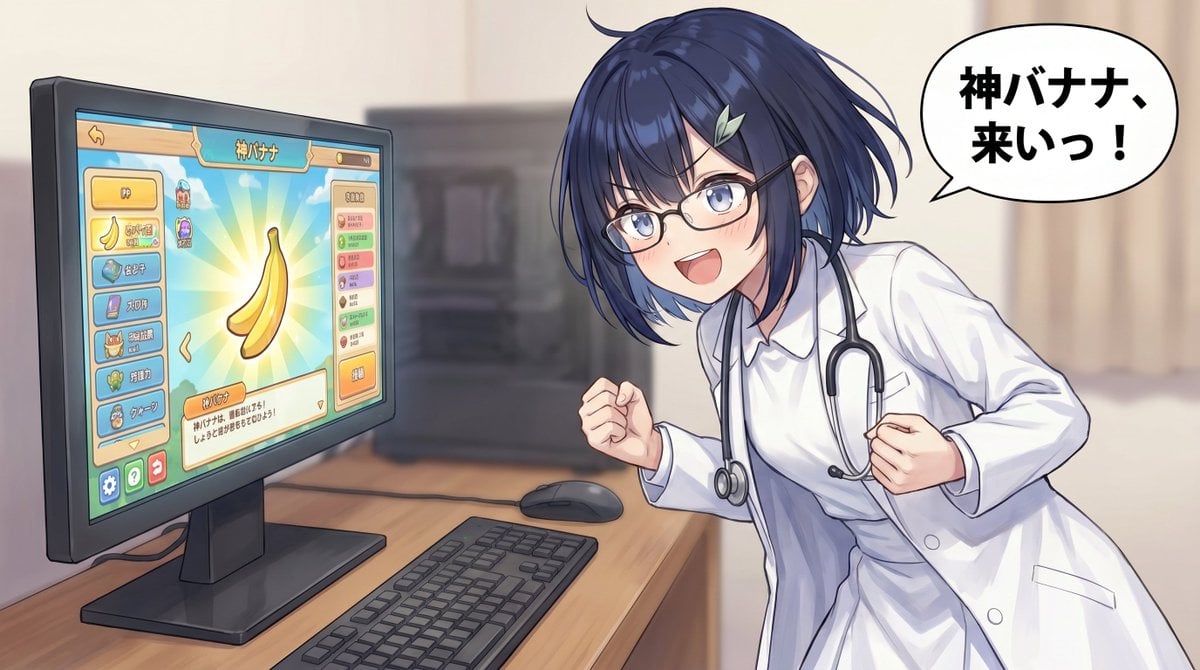
- Prompt included
- Model and format preset
- Free template
The prompt behind this image
Copy the exact prompt behind Anime Doctor Summoning Divine Banana, or open it in the studio and make it yours.
- Type
- wide anime illustration with a game UI on a desktop monitor
- Style
- polished Japanese anime, clean line art, soft painterly shading, warm indoor lighting, high detail, 16:9 composition
- Scene › Setting
- a softly blurred bedroom or clinic-like room with beige curtains and a wooden computer desk
- Scene › Camera
- medium-wide shot from slightly above desk height, monitor on the left and character on the right
- Scene › Mood
- excited, pleading, humorous anticipation
- Main Subject › Description
- a young anime-style female doctor leaning forward toward a computer monitor, fists clenched in excitement, body angled dynamically as if cheering at the screen
- Main Subject › Face
- the character's face is intentionally covered by a centered opaque square mosaic censor block in muted gray-brown, hiding all facial features
- Main Subject › Hair
- short messy {argument name="hair color" default="dark navy blue"} bob with layered bangs and loose strands
- Main Subject › Outfit
- white lab coat over a white collared shirt, black stethoscope hanging around the neck, realistic folds and buttons
- Main Subject › Pose
- bent forward with both elbows tucked, both hands clenched into fists near the chest
- Desktop Objects › Count
- 3
- Desktop Objects › Items
- large black flat-screen monitor on a stand at left, black keyboard on the wooden desk in the foreground, black mouse behind the keyboard near the monitor
- Monitor Content › Description
- a bright mobile-game-like interface displayed on the monitor, themed around a divine banana, with rounded buttons, pastel colors, and a central glowing banana reward image
- Monitor Content › Main Screen Text
- {argument name="game title text" default="神バナナ"}
- Monitor Content › Central Object
- one large yellow banana floating in the center, surrounded by turquoise and yellow radial sunburst rays
- Monitor Content › Visible UI Groups › Count
- 4
- Monitor Content › Visible UI Groups › Items
- top header bar with a back arrow, the title 神バナナ, and a small currency indicator, left vertical menu with 7 rounded icon buttons, including a banana icon, gem icon, book icon, crown icon, clover icon, and character icon, right vertical status panel with 7 small colored stat rows, bottom text panel with Japanese explanatory text and an orange action button
- Monitor Content › Colors
- turquoise, cream, orange, yellow, pink, and mint UI accents
- Speech Bubble › Position
- upper right
- Speech Bubble › Shape
- large white comic speech bubble with black outline and pointed tail aimed at the character
- Speech Bubble › Text
- {argument name="speech bubble text" default="神バナナ、来いっ!"}
- Speech Bubble › Typography
- bold black Japanese characters, thick rounded sans-serif, centered
- Composition › Left Side
- monitor dominates the left third, angled slightly toward viewer
- Composition › Right Side
- doctor character fills the right half, leaning toward the monitor
Raw JSON
{"type":"wide anime illustration with a game UI on a desktop monitor","style":"polished Japanese anime, clean line art, soft painterly shading, warm indoor lighting, high detail, 16:9 composition","scene":{"setting":"a softly blurred bedroom or clinic-like room with beige curtains and a wooden computer desk","camera":"medium-wide shot from slightly above desk height, monitor on the left and character on the right","mood":"excited, pleading, humorous anticipation"},"main subject":{"description":"a young anime-style female doctor leaning forward toward a computer monitor, fists clenched in excitement, body angled dynamically as if cheering at the screen","face":"the character's face is intentionally covered by a centered opaque square mosaic censor block in muted gray-brown, hiding all facial features","hair":"short messy {argument name=\"hair color\" default=\"dark navy blue\"} bob with layered bangs and loose strands","outfit":"white lab coat over a white collared shirt, black stethoscope hanging around the neck, realistic folds and buttons","pose":"bent forward with both elbows tucked, both hands clenched into fists near the chest"},"desktop objects":{"count":3,"items":["large black flat-screen monitor on a stand at left","black keyboard on the wooden desk in the foreground","black mouse behind the keyboard near the monitor"]},"monitor content":{"description":"a bright mobile-game-like interface displayed on the monitor, themed around a divine banana, with rounded buttons, pastel colors, and a central glowing banana reward image","main screen text":"{argument name=\"game title text\" default=\"神バナナ\"}","central object":"one large yellow banana floating in the center, surrounded by turquoise and yellow radial sunburst rays","visible UI groups":{"count":4,"items":["top header bar with a back arrow, the title 神バナナ, and a small currency indicator","left vertical menu with 7 rounded icon buttons, including a banana icon, gem icon, book icon, crown icon, clover icon, and character icon","right vertical status panel with 7 small colored stat rows","bottom text panel with Japanese explanatory text and an orange action button"]},"colors":"turquoise, cream, orange, yellow, pink, and mint UI accents"},"speech bubble":{"position":"upper right","shape":"large white comic speech bubble with black outline and pointed tail aimed at the character","text":"{argument name=\"speech bubble text\" default=\"神バナナ、来いっ!\"}","typography":"bold black Japanese characters, thick rounded sans-serif, centered"},"composition":{"left side":"monitor dominates the left third, angled slightly toward viewer","right side":"doctor character fills the right half, leaning toward the monitor","background":"softly defocused room details to keep attention on the monitor and character","aspect ratio":"wide 16:9"},"rendering instructions":"make the computer screen crisp and readable while the background remains softly blurred; emphasize glossy anime highlights on hair, fabric folds on the lab coat, and the comedic contrast between the serious doctor outfit and the playful banana game; include no extra characters"}How to use Anime Doctor Summoning Divine Banana in 3 steps
- 1Upload ImagePNG, JPG or paste
Add your photo
Upload the photo the template builds on. The prompt, model and format are already set.
- 2…a portrait of your subject in softgolden-hour light, 85mm…
Personalize
Edit the subject and creative details for your destination.
- 3Generate
Generate
Press Generate — your image is created in PicX Studio, so you can compare it with the original and refine one variable at a time.
More like this
Templates with the same subject, style or setup. Open one to see its prompt.












Make it yours
Anime Doctor Summoning Divine Banana works as-is. These are the safest ways to change it without losing the look.
Swap the setting
Keep the rest of the prompt and replace the location block. The current setting is “a softly blurred bedroom or clinic-like room with beige curtains and a wooden co”.
Change one field
Copy a single group, rewrite it, and generate again so you can see what that field is doing.
Keep the frame, change the subject
Hold the composition and light of Anime Doctor Summoning Divine Banana, then swap wardrobe, props or the person for a new take.
| If the result… | Why | Fix |
|---|---|---|
| The result drifts from the preview | Too many fields changed at once. | Reuse Anime Doctor Summoning Divine Banana as-is first, then change one group — subject, light, or setting. |
| GPT Image 2 ignores part of the JSON | Some models flatten or skip nested keys. | Keep the same values and paste them as a short paragraph instead. |
More GPT Image 2 templates
Other prompts made for GPT Image 2.

Six VTuber Japanese Logo Sheet

Realistic Portrait of Woman and Deer

The Vista Modular Condo Poster

AI Model Routing Comparison Infographic

2.5D Anime Art Board

Isometric Productivity Desk Scene

New York Double Exposure Poster

Four-Panel AI Landscape Comparison

Japanese Tatami Lifestyle Magazine Cover

NESCAFÉ Coffee Map Poster
More image prompts
Fresh picks from across the catalog.
Surreal Rubber-Hose Ink Style Illustration
Hyper-realistic Macro Photo of Pineapple in Juice
Premium Sports Editorial Collage
Behind-the-Scenes Generation Prompt
Emma Myers Portrait Prompt for Nano Banana 2
High-End Soda Advertising Visual
Nighttime Industrial Loft Fashion Shot (35mm Film Aesthetic)
10 Modern Glass HQ Building — California Series
Ultra Photorealistic Mirror Selfie in Red Athletic Wear

untitled
Browse template categories
Anime Doctor Summoning Divine Banana questions
How do I use the Anime Doctor Summoning Divine Banana template?
Add your photo if the template asks for one, edit the prompt if you like — the template's model and format are already selected — and press Generate. Your version opens in PicX Studio.
Can I customize the Anime Doctor Summoning Divine Banana template?
Yes. You can change the subject, setting, lighting, mood, format, and available model controls before creating your image.
Is the Anime Doctor Summoning Divine Banana template free?
Opening and editing this template is free. Generating uses credits, shown on the Generate button when you are signed in.
Which AI model should I use?
Start with GPT Image 2, which is the model associated with this template. You can compare another compatible model for a different finish.
Looking for something else? Browse all templates.

Your photo, any look
Thousands of ready templates for every top image and video model, from one credit balance.