How do I use the Surreal Dark Digital Collage template?
Edit the prompt in the box under the preview — the template's model and format are already selected — and press Generate. Your version appears right on this page.
A detailed prompt for creating a dark, surreal digital collage that merges human faces with textures, ancient texts, and mathematical equations, featuring a glowing golden ECG heartbeat line.

This template uses your photo — add one with the + button.
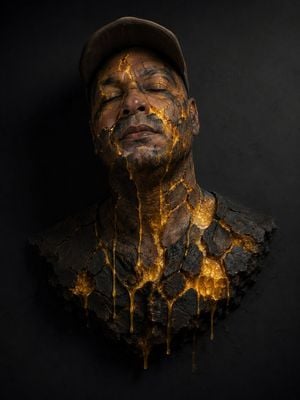
Main Subject and Composition: The image presents a {argument name="artistic style" default="surreal and dark digital collage-style"} artistic composition. In the center right, the face from the {argument name="reference image" default="first attached image"} dominates, fused with complex textures. To its left, ethereally integrated and in shadow, is the profile of another face, that is, the second attached image. Details of the Frontal Face: The right half of this face (from the viewer's perspective) shows two realistic and expressive eyes, skin with a stone or bronze texture, and superimposed fragments of ancient texts and geometric patterns. The rest of the face fades away. Background and Textures: The entire background is predominantly black and textured, imitating an aged, cracked, and dust-spattered canvas. Technical diagrams, abstract mathematical equations, ancient manuscripts, and grids of dots are subtly integrated into the darkness. Lighting Element: In the lower half, a line of an electrocardiogram (heartbeat or ECG signal) stands out horizontally from side to side, glowing intensely with a golden or liquid fire color. Two of the pulse's highest peaks align vertically with the two halves of the main face. Color Palette: Extremely minimalist and dramatic, composed almost entirely of dark tones: blacks, earthy browns, aged bronze, and the bright orange/gold flash of the electrocardiogram. Uses a {argument name="aspect ratio" default="1:1"} aspect ratio.
Main Subject and Composition: The image presents a {argument name="artistic style" default="surreal and dark digital collage-style"} artistic composition. In the center right, the face from the {argument name="reference image" default="first attached image"} dominates, fused with complex textures. To its left, ethereally integrated and in shadow, is the profile of another face, that is, the second attached image. Details of the Frontal Face: The right half of this face (from the viewer's perspective) shows two realistic and expressive eyes, skin with a stone or bronze texture, and superimposed fragments of ancient texts and geometric patterns. The rest of the face fades away. Background and Textures: The entire background is predominantly black and textured, imitating an aged, cracked, and dust-spattered canvas. Technical diagrams, abstract mathematical equations, ancient manuscripts, and grids of dots are subtly integrated into the darkness. Lighting Element: In the lower half, a line of an electrocardiogram (heartbeat or ECG signal) stands out horizontally from side to side, glowing intensely with a golden or liquid fire color. Two of the pulse's highest peaks align vertically with the two halves of the main face. Color Palette: Extremely minimalist and dramatic, composed almost entirely of dark tones: blacks, earthy browns, aged bronze, and the bright orange/gold flash of the electrocardiogram. Uses a {argument name="aspect ratio" default="1:1"} aspect ratio.
Edit the prompt in the box under the preview — the template's model and format are already selected — and press Generate. Your version appears right on this page.
Yes. You can change the subject, setting, lighting, mood, format, and available model controls before creating your image.
Opening and editing this template is free. Generating uses credits, shown on the Generate button when you are signed in.
Start with GPT Image 2, which is the model associated with this template. You can compare another compatible model for a different finish.
Follow a topic to a crawlable collection of related PicX Studio templates.