How do I use the Minimal Fox Spirit Character Sketch template?
Edit the prompt in the box under the preview — the template's model and format are already selected — and press Generate. Your version appears right on this page.
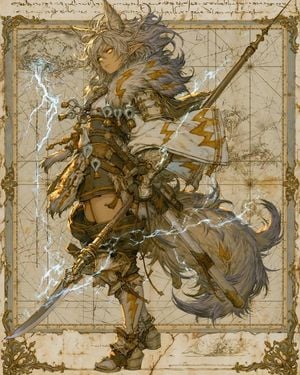
This prompt generates a centered full-body anime fox-spirit line-art character with a small colored magical flame, ideal for concept art and character design drafts.

This template uses your photo — add one with the + button.
A clean full-body anime character concept sketch on a plain white background, centered with lots of empty space around her. Depict a slender young fox-spirit woman with 2 upright fox ears on top of her head, very long flowing hair in {argument name="hair color" default="silver white"}, and a softly blurred, featureless face for an unfinished design-sheet look. She wears a short wrap-style robe dress inspired by a kimono, with short sleeves, a wide sash belt at the waist, layered asymmetrical skirt panels, and 1 long trailing ribbon or fabric tail drifting to the right. Add knee-high fitted boots with simple angular trim near the knees. Her pose is elegant and relaxed, standing with one leg slightly crossing in front of the other, left arm lowered naturally, right arm raised with palm open. Hover above her raised hand 1 small magical flame spirit, glowing in turquoise and pale gold, with a curled teardrop shape and tiny wisps orbiting it. Render the figure mostly in delicate monochrome pencil or ink line art with very light gray shading, while the floating flame is the only colored element. Minimalist character design sheet aesthetic, refined manga proportions, soft clean outlines, airy negative space, no background objects, no text.
A clean full-body anime character concept sketch on a plain white background, centered with lots of empty space around her. Depict a slender young fox-spirit woman with 2 upright fox ears on top of her head, very long flowing hair in {argument name="hair color" default="silver white"}, and a softly blurred, featureless face for an unfinished design-sheet look. She wears a short wrap-style robe dress inspired by a kimono, with short sleeves, a wide sash belt at the waist, layered asymmetrical skirt panels, and 1 long trailing ribbon or fabric tail drifting to the right. Add knee-high fitted boots with simple angular trim near the knees. Her pose is elegant and relaxed, standing with one leg slightly crossing in front of the other, left arm lowered naturally, right arm raised with palm open. Hover above her raised hand 1 small magical flame spirit, glowing in turquoise and pale gold, with a curled teardrop shape and tiny wisps orbiting it. Render the figure mostly in delicate monochrome pencil or ink line art with very light gray shading, while the floating flame is the only colored element. Minimalist character design sheet aesthetic, refined manga proportions, soft clean outlines, airy negative space, no background objects, no text.
Edit the prompt in the box under the preview — the template's model and format are already selected — and press Generate. Your version appears right on this page.
Yes. You can change the subject, setting, lighting, mood, format, and available model controls before creating your image.
Opening and editing this template is free. Generating uses credits, shown on the Generate button when you are signed in.
Start with GPT Image 2, which is the model associated with this template. You can compare another compatible model for a different finish.
Follow a topic to a crawlable collection of related PicX Studio templates.