
Cyberpunk Wireless Earbuds Commercial
A fast-paced, high-end tech commercial prompt for matte black wireless earbuds, using match-cuts and cyberpunk city aesthetics.
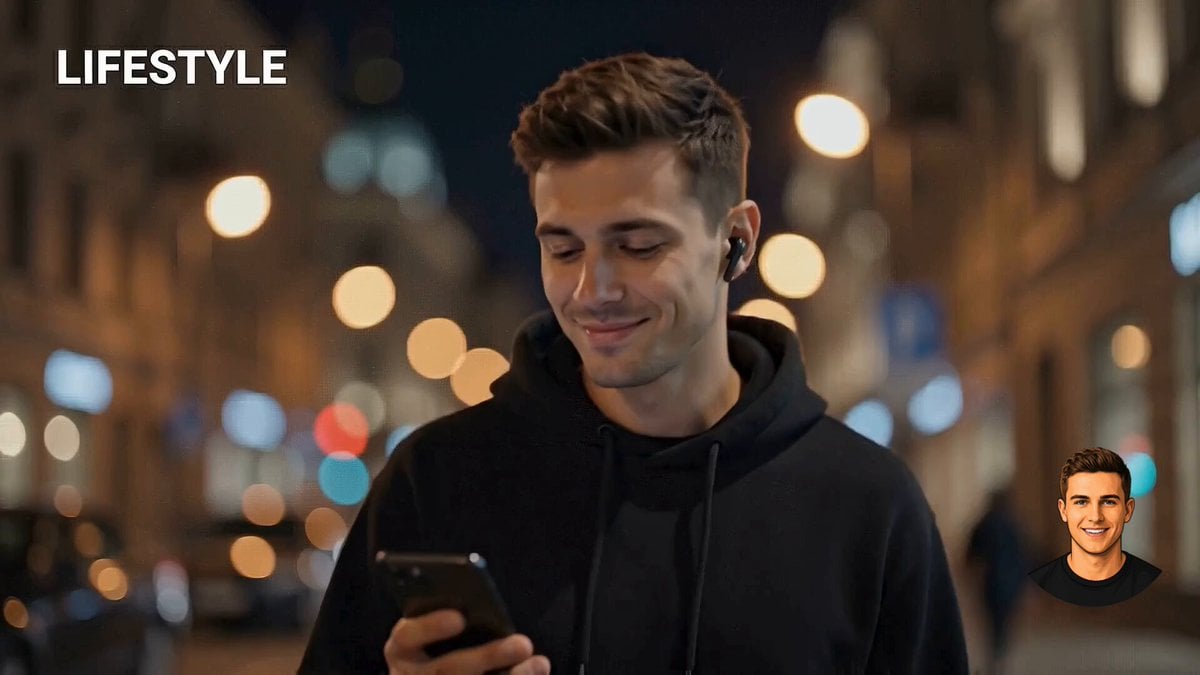
- Prompt included
- Model and format preset
- Premium template
The prompt behind this video
Copy the exact prompt behind Cyberpunk Wireless Earbuds Commercial, or open it in the studio and make it yours.
A hyper-visual, 16:9 fast-paced 10-second cinematic AI product commercial for premium matte black wireless earbuds, structured with four high-energy, seamless match-cuts. [0-2s] Lifestyle: A low-angle, tracking shot of a sharp, stylish young man walking through a moody, rainy cyberpunk city at night; vibrant neon signs create an ultra-blurred background bokeh while he glances down at a glowing smartphone screen, wearing a sleek earbud. [2-5s] Size & Portability: A top-down, geometric overhead flat-lay on a dark, wet obsidian stone texture. A seamless hard-cut reveals the earbuds precisely arranged alongside a modern smartphone, minimalist carbon-fiber wallet, and a luxury key fob, hit by a dramatic side-shadow. [5-8s] Packaging: An explosive, fast macro-zoom onto a floating, deep-black holographic retail box. The premium packaging performs a rapid 360-degree spin against an abstract, smoky dark background with glowing edge highlights. [8-10s] CTA: A perfectly symmetrical, ultra-close-up hero shot. The dual earbuds float and rotate in mid-air just above their open charging case, illuminated by a brilliant anamorphic lens flare and moody studio rim-lighting. Aesthetic: High-end tech commercial, 8k resolution, photorealistic textures, crisp anamorphic lighting, and snappy, seamless jump-cut transitions.
How to use Cyberpunk Wireless Earbuds Commercial in 3 steps
- 1
Open
The prompt is already in the box next to the preview, with the template's model and format selected.
- 2…a portrait of your subject in softgolden-hour light, 85mm…
Personalize
Edit the subject and creative details for your destination.
- 3Generate
Generate
Press Generate — your video is created in PicX Studio, so you can compare it with the original and refine one variable at a time.
More like this
Templates with the same subject, style or setup. Open one to see its prompt.
Realistic Wireless Earbuds Commercial
Wireless Earbuds Commercial Script

Cyberpunk Holographic Dance Performance - Seedance 2.5

RX-7 to Mech Transformation Cyberpunk

Fruit Cookie Commercial

Silk Road Pomegranate Folk Animation

Mechanical Flower Bloom Brand Film

Crystal Ball Match-Cut Brand Film

Sneaker Product Commercial

Skincare Product Commercial 3

Cinematic Portrait Study 3

Product UGC Commercial
Make it yours
Cyberpunk Wireless Earbuds Commercial works as-is. These are the safest ways to change it without losing the look.
Change one field
Copy a single group, rewrite it, and generate again so you can see what that field is doing.
Keep the frame, change the subject
Hold the composition and light of Cyberpunk Wireless Earbuds Commercial, then swap wardrobe, props or the person for a new take.
| If the result… | Why | Fix |
|---|---|---|
| The result drifts from the preview | Too many fields changed at once. | Reuse Cyberpunk Wireless Earbuds Commercial as-is first, then change one group — subject, light, or setting. |
| The model over-stylizes the scene | The prose prompt leaves finish and camera underspecified. | Add one camera or lighting sentence and stay on Seedance 2.0. |
More Seedance 2.0 templates
Other prompts made for Seedance 2.0.

Comical Martial Arts Punch Scene

Maglev Train Action Sequence

Martial Arts Fight Sequence

Wuxia Protection and Trust Script

Vintage Korean Arcade MiniDV Vlog

Mercedes 190 SL Luxury Ad

Rainy Night Supernatural Reverse Comedy Video Script

Amazon Civilization Discovery

Futuristic South Asian City Transformation

Cozy Luxury Cafe Commercial
More video prompts
Fresh picks from across the catalog.
Futuristic Home Transition Video

Rococo Celestial Swing

Time-lapse of black cherry sunflowers growing

Asha and Arjun Bridge Survival

Spy Movie Fight Scene Prompt
Nano Banana Seedance Environment Render Walk
Exploded View Spaceship Video Prompt
Video Prompt for Cobalt Blue Sentinel Saving Lives

Columbus Navigation Advertisement Video Prompt
Tokyo Tower Parkour Leap
Browse template categories
Cyberpunk Wireless Earbuds Commercial questions
How do I use the Cyberpunk Wireless Earbuds Commercial template?
Add your photo if the template asks for one, edit the prompt if you like — the template's model and format are already selected — and press Generate. Your version opens in PicX Studio.
Can I customize the Cyberpunk Wireless Earbuds Commercial template?
Yes. You can change the subject, setting, lighting, mood, format, and available model controls before creating your video.
Is the Cyberpunk Wireless Earbuds Commercial template free?
Opening and editing this template is free. Generating uses credits, shown on the Generate button when you are signed in.
Which AI model should I use?
Start with Seedance 2.0, which is the model associated with this template. You can compare another compatible model for a different finish.
Looking for something else? Browse all templates.

Your photo, any look
Thousands of ready templates for every top image and video model, from one credit balance.