
Crocodile Floodgate Jungle Escape
An intense, cinematic action prompt for Seedance 2.0 featuring a jungle ranger being chased by a colossal crocodile through a flooded facility, ending in a dramatic floodgate release.
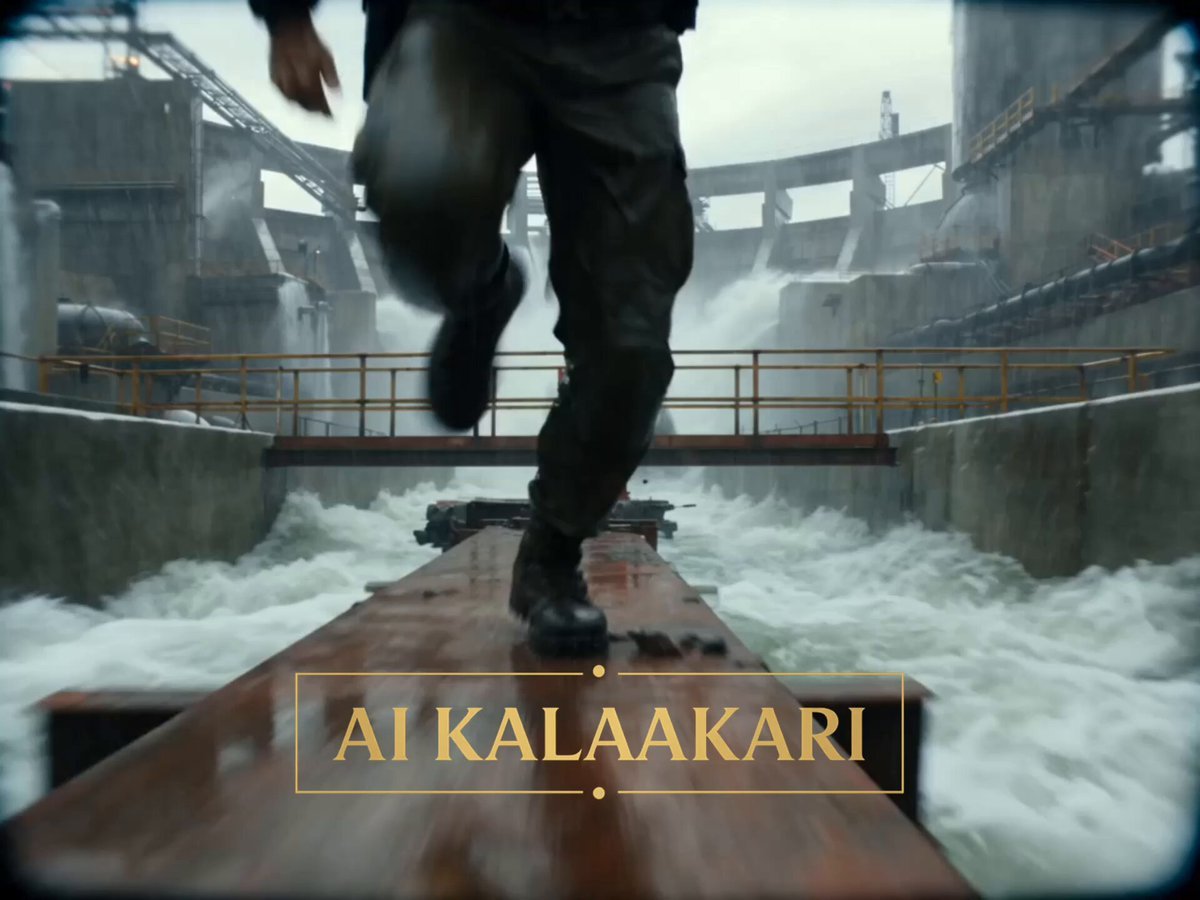
- Prompt included
- Model and format preset
- Free template
The prompt behind this video
Copy the exact prompt behind Crocodile Floodgate Jungle Escape, or open it in the studio and make it yours.
Subject: A jungle ranger in soaked tactical gear, sprinting for his life from a gigantic crocodile. Action/Emotion: Pure panic, survival, desperation, split-second thinking. Environment: Massive flooded jungle water-treatment plant deep inside the rainforest. Giant concrete water channels, rusted maintenance walkways, roaring spillways, floodgates, pumping stations, tropical storm conditions. Camera: Aggressive handheld chase camera, low-angle tracking shots, speed ramps during sprints, whip pans, crash zooms, bullet-time during the payoff. Lighting & Mood: Bright stormy daylight, heavy rain, mist from rushing water, chaotic disaster atmosphere. Technical: Ultra-realistic, 4K HDR, 35mm anamorphic lens, cinematic motion blur, practical creature realism, blockbuster creature-feature energy. SHOT 1 — 0–3s (THE HOOK) The sequence begins mid-chase. The ranger is already sprinting across a narrow maintenance walkway suspended above a raging water channel. Behind him— A gigantic crocodile explodes through a metal safety barrier. The barrier twists and flies into the floodwater below. The crocodile charges forward. Its enormous body sends spray everywhere. The camera races backward in front of the ranger as he leaps over broken sections of walkway. A radio on his vest crackles with static. SHOT 2 — 3–6s The ranger reaches a junction of elevated catwalks. He jumps across a gap. Barely makes it. The crocodile doesn’t slow down. It crashes straight through the handrails and follows. Concrete chunks tumble into the rushing water below. The distance between them is shrinking fast. SHOT 3 — 6–9s The ranger reaches the end of the platform. Dead end. Nothing ahead except a giant floodgate control station. Nowhere left to run. He turns. The crocodile advances. Water dripping from its jaws. The camera pushes in. Then— He notices a massive red emergency floodgate lever beside him. SHOT 4 — 9–12s The crocodile charges. Full speed. The ranger waits. Waits. Waits. At the last possible second he grabs the lever and yanks it downward with both hands. Warning sirens activate. Massive machinery begins moving. SHOT 5 — 12–15s (BULLET-TIME PAYOFF) The floodgate blasts open. Bullet time. A colossal wall of water erupts from the channel. The crocodile’s eyes widen. Concrete fragments. Rain. Water droplets. Everything suspended in the air. The torrent slams directly into the charging crocodile. The giant body is launched backward through concrete barriers and into the roaring spillway beyond. Time snaps back. A thunderous wave crashes through the facility. The ranger clings to the railing. Watching the crocodile disappear into the floodwaters below.
How to use Crocodile Floodgate Jungle Escape in 3 steps
- 1
Open
The prompt is already in the box next to the preview, with the template's model and format selected.
- 2…a portrait of your subject in softgolden-hour light, 85mm…
Personalize
Edit the subject and creative details for your destination.
- 3Generate
Generate
Press Generate — your video is created in PicX Studio, so you can compare it with the original and refine one variable at a time.
More like this
Templates with the same subject, style or setup. Open one to see its prompt.
Mutated Crocodile Jungle Escape
Energy Bow Jungle Edit
T-Rex Jungle Airstrip Escape
Rainforest Thriller — Searching the Unseen
Tiger vs Gorilla — Jungle Canyon Clash
Sci-fi action sequence escape prompt
Tribal Warrior Shapeshift Jungle
Cinematic Urban Foot Chase Escape
T-Rex Dashcam Jungle Attack
Dreamstate Nightmare Escape
Cinematic Subway Flood Escape
Jungle Animal Interaction Video Prompt
Make it yours
Crocodile Floodgate Jungle Escape works as-is. These are the safest ways to change it without losing the look.
Change one field
Copy a single group, rewrite it, and generate again so you can see what that field is doing.
Keep the frame, change the subject
Hold the composition and light of Crocodile Floodgate Jungle Escape, then swap wardrobe, props or the person for a new take.
| If the result… | Why | Fix |
|---|---|---|
| The result drifts from the preview | Too many fields changed at once. | Reuse Crocodile Floodgate Jungle Escape as-is first, then change one group — subject, light, or setting. |
| The model over-stylizes the scene | The prose prompt leaves finish and camera underspecified. | Add one camera or lighting sentence and stay on Seedance 2.0. |
More Seedance 2.0 templates
Other prompts made for Seedance 2.0.

Comical Martial Arts Punch Scene

Maglev Train Action Sequence

Martial Arts Fight Sequence

Wuxia Protection and Trust Script

Vintage Korean Arcade MiniDV Vlog

Mercedes 190 SL Luxury Ad

Rainy Night Supernatural Reverse Comedy Video Script

Amazon Civilization Discovery

Futuristic South Asian City Transformation

Cozy Luxury Cafe Commercial
More video prompts
Fresh picks from across the catalog.
Dragon Protecting Child Fantasy Film

Mysterious Home Exploration Vlog - Seedance 2.5

Pixar Style Pistachio Tree Story

Celestial Creatures Knitting Constellations
Studio Ghibli Inspired Cozy Attic
Motivational rap lyrics video

Purikura Booth Comedy Scene
Magenta Organic Zoom Loop
Disneyland FPV Cinematic Flight
Fantasy Isekai Anime Storyboard
Browse template categories
Crocodile Floodgate Jungle Escape questions
How do I use the Crocodile Floodgate Jungle Escape template?
Add your photo if the template asks for one, edit the prompt if you like — the template's model and format are already selected — and press Generate. Your version opens in PicX Studio.
Can I customize the Crocodile Floodgate Jungle Escape template?
Yes. You can change the subject, setting, lighting, mood, format, and available model controls before creating your video.
Is the Crocodile Floodgate Jungle Escape template free?
Opening and editing this template is free. Generating uses credits, shown on the Generate button when you are signed in.
Which AI model should I use?
Start with Seedance 2.0, which is the model associated with this template. You can compare another compatible model for a different finish.
Looking for something else? Browse all templates.

Your photo, any look
Thousands of ready templates for every top image and video model, from one credit balance.