How do I use the Celebrity Portrait in Sun-Drenched Garden template?
Choose the primary action to open PicX Studio with the available template settings. Review the model and format, personalize the creative direction, and generate when ready.
A highly structured JSON-format prompt for generating a graceful garden portrait with specific lighting and wardrobe details. Change the subject, setting, or lighting one variable at a time.
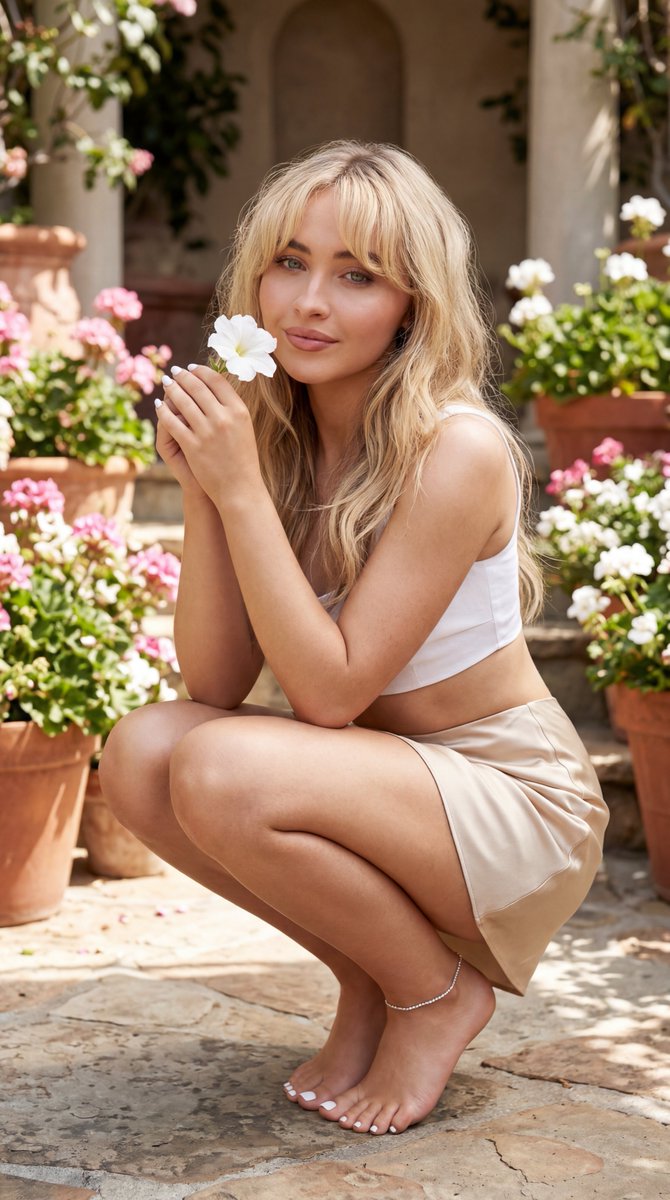
{ "subject": { "subjects_interaction": "Centered portrait, medium shot. {argument name="celebrity" default="Sabrina Carpenter"} is crouching gracefully in a lush, sun-drenched garden setting, holding a white flower near her face, looking directly at the camera.", "first_subject": { "identity": { "biometric_reference": "{argument name="celebrity" default="Sabrina Carpenter"}", "facial_matrix": { "hair_profile": "Soft blonde hair with loose waves and bangs, styled naturally.", "ocular_biometrics": "Bright blue eyes, focused gaze, soft and inviting expression.", "maxillofacial_data": "Refined facial geometry, soft smile, lips closed." } }, "body": { "kinesiology_pose": "Crouching low to the ground in a fluid, elegant pose, hands held near the face with a flower. Natural skin texture and posture.", "epidermal_physics": "Dermis appears healthy and radiant, reflecting natural, soft sunlight, highlighting smooth skin contours." }, "wardrobe": { "full_layer": { "item": "Aesthetic {argument name="clothing top" default="white cropped top"} paired with a flowing, {argument name="clothing bottom" default="champagne-colored satin maxi skirt"}.", "material_properties": "Soft cotton and luxurious satin, elegant and breezy.", "cosmetic_accents": "Bare feet, meticulously applied high-gloss white nail polish on all digits, delicate silver ankle bracelet." } } } }, "scene": { "configuration": "Outdoor garden setting with potted flowers and stone architectural elements.", "background_architecture": { "surface_properties": "Terracotta pots, blooming pink and white flowers, stone flooring, warm natural light.", "reflection_integrity_rules": "Reflective indices optimized for soft, natural light interaction with floral textures and stone, maintaining an airy garden aesthetic." }, "text_and_logos": { "constraints": "No text, no watermarks, no skin piercings, no hosiery, no extra limbs." } }, "lighting": { "source_profile": "Soft, warm, natural afternoon sunlight, engineered for gentle gradients, high-key atmosphere, and rich, natural color rendering." }, "camera": { "projection_type": "Wide-angle lens, medium-shot depth of field.", "optical_profile": "35mm focal length, f/2.0, focus lock on the subject's face, soft bokeh background, 4:5 aspect ratio." } }
Choose the primary action to open PicX Studio with the available template settings. Review the model and format, personalize the creative direction, and generate when ready.
Yes. You can change the subject, setting, lighting, mood, format, and available model controls before creating your image.
This template is free to open and customize. Generation usage is shown in PicX Studio before you create.
Start with Nano Banana 2, which is the model associated with this template. You can compare another compatible model for a different finish.
Follow a topic to a crawlable collection of related PicX Studio templates.
43,474 public templates available. Verified via the PicX Studio public templates API; refreshed hourly.



![69-untitled — FORMAT: 15s / 145 BPM / 14 SHOTS
SUBJECT: @[image1]
WARDROBE: Clean modern outfit
ENVIRONMENT: Street / indoor transitions
MOOD: Discovery → contr](/_next/image?url=https%3A%2F%2Fcdn.picxstudio.com%2Fuploads%2Fpost69_img0_d45faecf-38c3-4bcb-81a4-f6eb1cf42bb2.jpg&w=828&q=100)












![118-google-nano-banana-pro-skincare-product- — A professional skincare shot of a [product container] with [cap/lid], labeled [brand, product, descriptor, volume](/_next/image?url=https%3A%2F%2Fcdn.picxstudio.com%2Fuploads%2Fpost118_img0_332898b8-29ea-42a9-87ab-9ed746a3f944.jpg&w=828&q=100)
![Naive doodle-style subject illustration — A doodle-style {argument name="subject" default="[subject]"}, naive lines, humorous shape exaggeration](https://pbs.twimg.com/media/G6Wl2YxbsAARB2b.jpg)