How do I use the Red Monochrome Fashion Studio Portrait template?
Edit the prompt in the box under the preview — the template's model and format are already selected — and press Generate. Your version appears right on this page.
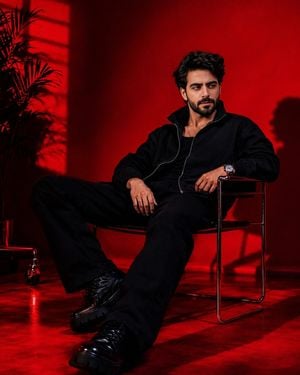
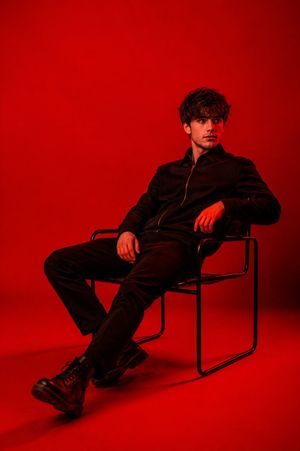
A high-fashion editorial photography prompt set in an intense monochrome red studio, featuring a dramatic low-angle perspective and detailed realistic textures.

Ultra-realistic fashion portrait photography, UHD 18K, vertical aspect ratio 2:3, cinematic editorial masterpiece. A {argument name="subject" default="young women"} sits casually on a simple chair in the middle of a minimalist studio entirely covered in {argument name="color theme" default="intense, bright red"}. The camera is positioned at an extreme low angle from below, creating a dominant and dramatic perspective that makes the figure appear strong, charismatic, and alluring. The women sits with her body slightly slumped back against the back of the chair. Her legs are spread loosely, creating a natural and confident pose. Her right hand hangs loosely beside her thigh, while her left hand rests on her knee with loose, relaxed fingers. Her shoulders are slightly slumped, reinforcing a tired yet elegant impression. Her head is raised and tilted slightly back, revealing a strong jawline and long neck. Her eyes are gently closed as if she is enjoying a moment of silence, lost in thought, or feeling the warmth of the light enveloping her body. Her lips are slightly parted, conveying a subtle emotional nuance of exhaustion, longing, and serenity. Her wavy hair with a natural texture appears slightly messy, creating a lively and spontaneous impression. The skin appears clean, healthy, and realistic, with fine pore details and soft reflections of light on the face, neck, and hands. There are no tattoos on the body; the focus is entirely on the facial structure, expression, and the play of light that shapes the body's contours. The {argument name="clothing" default="long-sleeved white shirt"} is worn casually. The top few buttons are undone, creating a more casual and elegant silhouette. The sleeves are rolled up below the elbows, revealing the fabric's natural, realistic creased texture. The well-cut dark trousers are paired with a classic leather belt, providing a masculine and modern touch. The studio lighting is dramatic, with a deep red hue dominating the entire background and surrounding space. The strong red light comes from behind and to the sides, creating contrasting silhouettes and soft shadows that emphasize the shape of the body and face. A thin layer of atmospheric smoke or haze permeates the air, making the red light appear deeper and more cinematic. The background is kept simple, with no distracting elements, just a gradation of bright red to dark red, creating an emotional and intense atmosphere. The combination of the bright red with the white clothing creates a strong and eye-catching visual contrast. Luxury fashion campaign, dramatic studio lighting, cinematic low-angle portrait, intense monochromatic red environment, editorial photography, photorealistic skin texture, realistic fabric folds, masculine elegance, emotional storytelling, moody atmosphere, volumetric light, subtle haze, contemporary fashion aesthetic, ultra detailed face, sharp focus, award-winning photography, premium magazine cover quality, masterpiece composition, extraordinary realism, hyper realistic portrait.
Ultra-realistic fashion portrait photography, UHD 18K, vertical aspect ratio 2:3, cinematic editorial masterpiece. A {argument name="subject" default="young women"} sits casually on a simple chair in the middle of a minimalist studio entirely covered in {argument name="color theme" default="intense, bright red"}. The camera is positioned at an extreme low angle from below, creating a dominant and dramatic perspective that makes the figure appear strong, charismatic, and alluring. The women sits with her body slightly slumped back against the back of the chair. Her legs are spread loosely, creating a natural and confident pose. Her right hand hangs loosely beside her thigh, while her left hand rests on her knee with loose, relaxed fingers. Her shoulders are slightly slumped, reinforcing a tired yet elegant impression. Her head is raised and tilted slightly back, revealing a strong jawline and long neck. Her eyes are gently closed as if she is enjoying a moment of silence, lost in thought, or feeling the warmth of the light enveloping her body. Her lips are slightly parted, conveying a subtle emotional nuance of exhaustion, longing, and serenity. Her wavy hair with a natural texture appears slightly messy, creating a lively and spontaneous impression. The skin appears clean, healthy, and realistic, with fine pore details and soft reflections of light on the face, neck, and hands. There are no tattoos on the body; the focus is entirely on the facial structure, expression, and the play of light that shapes the body's contours. The {argument name="clothing" default="long-sleeved white shirt"} is worn casually. The top few buttons are undone, creating a more casual and elegant silhouette. The sleeves are rolled up below the elbows, revealing the fabric's natural, realistic creased texture. The well-cut dark trousers are paired with a classic leather belt, providing a masculine and modern touch. The studio lighting is dramatic, with a deep red hue dominating the entire background and surrounding space. The strong red light comes from behind and to the sides, creating contrasting silhouettes and soft shadows that emphasize the shape of the body and face. A thin layer of atmospheric smoke or haze permeates the air, making the red light appear deeper and more cinematic. The background is kept simple, with no distracting elements, just a gradation of bright red to dark red, creating an emotional and intense atmosphere. The combination of the bright red with the white clothing creates a strong and eye-catching visual contrast. Luxury fashion campaign, dramatic studio lighting, cinematic low-angle portrait, intense monochromatic red environment, editorial photography, photorealistic skin texture, realistic fabric folds, masculine elegance, emotional storytelling, moody atmosphere, volumetric light, subtle haze, contemporary fashion aesthetic, ultra detailed face, sharp focus, award-winning photography, premium magazine cover quality, masterpiece composition, extraordinary realism, hyper realistic portrait.
Edit the prompt in the box under the preview — the template's model and format are already selected — and press Generate. Your version appears right on this page.
Yes. You can change the subject, setting, lighting, mood, format, and available model controls before creating your image.
Opening and editing this template is free. Generating uses credits, shown on the Generate button when you are signed in.
Start with Nano Banana 2, which is the model associated with this template. You can compare another compatible model for a different finish.
Follow a topic to a crawlable collection of related PicX Studio templates.