How do I use the Premium Fitness Editorial Campaign Framework template?
Choose the primary action to open PicX Studio with the available template settings. Review the model and format, personalize the creative direction, and generate when ready.
An advanced technical framework and prompt structure for generating high-fashion activewear campaign images with specific poses and lighting setups.
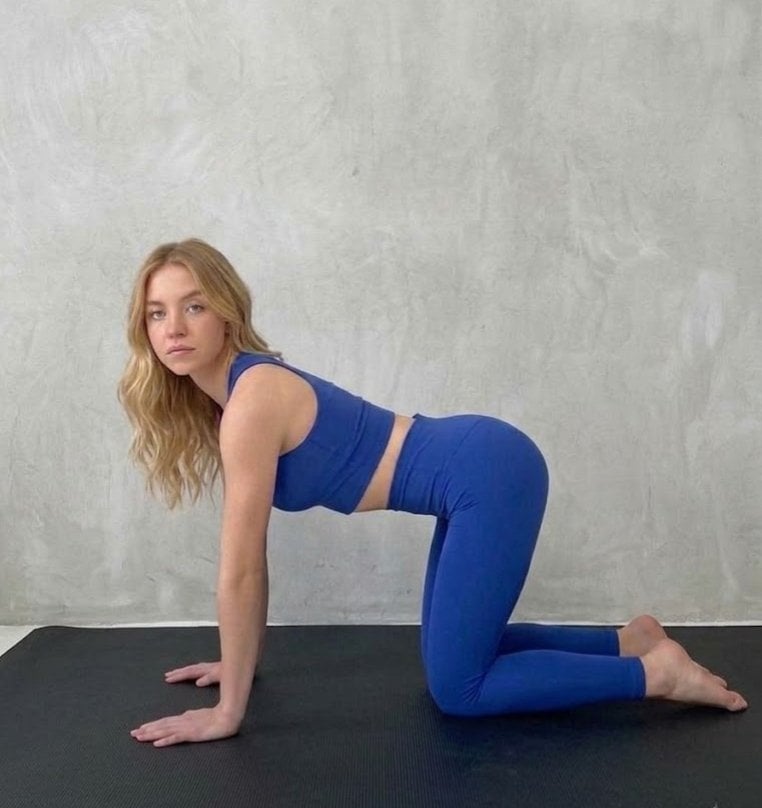
{ "nano_banana_pro_framework": { "version": "v4.2_enhanced", "global_specifications": { "output_quality": "4K Ultra-HD, Photorealistic, 8K post-processing", "aesthetic": "{argument name="aesthetic" default="Premium Fitness Editorial, High-Fashion Activewear Campaign"}", "color_palette": "Vibrant Cobalt Blue, Deep Slate Gray, Minimalist White, Natural Skin Tones", "atmosphere": "Clean, professional, athletic, serene" }, "subject_manifest": { "physical_attributes": { "hair": "Voluminous blonde hair with soft beach waves, natural highlights, effortless texture", "physique": "Athletic and toned build, defined muscle structure", "skin": "Natural skin texture, soft specular highlights, realistic subsurface scattering" }, "apparel_specs": { "fabric": "High-compression performance spandex-nylon blend, matte finish, visible micro-texture", "top": "{argument name="top" default="Cobalt blue high-neck racerback crop top"}", "bottom": "High-waisted matching leggings, sculpted fit, full-length silhouette" } }, "technical_metadata": { "camera_rig": "Sony A7R V, Full Frame Sensor", "lens_optics": "85mm f/1.4 Prime Lens for shallow depth of field and compression", "lighting_setup": [ "Primary: Large octabox for soft, diffused key light", "Secondary: Edge lighting to define the subject silhouette", "Ambient: Neutral fill to maintain shadow detail in the creases of the blue fabric" ], "post_processing": "High-dynamic range (HDR), color grading for punchy blues, noise reduction, sharp focus on eyes" }, "pose_architecture": [ { "id": "NB_POSE_01", "description": "Tabletop position on a black rubberized yoga mat", "coordinates": "All-fours, neutral spine, looking directly into the lens", "background": "Brushed concrete wall with subtle vertical texture" }, { "id": "NB_POSE_02", "description": "Seated rest pose, leaning back on hands", "coordinates": "Knees bent, torso angled 45 degrees, relaxed facial expression", "background": "Seamless white cyclorama for infinite depth effect" }, { "id": "NB_POSE_03", "description": "Prone sphinx variation with leg elevation", "coordinates": "Lying on stomach, upper body lifted by forearms, knees bent with soles of feet facing skyward", "lighting_focus": "Emphasis on the arch of the back and fabric tension" }, { "id": "NB_POSE_04", "description": "Vertical V-sit stretch / Reclined leg extension", "coordinates": "Legs fully extended in a wide V, hands gripping ankles for stability", "focus_point": "Symmetry and balance within the frame" } ] } }
Choose the primary action to open PicX Studio with the available template settings. Review the model and format, personalize the creative direction, and generate when ready.
Yes. You can change the subject, setting, lighting, mood, format, and available model controls before creating your image.
This template is free to open and customize. Generation usage is shown in PicX Studio before you create.
Start with Nano Banana 2, which is the model associated with this template. You can compare another compatible model for a different finish.
Follow a topic to a crawlable collection of related PicX Studio templates.