How do I use the Crimson Asymmetry Gemcutter Portrait template?
Choose the primary action to open PicX Studio with the available template settings. Review the model and format, personalize the creative direction, and generate when ready.
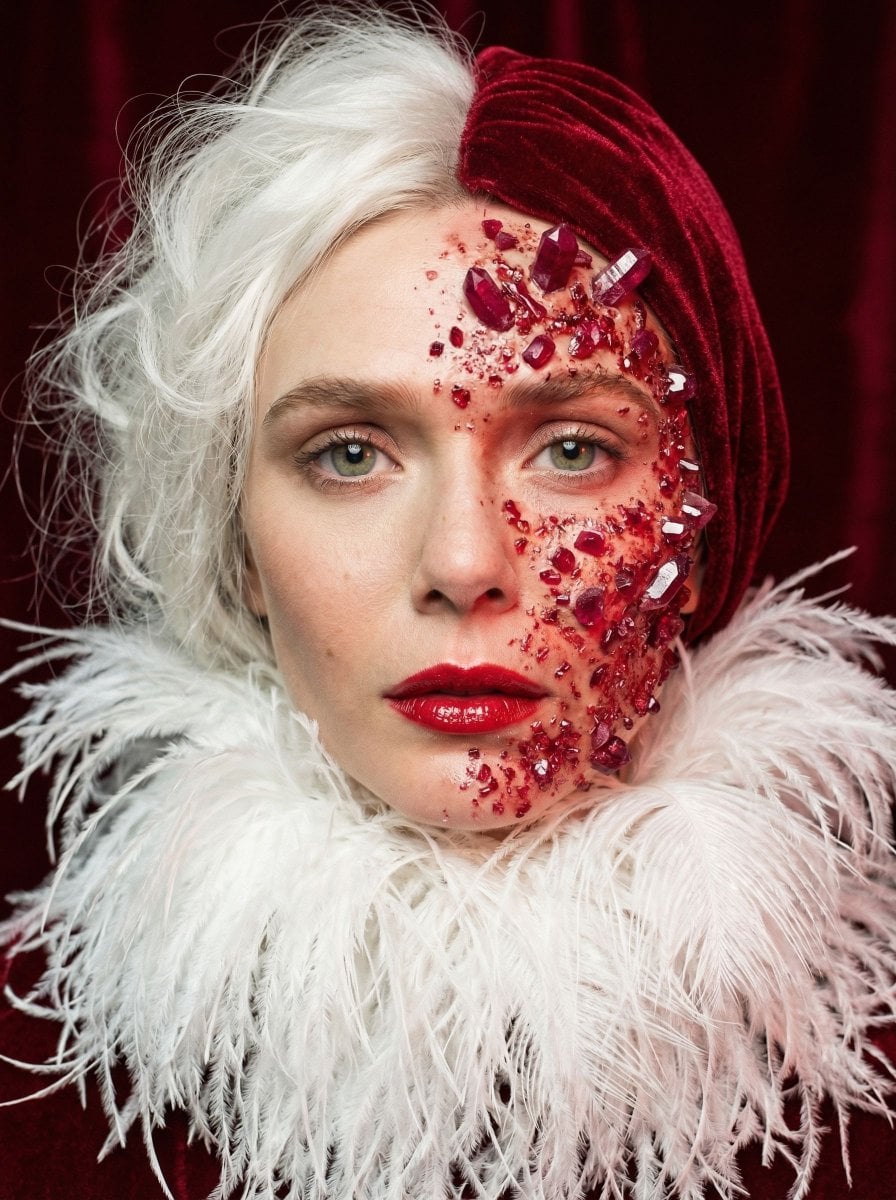
An editorial-style medium format portrait of a subject with striking asymmetrical styling, featuring one side as white silk threads and the other as ruby crystals extruding from the skin. (free to use) — Free AI image template on PicX Studio.
{"vibe_title_en": "Crimson Asymmetry", "master_prompt": "A hyper-realistic, medium format beauty portrait of The Protagonist inside a master gemcutter's velvet-lined inspection vault. The subject's face is dead-center, holding an intense, unblinking, regal gaze directly into the lens. Striking asymmetrical styling: one side of the hair is constructed of chaotic, soft white spun silk threads, while the other side is densely flocked in matte crimson velvet. A surreal, high-budget practical effect dominates the right half of the face: raw, shimmering ruby crystals and crushed red glass organically extruding directly from the pores, catching the light with sharp, volumetric refractions like a shattered geode. The skin itself displays authentic micro-texture, peach fuzz, and natural imperfections beneath the mineral growth. The subject wears an oversized, stark white ostrich feather collar framing the neck, contrasting with a pure, saturated velvet-red background. Cinematic lighting features a soft, diffused beauty key light and a deep crimson fill, creating sharp specular highlights on the ruby facets and glossy lips. Shot on Hasselblad H6D-100c, 100mm f/2.2 lens, Kodak Portra 400 film stock. Masterful physical depth of field, razor-sharp focus on the crystal edges and the irises, with a creamy, organic falloff on the feathers. No neon, pure analog film texture, high-end editorial surrealism.", "meta": {"intent": "To bridge surreal artistic concepts with high-end editorial photography, using practical-effect-style texturing to ground impossible geometry in physical reality.", "priorities": "Photographic texture (pores, glass refraction, feather softness), strict asymmetrical color-blocking, and an intense, unwavering direct gaze.", "device_profile": "High-resolution medium format digital mimicking analog film stock."}, "frame": {"aspect": "3:4", "composition": "Center-aligned, intimate close-up portrait", "layout": "Symmetrical structural framing housing highly asymmetrical subject styling", "camera_angle": "Dead-on, eye-level to enforce an imposing connection", "tilt_roll_degrees": "0"}, "subject": {"gender": "Female", "identity": "The Protagonist", "demographics": "Androgynous, ageless, striking facial symmetry", "face": "Flawless skin texture overlaid with heavy, 3D practical-effect crushed ruby crystals expanding across the right hemisphere; glossy, over-lined crimson lips", "hair": "Split violently down the middle: left side chaotic wispy white spun silk, right side dense matte crimson flocking", "body": "Only neck and collarbones visible, framed by voluminous textures", "expression": "Regal, hypnotic, entirely unbothered by the surreal mutation on their face", "pose": "Still, monumental, shoulders squared perfectly to the camera"}, "wardrobe_accessories": {"garments": [{"item": "Oversized structural collar", "material": "Ostrich feathers and down", "color": "Stark white", "fit": "Voluminous, engulfing the lower neck"}], "accessories": [{"item": "Facial crystal extrusions (treated as physical accessory)", "color": "Blood red and crimson", "material": "Raw ruby shards and crushed glass", "brand_style": "Avant-garde practical SFX makeup"}]}, "environment": {"setting": "A master gemcutter's velvet-lined inspection vault", "surfaces": "Light-absorbing crimson velvet backdrop", "depth": "Extremely shallow, isolating the subject completely from the background", "atmosphere": "Sterile, quiet, focused, smelling faintly of ozone and crushed minerals", "lens_interaction": "Sharp specular micro-flares bouncing off the jagged ruby crystal facets"}, "lighting": {"key": "Soft, diffused directional beauty light positioned slightly above center", "fill": "Deep, saturated crimson spill bouncing from the environment to tint the shadows", "rim": "Subtle white edge light on the left side to separate the white hair from the red background", "shadows": "Soft but deep, with a smooth roll-off into true black beneath the chin", "color_temperature": "Slightly warm on the skin tones (5500K) to contrast the stark white elements", "sensor_flare": "None, extreme controlled studio lighting"}, "camera": {"lens_type": "Medium format prime portrait lens", "focal_length": "100mm", "aperture": "f/2.2", "focus": "Tack sharp on the leading edge of the ruby crystals and the closest iris", "sensor_format": "Medium Format (Hasselblad H6D-100c)", "perspective_distortion": "None, compressed and flattering facial features"}, "post_processing": {"color": "High-contrast two-tone palette (crimson and white) with natural warm skin tones acting as the anchor", "tonality": "Rich, deep shadows with brilliant, punchy highlights on reflective surfaces", "texture": "Authentic analog grain emulation (Kodak Portra 400), micro-contrast enhanced on the crystals", "digital_sharpening": "Minimal, relying on optical lens sharpness to maintain realistic skin rendering", "chromatic_aberration": "Very faint optical fringing on the extreme out-of-focus white hairs"}, "negative_specifications": ["neon", "cyberpunk", "digital painting", "illustration", "flat lighting", "plastic skin", "smooth airbrushing", "cartoonish proportions", "fantasy art", "CGI look"]}
Use Crimson Asymmetry Gemcutter Portrait to plan an AI image around nano-banana-2 generation. Match the preview's composition first, then personalize the subject, setting, and mood for your own project.
Use the primary action to load the template settings in PicX Studio.
Adjust the subject and creative details for your destination.
Create the image, compare the result with the preview, and refine one variable at a time.
A continuous mix — similar concepts first, woven with same-model prompts and fresh picks from the catalog.
Choose the primary action to open PicX Studio with the available template settings. Review the model and format, personalize the creative direction, and generate when ready.
Yes. You can change the subject, setting, lighting, mood, format, and available model controls before creating your image.
This template is free to open and customize. Generation usage is shown in PicX Studio before you create.
Start with nano-banana-2, which is the model associated with this template. You can compare another compatible model for a different finish.
A continuous mix — similar concepts first, woven with same-model prompts and fresh picks from the catalog.
Follow a topic to a crawlable collection of related PicX Studio templates.
32,032 public templates available. Verified via the PicX Studio public templates API; refreshed hourly.