How do I use the Luxury Loungewear Outfit Card template?
Choose the primary action to open PicX Studio with the available template settings. Review the model and format, personalize the creative direction, and generate when ready.
Generates a premium fantasy collectible card showcasing a soft henley loungewear outfit with ornate gold UI framing and Japanese card text.
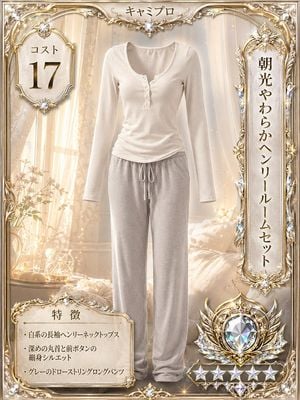
Goal: Create a luxurious high-rarity collectible outfit card featuring only a soft loungewear outfit as the main subject, no model, no mannequin head, no face, presented like a premium fantasy game costume card. Canvas: Vertical portrait card, 3:4 ratio, ornate gold-and-ivory frame filling the full image. Use a warm morning bedroom background with sheer curtains, sunlight beams, soft bokeh sparkles, pale flowers, a bedside table, glass decor, and a cream bed, all softly blurred behind the outfit. Main subject: Center the outfit front-facing as if invisibly worn or neatly displayed in human shape. The outfit has exactly 2 clothing pieces: 1 ivory/white long-sleeve henley neck top with a deep rounded neckline and small front buttons, gently ruched at the waist; 1 light gray drawstring long lounge pant with relaxed straight legs and soft fabric folds. Make the fabric look plush, comfortable, and slightly ribbed/knit, with realistic shadows and highlights. Card layout: Add exactly 4 main information areas: 1 top-center title plaque, 1 left cost medallion, 1 right vertical name plaque, and 1 bottom-left feature box. The frame should be elaborate with gold filigree, crystal gems, pearl-like highlights, wing-like flourishes, and symmetrical decorative corners. Add a large jewel rarity crest at the bottom right with a faceted iridescent diamond in the center and exactly 6 star-shaped rarity emblems beneath/around it. Text content: Top-center title reads {argument name="card title" default="キャミプロ"}. Left medallion reads small label {argument name="cost label" default="コスト"} above a large number {argument name="cost number" default="17"}. Right vertical plaque reads {argument name="outfit name" default="朝光やわらかヘンリールームセット"}. Bottom-left feature box title reads 「特徴」 and contains exactly 3 bullet points: 「白系の長袖ヘンリーネックトップス」, 「深めの丸首と前ボタンの細身シルエット」, 「グレーのドローストリングロングパンツ」. Visual style: Ultra-polished collectible card design, elegant fantasy luxury, warm ivory and champagne gold palette, photorealistic clothing with illustrated ornate UI elements, high detail, radiant highlights, soft glow, premium rare-card feel. Constraints: Keep the outfit as the clear central focus, do not add a person or face, do not add extra clothing pieces, keep exactly 3 feature bullets and exactly 6 rarity stars, preserve the Japanese text where specified, avoid logos or watermarks.
Choose the primary action to open PicX Studio with the available template settings. Review the model and format, personalize the creative direction, and generate when ready.
Yes. You can change the subject, setting, lighting, mood, format, and available model controls before creating your image.
This template is free to open and customize. Generation usage is shown in PicX Studio before you create.
Start with GPT Image 2, which is the model associated with this template. You can compare another compatible model for a different finish.
Follow a topic to a crawlable collection of related PicX Studio templates.